1
Brackets & mounts
Sonos Era 300 wall bracket with cable channel
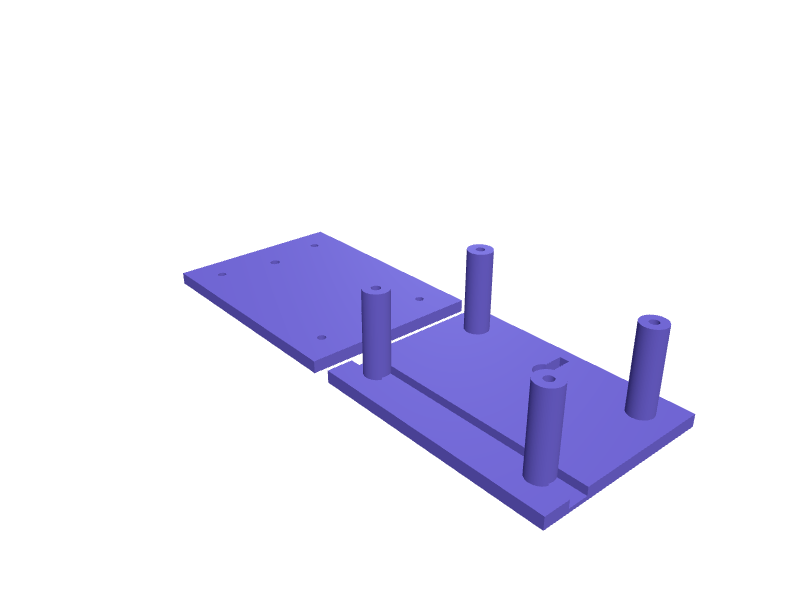
A bracket that holds an Era 300 (about 260 mm wide) 40 mm off the wall with a 10 mm cable channel. Two 5 mm holes sit on 80 mm centres. Print in two PETG halves. Open the ready-made model free, resize it on your phone or computer, then download a print-ready STL, 3MF or G-code sliced for your printer, free.Opening the ready-made model and downloading it as STL or 3MF are free, no card; AI changes use credits, from Maker at $7.99 a month.No printer? We print this part and ship it to your door. See its priceUpdated
2
Adjust
Change its numbers in the viewer for free, or ask the AI in the chat: wall thickness, hole size, the thing it clips onto. AI changes use 2 credits per request (1 for a quick edit, 3 for a redesign), paid with a plan from Maker at $7.99 a month, where the first 3 small changes are free.3Print
Download a watertight STL or 3MF free, with your numbers and hand edits, or G-code sliced for your printer at the same price. After an AI change the download is included in every plan (4 credits without one).
Dimensions of the ready-made model (editable)
| Parameter | Value |
|---|---|
| plate width (X) | 120 mm |
| plate height (Y) | 90 mm |
| plate thickness | 6 mm |
| wall screw hole diameter | 5 mm |
| standoff post diameter | 12 mm |
| standoff height (wall to speaker plate) | 40 mm |
| clearance hole for M4 assembly screw | 4.2 mm |
| inset of standoff centres from plate edges | 15 mm |
| cable channel width | 10 mm |
| cable channel depth | 4 mm |
| Era 300 keyhole large circle | 10 mm |
| keyhole slot width | 5 mm |
| keyhole slot length | 14 mm |
Example prompt
Create an Era 300 wall bracket, 40 mm standoff, 10 mm cable channel, two 5 mm holes on 80 mm centres, two PETG halves.
Fit notes
The official bracket is sold out. In SpeakCAD you confirm the insert pattern, preview the bracket in the browser, then download the STL.
Questions people ask about a Sonos Era 300 wall bracket with cable channel
A bracket that holds an Era 300 (about 260 mm wide) 40 mm off the wall with a 10 mm cable channel. Two 5 mm holes sit on 80 mm centres. Print in two PETG halves.
Click Open it free on this page and create a free account (no card): the ready-made model opens in your browser, on your phone or computer, nothing to install. Change its numbers in the viewer for free and download a watertight STL or 3MF free, or G-code sliced for your printer at the same price. An AI change in the chat uses 2 credits per request (3 for a redesign), and the download after it is included in every plan (4 credits without one). Start with Maker: 50 credits a month for $7.99, cancel anytime.
On this page: open the ready-made model free in a SpeakCAD account (no card), change any dimension in the viewer, then download the STL or 3MF free, or G-code sliced for your printer at the same price.
A shared STL is modelled for someone else's measurements. Here you open the ready-made model free, change it to your measurements in the viewer, then download a file sized for the part you actually own, free as STL or 3MF.
Yes. SpeakCAD slices the part on its servers with OrcaSlicer and your printer's official profile (380+ printers, including Bambu Lab, Prusa, Creality and Elegoo), and you download the G-code (a sliced .gcode.3mf for Bambu Lab printers). G-code sliced for your printer costs the same as the STL: included in every plan, free for a part you shaped by hand, 4 credits without a plan for a part with AI work in it. Pick your printer on the printers page to see its profile.
No. SpeakCAD runs in the browser on your phone or computer: the chat, the 3D engine and the live viewer load in the tab. The only file you download is the finished STL, 3MF or sliced G-code.
Print it your way
More brackets & mounts
Air-hose reel wall guide 8 mmReady-made, opens free. A wall guide that keeps an 8 mm ID air hose from rubbing the reel cheek, 40 mm ring with a 4.5 mm hole pair.Wall mount clips for a power stripReady-made, opens free. A pair of C-shaped clips that screw to a wall or cabinet side and let a power strip slide in and stay put, so it stops dangling from its cord.iPad Pro 13 inch under-cabinet kitchen mountReady-made, opens free. A pair of L-shaped hooks that screw to the underside of a kitchen cabinet and hold an iPad Pro 13 (281.6 x 215.5 x 5.1 mm) below eye level for recipes and vi…Hex dumbbell wall mount holder bracketReady-made, opens free. A pair of wall brackets that cradle a rubber hex dumbbell by its handle so a small home gym stays off the floor.DeWalt 20V MAX battery wall rack with drop-in slotsReady-made, opens free. A rail-style rack for DeWalt 20V MAX and XR batteries (also the 18V XR packs sold in Europe) that mirrors the slide-on rails of a DeWalt tool so a pack click…Meta Quest 3 headset wall hanger with strap restReady-made, opens free. A wall hanger that carries a Meta Quest 3 (184 x 160 x 98 mm with the strap folded, about 515 g) by its facial interface bar, with a second, higher arm that…