1
Everyday fixes
NACS to J1772 adapter holster
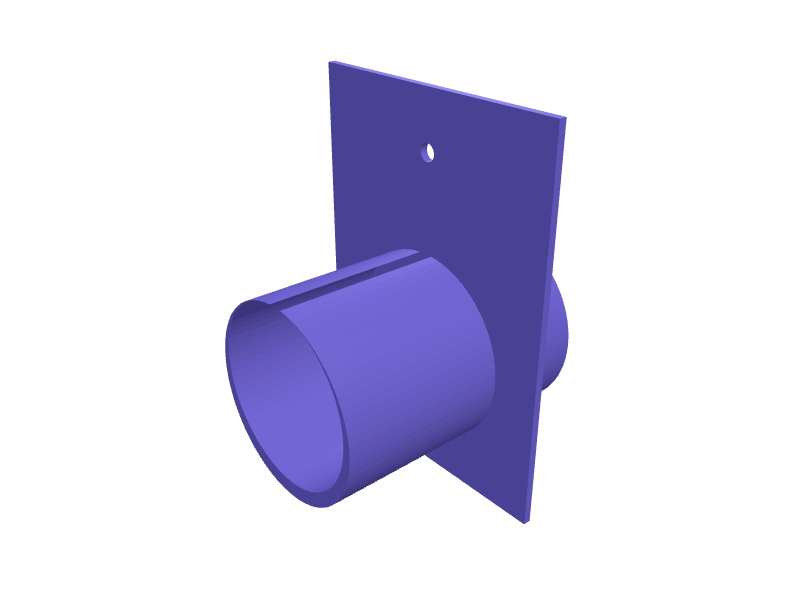
A wall holster that parks a NACS-to-J1772 adapter so the pins stay dry, 70 mm well and a 4.5 mm hole pair. Print in PETG. Open the ready-made model free, resize it on your phone or computer, then download a print-ready STL, 3MF or G-code sliced for your printer, free.Opening the ready-made model and downloading it as STL or 3MF are free, no card; AI changes use credits, from Maker at $7.99 a month.No printer? We print this part and ship it to your door. See its priceUpdated
2
Adjust
Change its numbers in the viewer for free, or ask the AI in the chat: wall thickness, hole size, the thing it clips onto. AI changes use 2 credits per request (1 for a quick edit, 3 for a redesign), paid with a plan from Maker at $7.99 a month, where the first 3 small changes are free.3Print
Download a watertight STL or 3MF free, with your numbers and hand edits, or G-code sliced for your printer at the same price. After an AI change the download is included in every plan (4 credits without one).
Dimensions of the ready-made model (editable)
| Parameter | Value |
|---|---|
| Wall thickness | 2 mm |
| Depth of well | 70 mm |
| Adapter body diameter | 45 mm |
| Flange width | 74 mm |
| Flange height | 100 mm |
| Flange thickness | 2 mm |
| Mounting hole diameter | 4.5 mm |
| Clearance around adapter body | 0.3 mm |
Example prompt
Design a NACS–J1772 adapter holster, 70 mm well, two 4.5 mm holes, 2 mm PETG.
Fit notes
The adapter in the frunk collects grit. Describe the adapter in SpeakCAD, preview the holster in the browser, then download the STL.
Questions people ask about a NACS to J1772 adapter holster
A wall holster that parks a NACS-to-J1772 adapter so the pins stay dry, 70 mm well and a 4.5 mm hole pair. Print in PETG.
Click Open it free on this page and create a free account (no card): the ready-made model opens in your browser, on your phone or computer, nothing to install. Change its numbers in the viewer for free and download a watertight STL or 3MF free, or G-code sliced for your printer at the same price. An AI change in the chat uses 2 credits per request (3 for a redesign), and the download after it is included in every plan (4 credits without one). Start with Maker: 50 credits a month for $7.99, cancel anytime.
On this page: open the ready-made model free in a SpeakCAD account (no card), change any dimension in the viewer, then download the STL or 3MF free, or G-code sliced for your printer at the same price.
A shared STL is modelled for someone else's measurements. Here you open the ready-made model free, change it to your measurements in the viewer, then download a file sized for the part you actually own, free as STL or 3MF.
Yes. SpeakCAD slices the part on its servers with OrcaSlicer and your printer's official profile (380+ printers, including Bambu Lab, Prusa, Creality and Elegoo), and you download the G-code (a sliced .gcode.3mf for Bambu Lab printers). G-code sliced for your printer costs the same as the STL: included in every plan, free for a part you shaped by hand, 4 credits without a plan for a part with AI work in it. Pick your printer on the printers page to see its profile.
No. SpeakCAD runs in the browser on your phone or computer: the chat, the 3D engine and the live viewer load in the tab. The only file you download is the finished STL, 3MF or sliced G-code.
Print it your way
More everyday fixes
Door panel trim clip replacementReady-made, opens free. Door panel trim clips snap when you remove a card to fix a window regulator, and dealers charge a fortune for a bag.Laundry basket clip-on dryer sheet caddyReady-made, opens free. Dryer sheets and stain pens end up loose in the laundry room, and a caddy that clips onto the basket rim keeps them where you fold.Black Diamond trekking pole tip protector capsReady-made, opens free. Rubber tip protectors for Black Diamond Trail, Distance Z and Alpine Carbon poles, as well as Leki and Komperdell, that slip over the carbide tip so the pole…iPhone 17 Pro Max MagSafe car vent mountReady-made, opens free. A clip-on car vent mount for an iPhone 17 Pro Max (about 163 × 78 × 8.8 mm) that hangs from a horizontal slat 8–14 mm thick.Hyundai Ioniq 6 charge-port holsterReady-made, opens free. A garage holster that parks a CCS / NACS handle next to an Ioniq 6 so the cable does not sit in a puddle.AirTag hidden bike bottle-cage mountReady-made, opens free. A 40 × 36 × 12 mm plate that hides an AirTag under a bottle cage so a thief does not see a hanging tag.