
1
Brackets & mounts
Milwaukee M18 FUEL impact wall holster
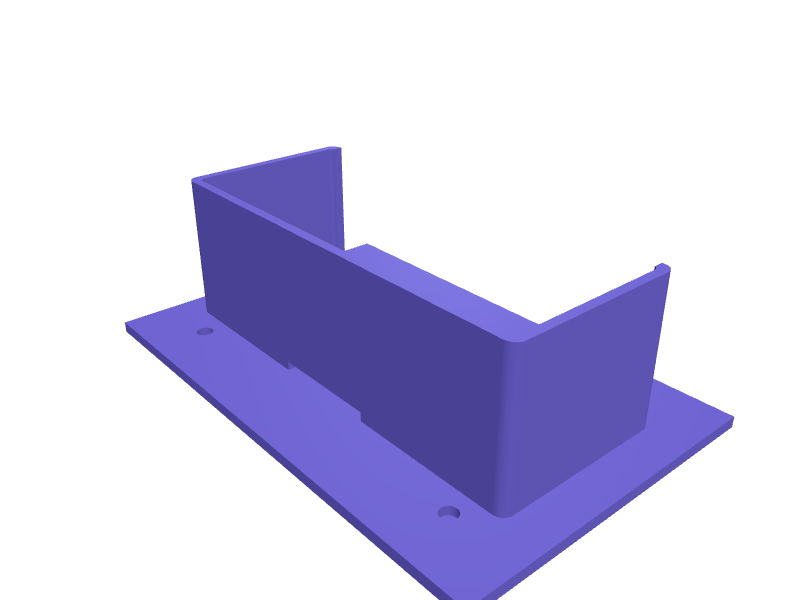
A holster that parks an M18 FUEL impact (about 140 mm long without battery) on a 4.5 mm hole pair so the tool is not on the bench. The well is 80 × 50 × 60 mm with a 20 mm trigger cutout. Print in PETG with 2.4 mm walls. Describe your measurements and SpeakCAD builds it with AI (credits), then download STL, 3MF or sliced G-code.No ready-made model yet: building it uses credits (4 credits for the part on a plan, its first 3 small changes free; Maker: 50 credits a month for $7.99, cancel anytime).Updated
No ready-made model for this part yet
Sign in and SpeakCAD builds it from the prompt below (4 credits for the part on a plan, its first 3 small changes free; Maker: 50 credits a month for $7.99, cancel anytime). Want to try the editor first? The live demo is free, no account.2
Adjust
Change its numbers in the viewer for free, or ask the AI for a change in the chat (2 credits for a small change, 1 for a quick edit, 3 for a redesign; the first 3 small changes are free on a plan).3Print
Download a watertight STL or 3MF, included in every plan (4 credits without one), or G-code sliced for your printer at the same price.
Example prompt
Design an M18 FUEL impact holster 80×50×60 mm, 20 mm trigger cutout, two 4.5 mm holes, 2.4 mm PETG.
Fit notes
The M12 holster is too small. Describe mid-torque vs high-torque in SpeakCAD, preview the holster in the browser, then download the STL.
Questions people ask about a Milwaukee M18 FUEL impact wall holster
A holster that parks an M18 FUEL impact (about 140 mm long without battery) on a 4.5 mm hole pair so the tool is not on the bench. The well is 80 × 50 × 60 mm with a 20 mm trigger cutout. Print in PETG with 2.4 mm walls.
There is no ready-made model for this part yet. Click Build it with AI and sign in: the example prompt on this page is filled in, and SpeakCAD builds the part from it in your browser (4 credits for the part on a plan, its first 3 small changes free). Change any number in the viewer for free, then download a watertight STL or 3MF, included in every plan (4 credits without one), or G-code sliced for your printer at the same price. Start with Maker: 50 credits a month for $7.99, cancel anytime.
SpeakCAD builds it to your measurements from the example prompt on this page: the part uses 4 credits on a plan, its first 3 small changes free (3 without a plan), and a small change after them 2, then the STL or 3MF download is included in every plan (4 credits without one), or G-code sliced for your printer at the same price. Start with Maker: 50 credits a month for $7.99, cancel anytime. To try the editor before paying, the live demo is free, no account.
A shared STL is modelled for someone else's measurements. SpeakCAD builds this part to the millimetres you give it (AI requests use credits), so the file you download is sized for the part you actually own.
Yes. SpeakCAD slices the part on its servers with OrcaSlicer and your printer's official profile (380+ printers, including Bambu Lab, Prusa, Creality and Elegoo), and you download the G-code (a sliced .gcode.3mf for Bambu Lab printers). G-code sliced for your printer costs the same as the STL: included in every plan, free for a part you shaped by hand, 4 credits without a plan for a part with AI work in it. Pick your printer on the printers page to see its profile.
No. SpeakCAD runs in the browser on your phone or computer: the chat, the 3D engine and the live viewer load in the tab. The only file you download is the finished STL, 3MF or sliced G-code.
Print it your way
More brackets & mounts
Wall bracket for a small bookshelf speakerReady-made, opens free. A wedge-shaped bracket that lifts a compact speaker onto the wall and angles it slightly downward toward the listening position.Quad Lock wall mount plate for shower or workshopReady-made, opens free. A flat plate with a Quad Lock style twist-lock recess so any phone in a Quad Lock case snaps onto a shower wall, a workshop board or the side of a fridge.Ski and snowboard wall rack bracketReady-made, opens free. A wall bracket for a pair of skis or a snowboard, with two 150 mm arms that hang skis tips-up by the brakes or bindings, or a single 30 mm slot version that…Ryobi ONE+ battery wall mount strip for 18V packsReady-made, opens free. A strip of sockets for Ryobi ONE+ 18V batteries, from the slim 1.5 Ah to the 6 Ah High Performance packs, which all share the same stem.Razer BlackShark V2 under desk headset hangerReady-made, opens free. An under-desk hanger for the Razer BlackShark V2 Pro and similar wide-band gaming headsets from SteelSeries Arctis Nova, HyperX Cloud III and Logitech G Pro X.Dyson Gen5detect crevice-tool clipReady-made, opens free. A clip that holds the Gen5detect crevice tool on the wand so it does not live in the other room.