1
Brackets & mounts
Dyson Gen5detect crevice-tool clip
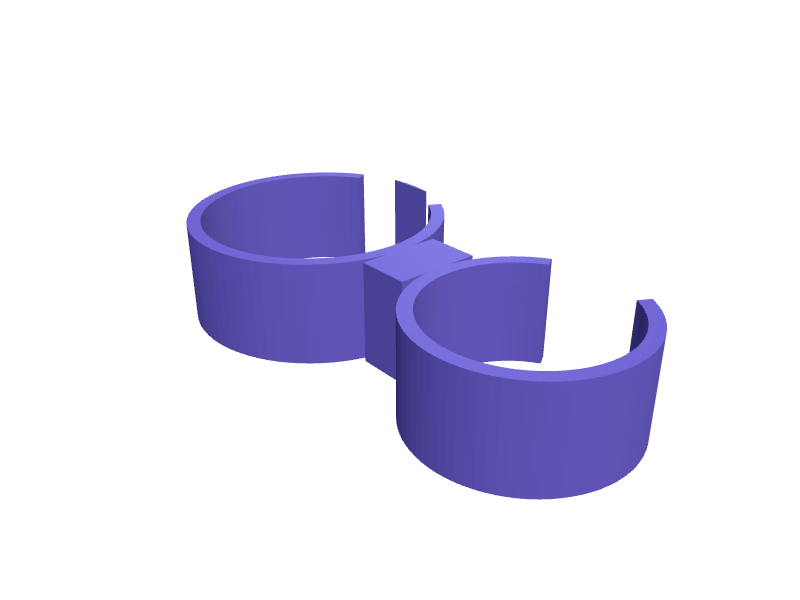
A clip that holds the Gen5detect crevice tool on the wand so it does not live in the other room. The snap is 28 mm. Print in PETG. Open the ready-made model free, resize it on your phone or computer, then download a print-ready STL, 3MF or G-code sliced for your printer, free.Opening the ready-made model and downloading it as STL or 3MF are free, no card; AI changes use credits, from Maker at $7.99 a month.No printer? We print this part and ship it to your door. See its priceUpdated
2
Adjust
Change its numbers in the viewer for free, or ask the AI in the chat: wall thickness, hole size, the thing it clips onto. AI changes use 2 credits per request (1 for a quick edit, 3 for a redesign), paid with a plan from Maker at $7.99 a month, where the first 3 small changes are free.3Print
Download a watertight STL or 3MF free, with your numbers and hand edits, or G-code sliced for your printer at the same price. After an AI change the download is included in every plan (4 credits without one).
Dimensions of the ready-made model (editable)
| Parameter | Value |
|---|---|
| wand diameter | 28 mm |
| tool saddle diameter | 22 mm |
| wall thickness (PETG) | 1.6 mm |
| height of each ring | 12 mm |
| snap-fit interference (reduces opening slightly) | 0.4 mm |
| straight bridge length between rings | 6 mm |
| bridge width | 10 mm |
| small edge chamfer | 1 mm |
Example prompt
Create a Gen5detect crevice clip, 28 mm wand snap, 22 mm tool saddle, 1.6 mm PETG.
Fit notes
The official clip is for a different tool. Describe the wand in SpeakCAD, preview the clip in the browser, then download the STL.
Questions people ask about a Dyson Gen5detect crevice-tool clip
A clip that holds the Gen5detect crevice tool on the wand so it does not live in the other room. The snap is 28 mm. Print in PETG.
Click Open it free on this page and create a free account (no card): the ready-made model opens in your browser, on your phone or computer, nothing to install. Change its numbers in the viewer for free and download a watertight STL or 3MF free, or G-code sliced for your printer at the same price. An AI change in the chat uses 2 credits per request (3 for a redesign), and the download after it is included in every plan (4 credits without one). Start with Maker: 50 credits a month for $7.99, cancel anytime.
On this page: open the ready-made model free in a SpeakCAD account (no card), change any dimension in the viewer, then download the STL or 3MF free, or G-code sliced for your printer at the same price.
A shared STL is modelled for someone else's measurements. Here you open the ready-made model free, change it to your measurements in the viewer, then download a file sized for the part you actually own, free as STL or 3MF.
Yes. SpeakCAD slices the part on its servers with OrcaSlicer and your printer's official profile (380+ printers, including Bambu Lab, Prusa, Creality and Elegoo), and you download the G-code (a sliced .gcode.3mf for Bambu Lab printers). G-code sliced for your printer costs the same as the STL: included in every plan, free for a part you shaped by hand, 4 credits without a plan for a part with AI work in it. Pick your printer on the printers page to see its profile.
No. SpeakCAD runs in the browser on your phone or computer: the chat, the 3D engine and the live viewer load in the tab. The only file you download is the finished STL, 3MF or sliced G-code.
Print it your way
More brackets & mounts
UniFi G6 Instant corner mountReady-made, opens free. A corner mount that aims a G6 Instant at 45 degrees across a porch, 80 × 40 × 40 mm with the official 4-hole pattern.Under-shelf bracket for a cable trayReady-made, opens free. A J-shaped bracket that screws to the underside of a shelf or table and cradles a bundle of cables or a slim power strip out of sight.reMarkable 2 wall mount holder with Marker slotReady-made, opens free. A wall holder for the reMarkable 2 tablet (187 x 246 x 4.7 mm) that keeps it and its Marker within reach beside a desk or on a kitchen wall for the shopping…Amazon Echo Dot 5th gen outlet shelf mountReady-made, opens free. A small shelf that sits over a wall outlet and carries an Amazon Echo Dot 5th gen, a 100 mm sphere-ish speaker 89 mm tall weighing about 300 g, so it takes n…Type 2 EV charging plug holster with cable hookReady-made, opens free. A garage holster that receives the Type 2 (Mennekes) plug of a home wallbox or granny cable so the pins stay dry and the cable hangs in a loop below.iPhone 17 Pro MagSafe bike stem mountReady-made, opens free. An out-front bicycle mount that holds an iPhone 17 Pro (about 150 × 72 × 8.8 mm) on a MagSafe ring so the camera bar clears the stem.