1
Brackets & mounts
iPhone 17 Pro MagSafe bike stem mount
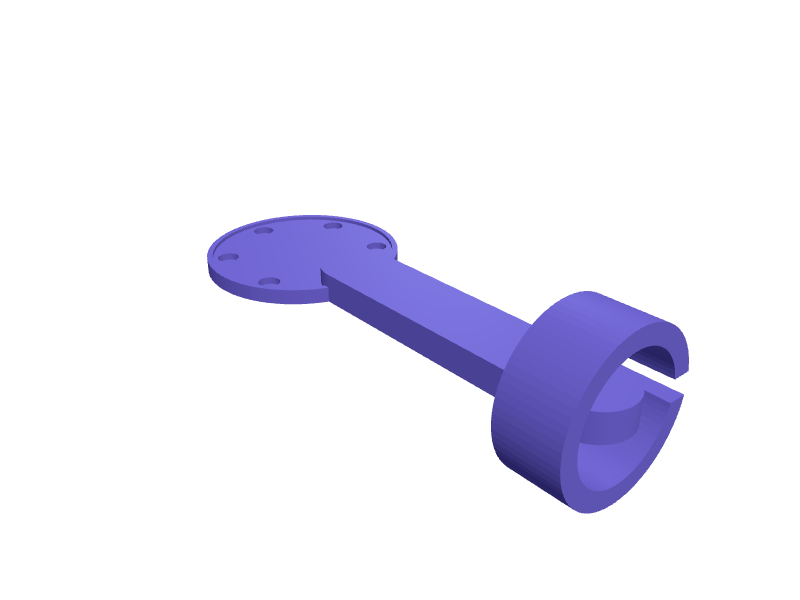
An out-front bicycle mount that holds an iPhone 17 Pro (about 150 × 72 × 8.8 mm) on a MagSafe ring so the camera bar clears the stem. The head is a 56 mm MagSafe-aligned disc 3.2 mm thick with six 6 × 2 mm magnet pockets, a 1 mm lip that stops the phone sliding off under braking, and a 22.2 mm stem clamp with 0.3 mm shim slots for 31.8 mm bars via a printed insert. The arm is 80 mm long, 18 mm wide and 8 mm thick, printed on its side in PETG with 2.4 mm walls so the clamp threads stay crisp. Open the ready-made model free, resize it on your phone or computer, then download a print-ready STL, 3MF or G-code sliced for your printer, free.Opening the ready-made model and downloading it as STL or 3MF are free, no card; AI changes use credits, from Maker at $7.99 a month.No printer? We print this part and ship it to your door. See its priceUpdated
2
Adjust
Change its numbers in the viewer for free, or ask the AI in the chat: wall thickness, hole size, the thing it clips onto. AI changes use 2 credits per request (1 for a quick edit, 3 for a redesign), paid with a plan from Maker at $7.99 a month, where the first 3 small changes are free.3Print
Download a watertight STL or 3MF free, with your numbers and hand edits, or G-code sliced for your printer at the same price. After an AI change the download is included in every plan (4 credits without one).
Dimensions of the ready-made model (editable)
| Parameter | Value |
|---|---|
| disc diameter | 56 mm |
| disc base thickness | 3.2 mm |
| retention lip height | 1 mm |
| lip wall thickness | 1.6 mm |
| magnet pocket diameter | 6 mm |
| magnet pocket depth | 2 mm |
| bolt circle for magnets | 44 mm |
| arm length (disc edge to clamp) | 80 mm |
| arm width | 20 mm |
| arm thickness | 8 mm |
| wall thickness | 2.4 mm |
| handlebar diameter | 31.8 mm |
| shim clearance for closing gap | 0.3 mm |
| clamp width along bar axis | 18 mm |
Example prompt
Design an out-front MagSafe bike mount for an iPhone 17 Pro: a 56 mm disc 3.2 mm thick with six 6×2 mm magnet pockets on a 44 mm circle, a 1 mm retention lip, an 80 mm arm, and a 22.2 mm stem clamp 18 mm wide with M5 through-bolt and 0.3 mm shim for a 31.8 mm bar. PETG, 2.4 mm walls.
Fit notes
A stem mount sold for last year's iPhone sits the camera bar on the arm and blocks the ultrawide. In SpeakCAD you type the phone thickness and bar diameter you measured, preview the mount in the browser, ask for a GoPro adapter under the disc in the chat, then download the STL.
Questions people ask about an iPhone 17 Pro MagSafe bike stem mount
An out-front bicycle mount that holds an iPhone 17 Pro (about 150 × 72 × 8.8 mm) on a MagSafe ring so the camera bar clears the stem. The head is a 56 mm MagSafe-aligned disc 3.2 mm thick with six 6 × 2 mm magnet pockets, a 1 mm lip that stops the phone sliding off under braking, and a 22.2 mm stem clamp with 0.3 mm shim slots for 31.8 mm bars via a printed insert. The arm is 80 mm long, 18 mm wide and 8 mm thick, printed on its side in PETG with 2.4 mm walls so the clamp threads stay crisp.
Click Open it free on this page and create a free account (no card): the ready-made model opens in your browser, on your phone or computer, nothing to install. Change its numbers in the viewer for free and download a watertight STL or 3MF free, or G-code sliced for your printer at the same price. An AI change in the chat uses 2 credits per request (3 for a redesign), and the download after it is included in every plan (4 credits without one). Start with Maker: 50 credits a month for $7.99, cancel anytime.
On this page: open the ready-made model free in a SpeakCAD account (no card), change any dimension in the viewer, then download the STL or 3MF free, or G-code sliced for your printer at the same price.
A shared STL is modelled for someone else's measurements. Here you open the ready-made model free, change it to your measurements in the viewer, then download a file sized for the part you actually own, free as STL or 3MF.
Yes. SpeakCAD slices the part on its servers with OrcaSlicer and your printer's official profile (380+ printers, including Bambu Lab, Prusa, Creality and Elegoo), and you download the G-code (a sliced .gcode.3mf for Bambu Lab printers). G-code sliced for your printer costs the same as the STL: included in every plan, free for a part you shaped by hand, 4 credits without a plan for a part with AI work in it. Pick your printer on the printers page to see its profile.
No. SpeakCAD runs in the browser on your phone or computer: the chat, the 3D engine and the live viewer load in the tab. The only file you download is the finished STL, 3MF or sliced G-code.
Print it your way
More brackets & mounts
iPhone 16 Pro MagSafe wall mount for charger puckReady-made, opens free. A slim wall plate that holds an Apple MagSafe charger puck (56 mm diameter, about 5.5 mm thick) so an iPhone 16 Pro (149.6 x 71.5 x 8.25 mm) snaps onto the w…Peloton Bike phone and tablet holder trayReady-made, opens free. A tray that clamps to the horizontal section of the Peloton Bike or Bike+ handlebar and holds a phone or small tablet beside the main screen, handy for readi…Apple TV 4K behind-TV VESA mount bracketReady-made, opens free. A holder that hides an Apple TV 4K behind the television using a spare VESA screw.Hatch Rest sound machine wall shelf with cable channelReady-made, opens free. A small shelf that mounts a Hatch Rest or Rest+ sound machine on the nursery wall out of reach of a toddler while keeping the top touch ring accessible.25 mm French-cleat cordless-drill holderReady-made, opens free. A French-cleat cradle for an 18V drill with a 50 mm handle saddle and a 20 mm battery rest, cut for a 25 mm cleat.L-shaped shelf bracket, 150 mm reachReady-made, opens free. A simple right-angle bracket for a light shelf up to about 150 mm deep, holding books, small speakers or plants in a hallway.