1
Desk & office
iPhone 17 Air MagSafe wallet stand
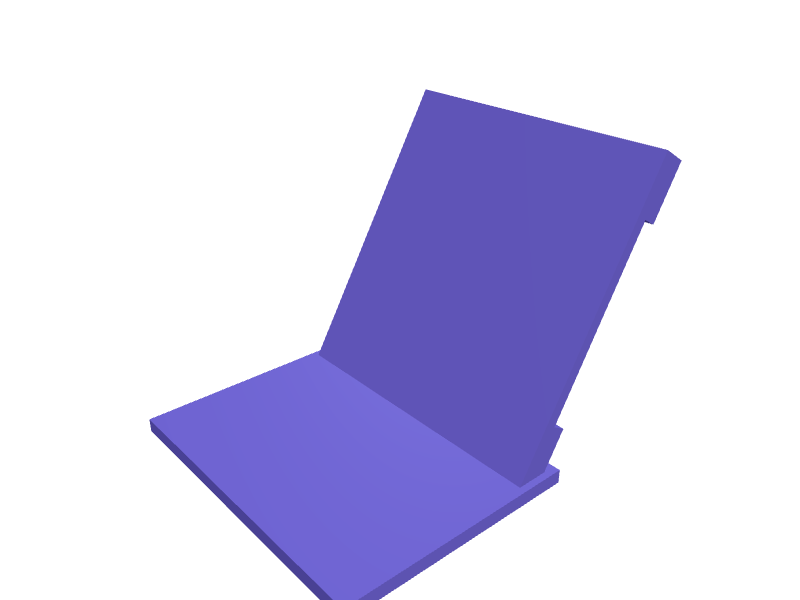
A slim nightstand stand that an iPhone 17 Air (about 147 × 72 × 5.6 mm) snaps onto at 60 degrees for StandBy, with a 4 mm pocket behind the MagSafe disc for two cards. The disc is 56 mm and 2.8 mm thick so the thinner Air does not rock, six 6 × 2 mm magnet wells sit on a 44 mm pitch circle, and a 12 mm USB-C cable channel drops out the back. The base is 90 × 70 mm with 2 mm walls and prints flat in PLA; a 0.4 mm chamfer on the card slot keeps cards from scuffing. Open the ready-made model free, resize it on your phone or computer, then download a print-ready STL, 3MF or G-code sliced for your printer, free.Opening the ready-made model and downloading it as STL or 3MF are free, no card; AI changes use credits, from Maker at $7.99 a month.No printer? We print this part and ship it to your door. See its priceUpdated
2
Adjust
Change its numbers in the viewer for free, or ask the AI in the chat: wall thickness, hole size, the thing it clips onto. AI changes use 2 credits per request (1 for a quick edit, 3 for a redesign), paid with a plan from Maker at $7.99 a month, where the first 3 small changes are free.3Print
Download a watertight STL or 3MF free, with your numbers and hand edits, or G-code sliced for your printer at the same price. After an AI change the download is included in every plan (4 credits without one).
Dimensions of the ready-made model (editable)
| Parameter | Value |
|---|---|
| base width (X) | 90 mm |
| base depth (Y) | 70 mm |
| base thickness | 4 mm |
| wing width | 86 mm |
| wing thickness (front-to-back, includes pocket) | 8 mm |
| disc diameter | 56 mm |
| disc pocket depth | 2.8 mm |
| magnet pocket diameter | 6 mm |
| magnet pocket depth | 2 mm |
| radius of magnet ring centers | 21 mm |
| card pocket opening width | 86 mm |
| card pocket opening height | 56 mm |
| internal depth of pocket | 4 mm |
| wall thickness | 2 mm |
Example prompt
Model a MagSafe wallet stand for iPhone 17 Air: 90×70 mm base, 56 mm disc 2.8 mm thick at 60 degrees with six 6×2 mm magnet pockets, a 86×56×4 mm card pocket behind the disc, a 12 mm USB-C channel at the back, 2 mm walls and a 0.4 mm card-slot chamfer.
Fit notes
Wallet stands cut for an iPhone 16 Pro are too deep and leave the Air floating off the magnets. Describe the phone thickness and card count in SpeakCAD, preview the stand in the browser, then download the STL when StandBy looks right.
Questions people ask about an iPhone 17 Air MagSafe wallet stand
A slim nightstand stand that an iPhone 17 Air (about 147 × 72 × 5.6 mm) snaps onto at 60 degrees for StandBy, with a 4 mm pocket behind the MagSafe disc for two cards. The disc is 56 mm and 2.8 mm thick so the thinner Air does not rock, six 6 × 2 mm magnet wells sit on a 44 mm pitch circle, and a 12 mm USB-C cable channel drops out the back. The base is 90 × 70 mm with 2 mm walls and prints flat in PLA; a 0.4 mm chamfer on the card slot keeps cards from scuffing.
Click Open it free on this page and create a free account (no card): the ready-made model opens in your browser, on your phone or computer, nothing to install. Change its numbers in the viewer for free and download a watertight STL or 3MF free, or G-code sliced for your printer at the same price. An AI change in the chat uses 2 credits per request (3 for a redesign), and the download after it is included in every plan (4 credits without one). Start with Maker: 50 credits a month for $7.99, cancel anytime.
On this page: open the ready-made model free in a SpeakCAD account (no card), change any dimension in the viewer, then download the STL or 3MF free, or G-code sliced for your printer at the same price.
A shared STL is modelled for someone else's measurements. Here you open the ready-made model free, change it to your measurements in the viewer, then download a file sized for the part you actually own, free as STL or 3MF.
Yes. SpeakCAD slices the part on its servers with OrcaSlicer and your printer's official profile (380+ printers, including Bambu Lab, Prusa, Creality and Elegoo), and you download the G-code (a sliced .gcode.3mf for Bambu Lab printers). G-code sliced for your printer costs the same as the STL: included in every plan, free for a part you shaped by hand, 4 credits without a plan for a part with AI work in it. Pick your printer on the printers page to see its profile.
No. SpeakCAD runs in the browser on your phone or computer: the chat, the 3D engine and the live viewer load in the tab. The only file you download is the finished STL, 3MF or sliced G-code.
Print it your way
More desk & office
AirPods Pro 3 desk charging wellReady-made, opens free. A well that parks an AirPods Pro 3 case (about 61 × 46 × 22 mm) on its USB-C or MagSafe side so the stem LEDs stay visible.Slim bookend pair with anti-slip baseReady-made, opens free. A pair of L-shaped bookends that keep manuals and notebooks upright on a desk or open shelf.Anker 737 power bank desk cradle with cable channelReady-made, opens free. A cradle that keeps the Anker 737 Power Bank (PowerCore 24K) standing upright on a desk with its charge cable plugged in and its display readable.ZSA Moonlander tenting legs setReady-made, opens free. A set of four screw-in tenting legs for a ZSA Moonlander that replace the stock 8 mm feet with 15, 25 and 40 mm options.Focusrite Scarlett Solo 4th Gen angled standReady-made, opens free. A 20 degree stand for a Scarlett Solo 4th Gen with a 14 mm USB-C slot and 10 mm foot recesses.Magic Keyboard with Touch ID desk trayReady-made, opens free. A shallow tray that parks an Apple Magic Keyboard with Touch ID (about 279 × 115 × 11 mm) at 6 degrees with a 14 mm USB-C slot at the back.