1
Desk & office
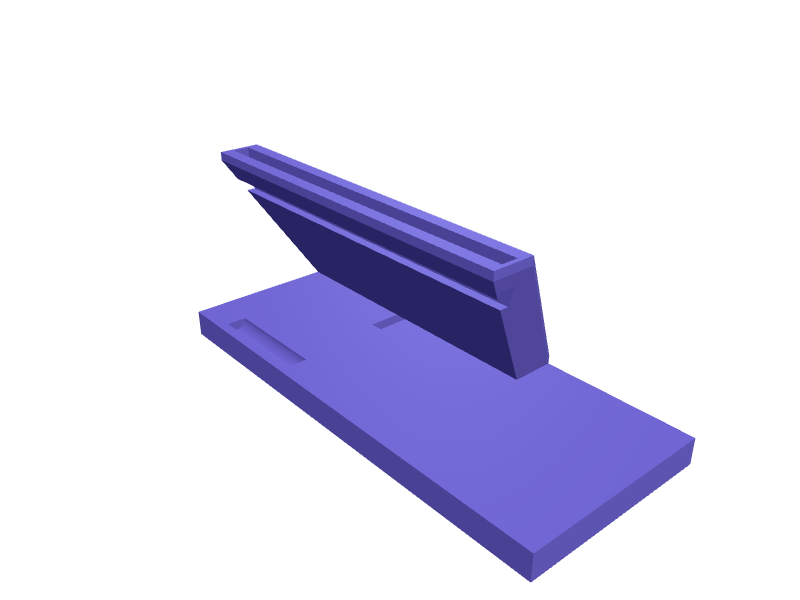
iPad Pro 11-inch M4 Pencil charging stand
A stand that holds an 11-inch iPad Pro M4 (about 250 × 177 × 5.3 mm) at 60 degrees for StandBy and parks an Apple Pencil Pro on a 9 mm MagSafe saddle. The well is 179 × 8 mm with 0.4 mm case clearance, a 12 mm USB-C slot drops out the back, and the base is 140 × 90 mm. Print in one piece on its back in PLA. Open the ready-made model free, resize it on your phone or computer, then download a print-ready STL, 3MF or G-code sliced for your printer, free.Opening the ready-made model and downloading it as STL or 3MF are free, no card; AI changes use credits, from Maker at $7.99 a month.No printer? We print this part and ship it to your door. See its priceUpdated
2
Adjust
Change its numbers in the viewer for free, or ask the AI in the chat: wall thickness, hole size, the thing it clips onto. AI changes use 2 credits per request (1 for a quick edit, 3 for a redesign), paid with a plan from Maker at $7.99 a month, where the first 3 small changes are free.3Print
Download a watertight STL or 3MF free, with your numbers and hand edits, or G-code sliced for your printer at the same price. After an AI change the download is included in every plan (4 credits without one).
Dimensions of the ready-made model (editable)
| Parameter | Value |
|---|---|
| minimum wall thickness | 2 mm |
| Base width | 140 mm |
| Base depth | 90 mm |
| Base plate thickness | 12 mm |
| Total stand height | 80 mm |
| Width of well support at top | 179 mm |
| Slab depth (Y extent) | 20 mm |
| Slab local thickness at each end box | 4 mm |
| Pencil groove diameter | 9 mm |
| Pencil groove length | 100 mm |
| Cable channel width | 12 mm |
| Cable channel height | 6 mm |
| Clearance around iPad edge, per side | 1 mm |
Example prompt
Design an iPad Pro 11 M4 charging stand 140×90×80 mm, 179×8 mm well at 60 degrees, 9 mm Pencil saddle, 12 mm USB-C slot, 2 mm walls.
Fit notes
The existing 11 M5 Magic Keyboard riser is a different part. In SpeakCAD you set case thickness, preview the stand in the browser, then download the STL.
Questions people ask about an iPad Pro 11-inch M4 Pencil charging stand
A stand that holds an 11-inch iPad Pro M4 (about 250 × 177 × 5.3 mm) at 60 degrees for StandBy and parks an Apple Pencil Pro on a 9 mm MagSafe saddle. The well is 179 × 8 mm with 0.4 mm case clearance, a 12 mm USB-C slot drops out the back, and the base is 140 × 90 mm. Print in one piece on its back in PLA.
Click Open it free on this page and create a free account (no card): the ready-made model opens in your browser, on your phone or computer, nothing to install. Change its numbers in the viewer for free and download a watertight STL or 3MF free, or G-code sliced for your printer at the same price. An AI change in the chat uses 2 credits per request (3 for a redesign), and the download after it is included in every plan (4 credits without one). Start with Maker: 50 credits a month for $7.99, cancel anytime.
On this page: open the ready-made model free in a SpeakCAD account (no card), change any dimension in the viewer, then download the STL or 3MF free, or G-code sliced for your printer at the same price.
A shared STL is modelled for someone else's measurements. Here you open the ready-made model free, change it to your measurements in the viewer, then download a file sized for the part you actually own, free as STL or 3MF.
Yes. SpeakCAD slices the part on its servers with OrcaSlicer and your printer's official profile (380+ printers, including Bambu Lab, Prusa, Creality and Elegoo), and you download the G-code (a sliced .gcode.3mf for Bambu Lab printers). G-code sliced for your printer costs the same as the STL: included in every plan, free for a part you shaped by hand, 4 credits without a plan for a part with AI work in it. Pick your printer on the printers page to see its profile.
No. SpeakCAD runs in the browser on your phone or computer: the chat, the 3D engine and the live viewer load in the tab. The only file you download is the finished STL, 3MF or sliced G-code.
Print it your way
More desk & office
Galaxy Tab S10 Ultra easel standReady-made, opens free. An easel that holds a Galaxy Tab S10 Ultra (about 326 × 208 × 5.4 mm) at 20 or 50 degrees for drawing, with a 210 mm ledge 10 mm deep and a folding 6 mm pin…Arturia MiniLab 3 angled feetReady-made, opens free. Replacement rear feet that put a MiniLab 3 at 8 degrees, 20 × 12 × 10 mm with the stock 4 mm pin.Mac Studio M4 under-desk trayReady-made, opens free. A ventilated tray that clamps a Mac Studio M4 (about 197 × 197 × 95 mm) under a 15–36 mm desk so the 120 mm rear exhaust stays open.Studio Display VESA cable channelReady-made, opens free. A channel that hides power and Thunderbolt behind a Studio Display on the official VESA mount so the cables follow the arm instead of hanging.Keycap storage tray with stem postsReady-made, opens free. A tray for sorting and storing loose MX-style keycaps on a grid of cross-shaped posts that hold each cap upright and prevent scuffing.Elgato Wave 3 microphone desk riser with cable slotReady-made, opens free. A riser that lifts the Elgato Wave:3 closer to mouth height without a boom arm.