1
Desk & office
Garmin Fenix 8 charger cable dock
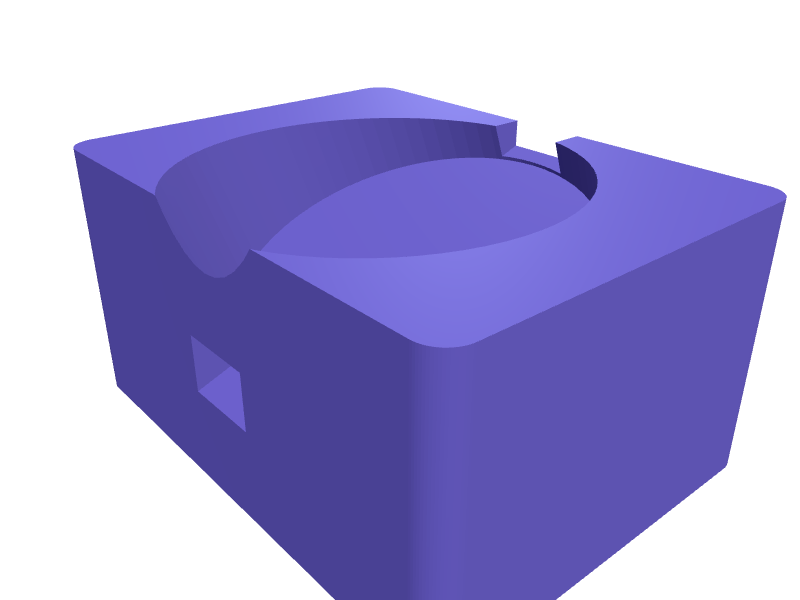
A desk dock that holds a Garmin Fenix 8 (51 mm case) face-out while the official clip charger clamps the back. The well is 54 mm with a 12 mm slot at 6 o'clock for the clip's cable, a 20 degree lean, and a 70 × 18 mm trough for the USB-A or USB-C brick. Print it in one piece on its back in PLA with 2 mm walls and a 0.3 mm clip clearance so the charger still snaps. Open the ready-made model free, resize it on your phone or computer, then download a print-ready STL, 3MF or G-code sliced for your printer, free.Opening the ready-made model and downloading it as STL or 3MF are free, no card; AI changes use credits, from Maker at $7.99 a month.No printer? We print this part and ship it to your door. See its priceUpdated
2
Adjust
Change its numbers in the viewer for free, or ask the AI in the chat: wall thickness, hole size, the thing it clips onto. AI changes use 2 credits per request (1 for a quick edit, 3 for a redesign), paid with a plan from Maker at $7.99 a month, where the first 3 small changes are free.3Print
Download a watertight STL or 3MF free, with your numbers and hand edits, or G-code sliced for your printer at the same price. After an AI change the download is included in every plan (4 credits without one).
Dimensions of the ready-made model (editable)
| Parameter | Value |
|---|---|
| base length (X) | 80 mm |
| base width (Y) | 60 mm |
| overall height (Z) | 40 mm |
| wall thickness | 2 mm |
| watch well diameter | 54 mm |
| well depth | 12 mm |
| cable slot width | 12 mm |
| cable slot height (through wall) | 8 mm |
| brick trough length | 70 mm |
| brick trough width | 18 mm |
| brick trough depth | 10 mm |
| clip clearance | 0.3 mm |
Example prompt
Create a Garmin Fenix 8 charger dock 80×60×40 mm with a 54 mm well at 20 degrees, a 12 mm cable slot at 6 o'clock, 0.3 mm clip clearance, a 70×18 mm brick trough and 2 mm walls.
Fit notes
Fenix 7 docks put the clip on the wrong lug after Garmin moved the contacts. Tell SpeakCAD which Fenix size you own, preview the dock in the browser, then download the STL.
Questions people ask about a Garmin Fenix 8 charger cable dock
A desk dock that holds a Garmin Fenix 8 (51 mm case) face-out while the official clip charger clamps the back. The well is 54 mm with a 12 mm slot at 6 o'clock for the clip's cable, a 20 degree lean, and a 70 × 18 mm trough for the USB-A or USB-C brick. Print it in one piece on its back in PLA with 2 mm walls and a 0.3 mm clip clearance so the charger still snaps.
Click Open it free on this page and create a free account (no card): the ready-made model opens in your browser, on your phone or computer, nothing to install. Change its numbers in the viewer for free and download a watertight STL or 3MF free, or G-code sliced for your printer at the same price. An AI change in the chat uses 2 credits per request (3 for a redesign), and the download after it is included in every plan (4 credits without one). Start with Maker: 50 credits a month for $7.99, cancel anytime.
On this page: open the ready-made model free in a SpeakCAD account (no card), change any dimension in the viewer, then download the STL or 3MF free, or G-code sliced for your printer at the same price.
A shared STL is modelled for someone else's measurements. Here you open the ready-made model free, change it to your measurements in the viewer, then download a file sized for the part you actually own, free as STL or 3MF.
Yes. SpeakCAD slices the part on its servers with OrcaSlicer and your printer's official profile (380+ printers, including Bambu Lab, Prusa, Creality and Elegoo), and you download the G-code (a sliced .gcode.3mf for Bambu Lab printers). G-code sliced for your printer costs the same as the STL: included in every plan, free for a part you shaped by hand, 4 credits without a plan for a part with AI work in it. Pick your printer on the printers page to see its profile.
No. SpeakCAD runs in the browser on your phone or computer: the chat, the 3D engine and the live viewer load in the tab. The only file you download is the finished STL, 3MF or sliced G-code.
Print it your way
More desk & office
Samsung Galaxy Watch charger puck holder for deskReady-made, opens free. An upright holder for the round Samsung Galaxy Watch wireless charging puck, so a Galaxy Watch 6 or 7 sits on its side charging instead of lying face down on…Nothing Phone (3) Glyph desk standReady-made, opens free. A clear-back-friendly stand for a Nothing Phone (3) (about 160 × 76 × 8.3 mm) that holds the phone at 65 degrees so the Glyph interface stays visible.Sonos Move 2 charging-cradle riserReady-made, opens free. A 20 mm riser under a Move 2 cradle so the speaker clears a deep windowsill lip.HackRF One PortaPack H2M standReady-made, opens free. A stand that holds a HackRF + PortaPack H2M at 30 degrees with a 14 mm USB slot.MacBook Pro 14 M4 HDMI hub under-standReady-made, opens free. A 22 mm shelf that sits under a 14-inch MacBook Pro M4 (about 15.5 mm closed, 312 mm wide) and parks a 6-port HDMI/SD hub so the left Thunderbolt ports stay…Vertical laptop stand for closed-lid dockingReady-made, opens free. A weighted-look holder that stores a closed laptop on its edge beside a monitor.