1
Desk & office
COROS Pace 3 charger clip dock
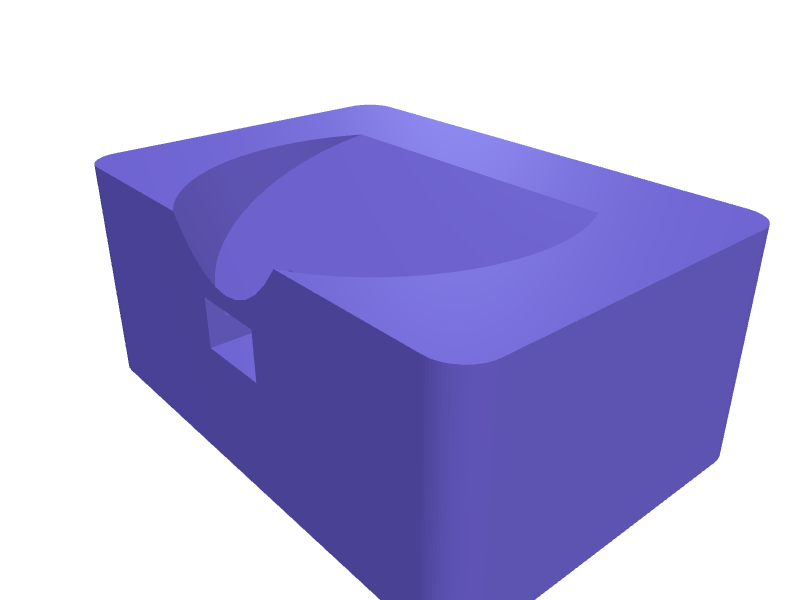
A bedside dock that holds a COROS Pace 3 (about 42 mm) on its pogo-clip charger at 20 degrees. The nest is 44 mm, a 9 mm slot at 6 o'clock clears the clip, and a 45 × 14 mm pocket hides the USB brick. Print in PLA with 1.6 mm walls. Open the ready-made model free, resize it on your phone or computer, then download a print-ready STL, 3MF or G-code sliced for your printer, free.Opening the ready-made model and downloading it as STL or 3MF are free, no card; AI changes use credits, from Maker at $7.99 a month.No printer? We print this part and ship it to your door. See its priceUpdated
2
Adjust
Change its numbers in the viewer for free, or ask the AI in the chat: wall thickness, hole size, the thing it clips onto. AI changes use 2 credits per request (1 for a quick edit, 3 for a redesign), paid with a plan from Maker at $7.99 a month, where the first 3 small changes are free.3Print
Download a watertight STL or 3MF free, with your numbers and hand edits, or G-code sliced for your printer at the same price. After an AI change the download is included in every plan (4 credits without one).
Dimensions of the ready-made model (editable)
| Parameter | Value |
|---|---|
| length | 65 mm |
| depth | 45 mm |
| height | 28 mm |
| wall thickness around nest | 1.6 mm |
| outer diameter of nest opening | 44 mm |
| depth of nest cavity | 12 mm |
| length cut through wall toward back | 20 mm |
Example prompt
Create a COROS Pace 3 dock 65×45×28 mm with a 44 mm nest at 20 degrees, 9 mm clip slot, 45×14 mm brick pocket and 1.6 mm walls.
Fit notes
Pace 2 docks pinch the Pace 3's thicker case. Describe the charger you own in SpeakCAD, preview the dock in the browser, then download the STL.
Questions people ask about a COROS Pace 3 charger clip dock
A bedside dock that holds a COROS Pace 3 (about 42 mm) on its pogo-clip charger at 20 degrees. The nest is 44 mm, a 9 mm slot at 6 o'clock clears the clip, and a 45 × 14 mm pocket hides the USB brick. Print in PLA with 1.6 mm walls.
Click Open it free on this page and create a free account (no card): the ready-made model opens in your browser, on your phone or computer, nothing to install. Change its numbers in the viewer for free and download a watertight STL or 3MF free, or G-code sliced for your printer at the same price. An AI change in the chat uses 2 credits per request (3 for a redesign), and the download after it is included in every plan (4 credits without one). Start with Maker: 50 credits a month for $7.99, cancel anytime.
On this page: open the ready-made model free in a SpeakCAD account (no card), change any dimension in the viewer, then download the STL or 3MF free, or G-code sliced for your printer at the same price.
A shared STL is modelled for someone else's measurements. Here you open the ready-made model free, change it to your measurements in the viewer, then download a file sized for the part you actually own, free as STL or 3MF.
Yes. SpeakCAD slices the part on its servers with OrcaSlicer and your printer's official profile (380+ printers, including Bambu Lab, Prusa, Creality and Elegoo), and you download the G-code (a sliced .gcode.3mf for Bambu Lab printers). G-code sliced for your printer costs the same as the STL: included in every plan, free for a part you shaped by hand, 4 credits without a plan for a part with AI work in it. Pick your printer on the printers page to see its profile.
No. SpeakCAD runs in the browser on your phone or computer: the chat, the 3D engine and the live viewer load in the tab. The only file you download is the finished STL, 3MF or sliced G-code.
Print it your way
More desk & office
AKAI MPK Mini Plus standReady-made, opens free. A 12 degree stand for an MPK Mini Plus that clears the extra drum pads, 220 mm span in two halves.Mac mini M4 under-monitor shelfReady-made, opens free. A shelf that hides a Mac mini M4 (about 127 × 127 × 50 mm) under a monitor with 20 mm side vents and a 16 mm power/Thunderbolt cutout at the back.Thunderbolt 5 dock MacBook under-standReady-made, opens free. A 30 mm stand that lifts a closed MacBook Air or 14-inch Pro and hides a Thunderbolt 5 dock (about 200 × 80 × 28 mm) underneath so the single cable is the on…Adhesive desk cable clip setReady-made, opens free. A set of low-profile clips that stick to the edge of a desk and hold charging cables.Elgato Stream Deck XL low-profile angled standReady-made, opens free. A single-piece stand that replaces the tall stock cradle of the Elgato Stream Deck XL with a slimmer 30 degree wedge.Sony WH-1000XM6 under-desk hangerReady-made, opens free. An under-desk hanger for Sony WH-1000XM6 headphones (about 190 mm headband span) with a 22 mm saddle, a 6 mm clamp that grabs a 15–30 mm desktop, and a 10 mm…