1
Desk & office
Akai MPK Mini MK3 keyboard stand with laptop shelf
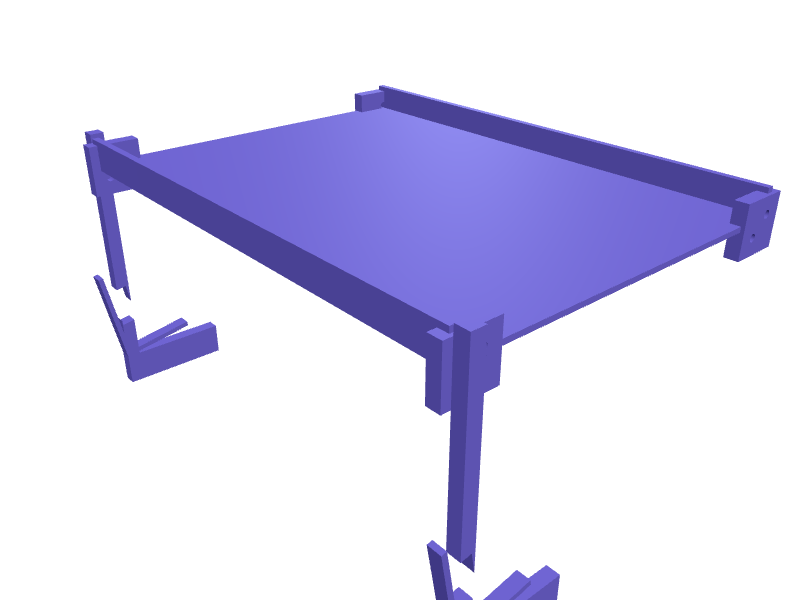
A two-tier stand that lifts an Akai MPK Mini MK3 or MPK Mini Plus (318 x 181 x 44 mm) 20 mm off the desk at a 10 degree angle and raises a 13 to 16 inch laptop on a shelf 150 mm above and behind it, so Ableton sits at eye level and the pads stay at hand height. Two side rails carry the controller in a 320 mm wide channel with 0.5 mm clearance and 2 mm lips, a 25 mm slot passes the USB lead behind, and the laptop shelf is 300 mm wide with 15 mm stops. The rails print flat with 3 mm walls and 30 percent infill and join with M4 bolts; they also fit an Arturia MiniLab 3 and a Novation Launchkey Mini. Open the ready-made model free, resize it on your phone or computer, then download a print-ready STL, 3MF or G-code sliced for your printer, free.Opening the ready-made model and downloading it as STL or 3MF are free, no card; AI changes use credits, from Maker at $7.99 a month.No printer? We print this part and ship it to your door. See its priceUpdated
2
Adjust
Change its numbers in the viewer for free, or ask the AI in the chat: wall thickness, hole size, the thing it clips onto. AI changes use 2 credits per request (1 for a quick edit, 3 for a redesign), paid with a plan from Maker at $7.99 a month.3Print
Download a watertight STL or 3MF free, with your numbers and hand edits, or G-code sliced for your printer at the same price. After an AI change the download is included in every plan (4 credits without one).
Dimensions of the ready-made model (editable)
| Parameter | Value |
|---|---|
| wall thickness | 3 mm |
| width of keyboard channel (outer rail-to-rail) | 320 mm |
| depth of keyboard cradle ledge | 45 mm |
| clearance for keyboard fit | 0.5 mm |
| height of channel above desk | 20 mm |
| usb cable slot width | 25 mm |
| usb cable slot height | 10 mm |
| laptop shelf width | 300 mm |
| laptop shelf depth | 220 mm |
| shelf thickness | 3 mm |
| height of shelf above base | 150 mm |
| laptop stop height | 15 mm |
| thickness of side rail plates | 8 mm |
| height of rail plate (for keyboard cradle side) | 60 mm |
Example prompt
Model a two-tier MIDI controller stand for an Akai MPK Mini MK3: two side rails forming a 320 mm wide channel 45 mm deep with 0.5 mm clearance tilted 10 degrees and raised 20 mm, a 25 mm USB slot, a 300 x 220 mm laptop shelf 150 mm above with 15 mm stops, 3 mm walls, M4 bolt joints.
Fit notes
Rather than a universal stand made for 61-key boards, tell SpeakCAD the controller footprint and laptop size you own, preview the stand in the browser, adjust the tilt in the chat and download the STL.
Questions people ask about an Akai MPK Mini MK3 keyboard stand with laptop shelf
A two-tier stand that lifts an Akai MPK Mini MK3 or MPK Mini Plus (318 x 181 x 44 mm) 20 mm off the desk at a 10 degree angle and raises a 13 to 16 inch laptop on a shelf 150 mm above and behind it, so Ableton sits at eye level and the pads stay at hand height. Two side rails carry the controller in a 320 mm wide channel with 0.5 mm clearance and 2 mm lips, a 25 mm slot passes the USB lead behind, and the laptop shelf is 300 mm wide with 15 mm stops. The rails print flat with 3 mm walls and 30 percent infill and join with M4 bolts; they also fit an Arturia MiniLab 3 and a Novation Launchkey Mini.
Click Open it free on this page and create a free account (no card): the ready-made model opens in your browser, on your phone or computer, nothing to install. Change its numbers in the viewer for free and download a watertight STL or 3MF free, or G-code sliced for your printer at the same price. An AI change in the chat uses 2 credits per request (3 for a redesign), and the download after it is included in every plan (4 credits without one). Start with Maker: 50 credits a month for $7.99, cancel anytime.
On this page: open the ready-made model free in a SpeakCAD account (no card), change any dimension in the viewer, then download the STL or 3MF free, or G-code sliced for your printer at the same price.
A shared STL is modelled for someone else's measurements. Here you open the ready-made model free, change it to your measurements in the viewer, then download a file sized for the part you actually own, free as STL or 3MF.
Yes. SpeakCAD slices the part on its servers with OrcaSlicer and your printer's official profile (380+ printers, including Bambu Lab, Prusa, Creality and Elegoo), and you download the G-code (a sliced .gcode.3mf for Bambu Lab printers). G-code sliced for your printer costs the same as the STL: included in every plan, free for a part you shaped by hand, 4 credits without a plan for a part with AI work in it. Pick your printer on the printers page to see its profile.
No. SpeakCAD runs in the browser on your phone or computer: the chat, the 3D engine and the live viewer load in the tab. The only file you download is the finished STL, 3MF or sliced G-code.
Print it your way
More desk & office
Magic Keyboard with Numeric Keypad angled trayReady-made, opens free. A 6 degree tray for the Magic Keyboard with Numeric Keypad (about 418 × 115 × 11 mm) so the larger board matches a Magic Trackpad wedge.Quad Lock desk dock stand with USB-C cable slotReady-made, opens free. A desk stand with a Quad Lock style twist-lock recess on a 60 degree face, so a phone in a Quad Lock case clicks on in portrait or landscape and charges thro…iPhone 17 Air MagSafe wallet standReady-made, opens free. A slim nightstand stand that an iPhone 17 Air (about 147 × 72 × 5.6 mm) snaps onto at 60 degrees for StandBy, with a 4 mm pocket behind the MagSafe disc for…COROS Pace 3 charger clip dockReady-made, opens free. A bedside dock that holds a COROS Pace 3 (about 42 mm) on its pogo-clip charger at 20 degrees.Elgato Facecam MK.2 privacy shutterReady-made, opens free. A sliding shutter that covers a Facecam MK.2 lens, 30 × 18 × 6 mm with a 1 mm track.Apple Pencil Pro MagSafe pair trayReady-made, opens free. A tray that parks an Apple Pencil Pro and a USB-C Pencil side by side with 9 mm saddles and a 12 mm cap well.