Arduino Nano case: a 3D printed enclosure for the Nano, Nano Every and Nano ESP32
The Nano family shares a 45 x 18 mm footprint with 1.8 mm corner holes. What changes between versions (USB type, height) and a prompt for a tiny snap case.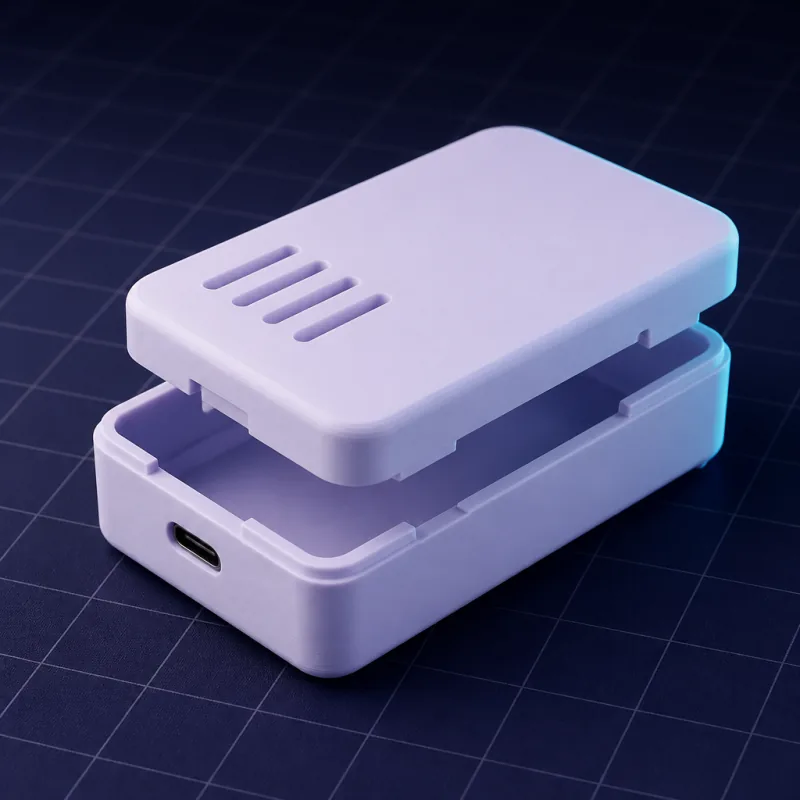
One footprint, many boards
Every board in the Nano family is 45 x 18 mm with four 1.8 mm holes at the corners on a 40.6 x 15.2 mm pattern. That covers the classic Nano, the Nano Every, the Nano 33 IoT, the Nano 33 BLE, the Nano RP2040 Connect and the Nano ESP32. What changes is the USB connector and the parts on top.
| Board | USB | Notes |
|---|---|---|
| Nano (classic) | Mini-B | Tallest part is the USB jack at about 4 mm |
| Nano Every | Micro-B | Same outline, lower profile |
| Nano 33 IoT / BLE | Micro-B | Antenna at the far end, keep 3 mm clear |
| Nano RP2040 Connect | Micro-B | Same as above |
| Nano ESP32 | USB-C | Antenna at the far end |
Nanos usually live on header pins, either soldered into a carrier board or plugged into a breadboard, so the case has to decide whether the pins stay accessible.
Three case styles
- Bare Nano, sealed. The board sits on two 2 mm locating pegs, the case is 8 mm tall inside, and only the USB connector is exposed. For a finished gadget.
- Nano with headers, pins out the bottom. The base has two 2.54 mm-pitch slots so the pins pass through; the case becomes a clip-on cover for a board on a carrier.
- Nano on a carrier PCB. Give the carrier's dimensions instead and treat the Nano as the tallest component.
The prompt
What to watch
- Wall thickness. At this size 1.5 mm walls are plenty and keep the case pocketable. Do not go below 1.2 mm.
- USB-C plug body. The plug's overmould is wider than the connector: a 9 x 4 mm hole clears the connector, but if the case wall is thick, ask for a 12 x 7 mm recess on the outside so the plug seats fully.
- Antenna. Plastic barely affects the 2.4 GHz antenna, but a wall right against it does. The 3 mm keep-out handles it.
- Keyring or clip. "Add a 5 mm keyring loop on one corner" turns a sensor into a wearable.
Printing
Print both halves open side up at 0.16 or 0.2 mm layers. Small cases benefit from two-perimeter walls printed slowly; 1.5 mm walls at 0.4 mm lines is not an exact multiple, so ask for 1.6 mm if your slicer complains about gaps.
Prompts to start from
Open one in the builder, change the numbers to yours, and the model renders in your browser, usually within a minute or two. Keep adjusting in the chat before you print.A slim two-part case for an Arduino Nano ESP32, board 45 x 18 mm, four 1.8 mm holes on a 40.6 x 15.2 mm pattern. Two 1.7 mm locating pegs in the base, 1.5 mm walls, 0.3 mm clearance, 8 mm internal height. A 9 x 4 mm USB-C cutout centred on one short side 2 mm above the floor, 3 mm antenna keep-out at the other end, friction-fit lid. Total height under 13 mm.
A clip-on cover for an Arduino Nano Every soldered onto headers: 45 x 18 mm board, 1.6 mm walls, 6 mm internal height above the board, two 2.54 mm pitch slots in the base 15.2 mm apart for the pin rows, micro USB cutout on one short side.
An enclosure for a 60 x 40 mm carrier PCB with an Arduino Nano socketed on top (tallest point 16 mm above the carrier), 3.2 mm holes 4 mm from each corner, 2 mm walls, snap-fit lid, a micro USB cutout on the long side 12 mm from the corner and a 6.5 mm hole in the lid for a push button.
Questions
The base does: all Nano boards share the 45 x 18 mm outline and hole pattern. The USB cutout must match your board (Mini-B, Micro-B or USB-C), so name the board in the prompt.
Yes. Ask for slots in the base on the 2.54 mm header pitch, or for the two long sides to be open above the board. The case then works as a cover over a breadboard or carrier.
About 50 x 23 x 12 mm outside with 1.5 mm walls and a bare board. Adding headers underneath adds 8 mm of height.