1
Organizers & storage
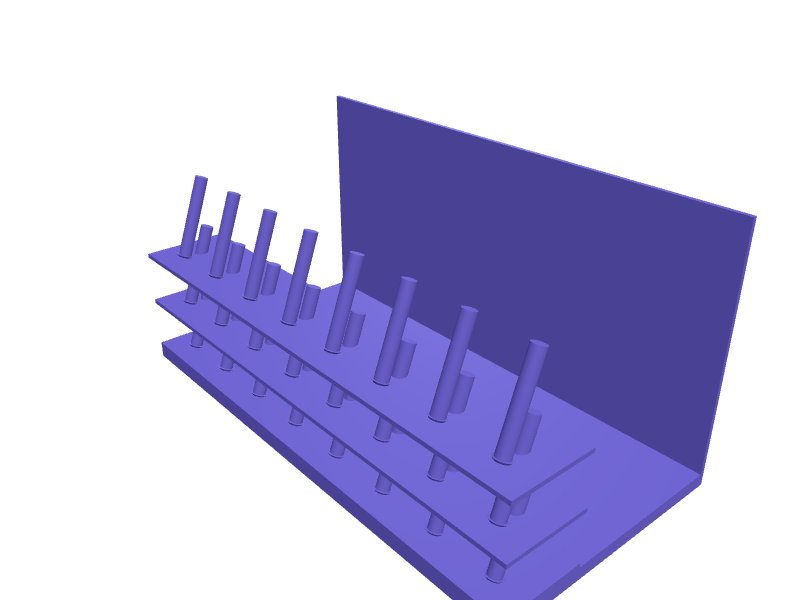
Tiered thread spool rack for sewing table
A stepped rack that holds sewing thread spools on angled pegs so the labels stay visible and the thread ends do not unravel into each other. Pegs are 6 mm in diameter, 40 mm long and lean back 20 degrees so spools do not slide forward; rows step up 25 mm so the back row is always in view. Print with the base flat, 2 mm walls, and add a 1 mm fillet at the peg root to stop them snapping off. Open the ready-made model free, resize it on your phone or computer, then download a print-ready STL, 3MF or G-code sliced for your printer, free.Opening the ready-made model and downloading it as STL or 3MF are free, no card; AI changes use credits, from Maker at $7.99 a month.No printer? We print this part and ship it to your door. See its priceUpdated
2
Adjust
Change its numbers in the viewer for free, or ask the AI in the chat: wall thickness, hole size, the thing it clips onto. AI changes use 2 credits per request (1 for a quick edit, 3 for a redesign), paid with a plan from Maker at $7.99 a month.3Print
Download a watertight STL or 3MF free, with your numbers and hand edits, or G-code sliced for your printer at the same price. After an AI change the download is included in every plan (4 credits without one).
Dimensions of the ready-made model (editable)
| Parameter | Value |
|---|---|
| X | 240 mm |
| Y | 120 mm |
| shelf/wall thickness | 2 mm |
| height step per tier | 25 mm |
| depth of each shelf (Y) | 40 mm |
| base slab thickness | 6 mm |
Example prompt
Create a three-tier thread spool rack 240 mm wide and 120 mm deep, tiers stepping up 25 mm each, eight pegs per tier 6 mm diameter and 40 mm long angled back 20 degrees on 30 mm spacing, 2 mm walls, 1 mm fillets at the peg bases.
Fit notes
Spool rack files online rarely match either your spool count or the width of your table. With SpeakCAD you state how many spools and what footprint you have and it builds a rack that fills the space exactly. Iterate on peg spacing or add a bobbin row in the chat, then download when the layout works.
Questions people ask about a tiered thread spool rack for sewing table
A stepped rack that holds sewing thread spools on angled pegs so the labels stay visible and the thread ends do not unravel into each other. Pegs are 6 mm in diameter, 40 mm long and lean back 20 degrees so spools do not slide forward; rows step up 25 mm so the back row is always in view. Print with the base flat, 2 mm walls, and add a 1 mm fillet at the peg root to stop them snapping off.
Click Open it free on this page and create a free account (no card): the ready-made model opens in your browser, on your phone or computer, nothing to install. Change its numbers in the viewer for free and download a watertight STL or 3MF free, or G-code sliced for your printer at the same price. An AI change in the chat uses 2 credits per request (3 for a redesign), and the download after it is included in every plan (4 credits without one). Start with Maker: 50 credits a month for $7.99, cancel anytime.
On this page: open the ready-made model free in a SpeakCAD account (no card), change any dimension in the viewer, then download the STL or 3MF free, or G-code sliced for your printer at the same price.
A shared STL is modelled for someone else's measurements. Here you open the ready-made model free, change it to your measurements in the viewer, then download a file sized for the part you actually own, free as STL or 3MF.
Yes. SpeakCAD slices the part on its servers with OrcaSlicer and your printer's official profile (380+ printers, including Bambu Lab, Prusa, Creality and Elegoo), and you download the G-code (a sliced .gcode.3mf for Bambu Lab printers). G-code sliced for your printer costs the same as the STL: included in every plan, free for a part you shaped by hand, 4 credits without a plan for a part with AI work in it. Pick your printer on the printers page to see its profile.
No. SpeakCAD runs in the browser on your phone or computer: the chat, the 3D engine and the live viewer load in the tab. The only file you download is the finished STL, 3MF or sliced G-code.
Print it your way
More organizers & storage
Apple TV, Roku and Fire TV remote holderReady-made, opens free. A sofa-side caddy with three angled slots sized to the remotes that come with streaming boxes.IKEA Pax clothes rail hook for bags and beltsReady-made, opens free. A hook that hangs from the Komplement clothes rail inside an IKEA Pax wardrobe and holds handbags, belts, ties or a laundry bag without taking a hanger slot.Boss pedal patch cable and 9V power lead organizerReady-made, opens free. A gig-bag tray that keeps the small stuff behind a pedalboard sorted: 15 cm patch cables, 5.5 x 2.1 mm 9 V daisy-chain leads for Boss and Strymon pedals, spa…IKEA SKÅDIS holder for Makita impact bitsReady-made, opens free. A SKÅDIS pegboard plate with 15 hex pockets 6.6 mm across and two 5 mm SKÅDIS hooks on 40 mm centres.Apple TV Siri Remote 3rd-gen trayReady-made, opens free. A tray that parks a 3rd-gen Siri Remote (about 136 × 35 × 9 mm) plus a spare USB-C cable so the remote does not vanish between sofa cushions.Glasses stand for several pairs of spectaclesReady-made, opens free. A tiered stand that holds reading glasses, sunglasses and spare frames open-armed, lenses facing out and never touching a surface.