1
Desk & office
Studio Display tilt-stop wedge
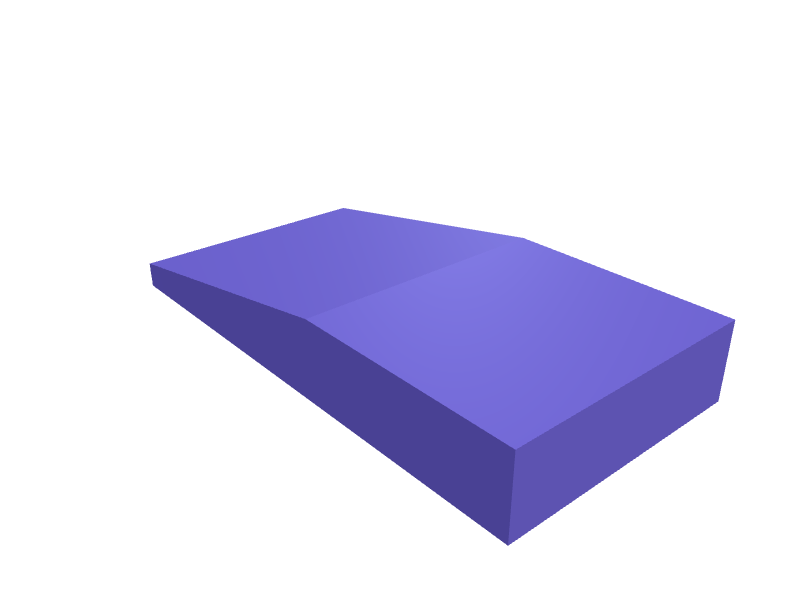
A 12 mm wedge that sits under a Studio Display stand so the screen cannot droop below 10 degrees on a polished desk. The pad is 80 × 40 mm with a 2 mm TPU face. Print the core in PLA and the face in TPU, or all TPU. Open the ready-made model free, resize it on your phone or computer, then download a print-ready STL, 3MF or G-code sliced for your printer, free.Opening the ready-made model and downloading it as STL or 3MF are free, no card; AI changes use credits, from Maker at $7.99 a month.No printer? We print this part and ship it to your door. See its priceUpdated
2
Adjust
Change its numbers in the viewer for free, or ask the AI in the chat: wall thickness, hole size, the thing it clips onto. AI changes use 2 credits per request (1 for a quick edit, 3 for a redesign), paid with a plan from Maker at $7.99 a month, where the first 3 small changes are free.3Print
Download a watertight STL or 3MF free, with your numbers and hand edits, or G-code sliced for your printer at the same price. After an AI change the download is included in every plan (4 credits without one).
Dimensions of the ready-made model (editable)
| Parameter | Value |
|---|---|
| Overall length (mm) | 80 mm |
| Overall width (mm) | 40 mm |
| Max height at rear, incl. TPU face (mm) | 12 mm |
| TPU face layer thickness (mm) | 2 mm |
Example prompt
Design a Studio Display tilt wedge 80×40×12 mm with a 2 mm TPU face, 10 degree stop.
Fit notes
The official tilt creeps during the day. Tell SpeakCAD the angle you want, preview the wedge in the browser, then download the STL.
Questions people ask about a Studio Display tilt-stop wedge
A 12 mm wedge that sits under a Studio Display stand so the screen cannot droop below 10 degrees on a polished desk. The pad is 80 × 40 mm with a 2 mm TPU face. Print the core in PLA and the face in TPU, or all TPU.
Click Open it free on this page and create a free account (no card): the ready-made model opens in your browser, on your phone or computer, nothing to install. Change its numbers in the viewer for free and download a watertight STL or 3MF free, or G-code sliced for your printer at the same price. An AI change in the chat uses 2 credits per request (3 for a redesign), and the download after it is included in every plan (4 credits without one). Start with Maker: 50 credits a month for $7.99, cancel anytime.
On this page: open the ready-made model free in a SpeakCAD account (no card), change any dimension in the viewer, then download the STL or 3MF free, or G-code sliced for your printer at the same price.
A shared STL is modelled for someone else's measurements. Here you open the ready-made model free, change it to your measurements in the viewer, then download a file sized for the part you actually own, free as STL or 3MF.
Yes. SpeakCAD slices the part on its servers with OrcaSlicer and your printer's official profile (380+ printers, including Bambu Lab, Prusa, Creality and Elegoo), and you download the G-code (a sliced .gcode.3mf for Bambu Lab printers). G-code sliced for your printer costs the same as the STL: included in every plan, free for a part you shaped by hand, 4 credits without a plan for a part with AI work in it. Pick your printer on the printers page to see its profile.
No. SpeakCAD runs in the browser on your phone or computer: the chat, the 3D engine and the live viewer load in the tab. The only file you download is the finished STL, 3MF or sliced G-code.
Print it your way
More desk & office
Slim bookend pair with anti-slip baseReady-made, opens free. A pair of L-shaped bookends that keep manuals and notebooks upright on a desk or open shelf.Anker 737 power bank desk cradle with cable channelReady-made, opens free. A cradle that keeps the Anker 737 Power Bank (PowerCore 24K) standing upright on a desk with its charge cable plugged in and its display readable.Keychron Q1 HE magnetic wrist restReady-made, opens free. A 20 mm tall wrist rest that matches a Keychron Q1 HE (about 380 × 150 mm) with two 8 × 2 mm magnet pockets that line up with the case's front magnets.Shure SM7dB yoke spacerReady-made, opens free. A pair of spacers that move an SM7dB yoke 8 mm so a thicker windscreen still clears.Magic Keyboard with Touch ID desk trayReady-made, opens free. A shallow tray that parks an Apple Magic Keyboard with Touch ID (about 279 × 115 × 11 mm) at 6 degrees with a 14 mm USB-C slot at the back.Apple Watch Series 11 nightstand angle wedgeReady-made, opens free. A 15 degree wedge that sits under an official Series 11 charger puck so the 46 mm watch face is readable from the pillow.