1
Enclosures & cases
Shelly 2PM Gen3 DIN-rail adapter
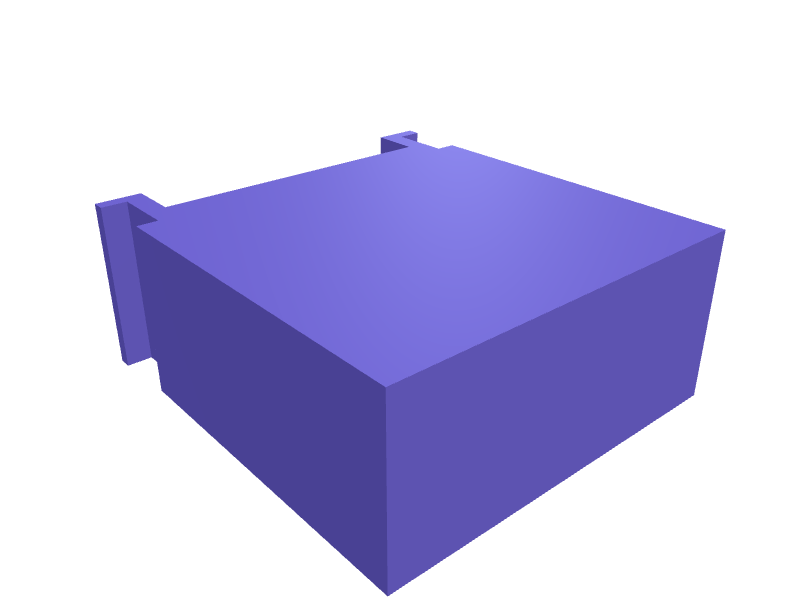
An adapter that snaps a Shelly 2PM Gen3 onto a 35 mm DIN rail with 0.3 mm clearance. Print in PETG. Open the ready-made model free, resize it on your phone or computer, then download a print-ready STL, 3MF or G-code sliced for your printer, free.Opening the ready-made model and downloading it as STL or 3MF are free, no card; AI changes use credits, from Maker at $7.99 a month.No printer? We print this part and ship it to your door. See its priceUpdated
2
Adjust
Change its numbers in the viewer for free, or ask the AI in the chat: wall thickness, hole size, the thing it clips onto. AI changes use 2 credits per request (1 for a quick edit, 3 for a redesign), paid with a plan from Maker at $7.99 a month, where the first 3 small changes are free.3Print
Download a watertight STL or 3MF free, with your numbers and hand edits, or G-code sliced for your printer at the same price. After an AI change the download is included in every plan (4 credits without one).
Dimensions of the ready-made model (editable)
| Parameter | Value |
|---|---|
| Base wall thickness | 1.6 mm |
| DIN rail width (top-hat, EN50022) | 35 mm |
| How far hooks reach behind the spine | 6 mm |
| How far each hook foot returns to grip the rail lip | 3 mm |
| Extrusion length = rail engagement length | 20 mm |
| Clearance around the DIN rail | 0.3 mm |
| Plate depth (away from rail) | 40 mm |
| Plate height | 45 mm |
| Screw hole diameter | 3.2 mm |
Example prompt
Create a 2PM Gen3 DIN adapter, 35 mm rail, 0.3 mm clearance, 1.6 mm PETG.
Fit notes
The 2PM is meant for a box, not a rail. In SpeakCAD you confirm Gen3, preview the adapter in the browser, then download the STL.
Questions people ask about a Shelly 2PM Gen3 DIN-rail adapter
An adapter that snaps a Shelly 2PM Gen3 onto a 35 mm DIN rail with 0.3 mm clearance. Print in PETG.
Click Open it free on this page and create a free account (no card): the ready-made model opens in your browser, on your phone or computer, nothing to install. Change its numbers in the viewer for free and download a watertight STL or 3MF free, or G-code sliced for your printer at the same price. An AI change in the chat uses 2 credits per request (3 for a redesign), and the download after it is included in every plan (4 credits without one). Start with Maker: 50 credits a month for $7.99, cancel anytime.
On this page: open the ready-made model free in a SpeakCAD account (no card), change any dimension in the viewer, then download the STL or 3MF free, or G-code sliced for your printer at the same price.
A shared STL is modelled for someone else's measurements. Here you open the ready-made model free, change it to your measurements in the viewer, then download a file sized for the part you actually own, free as STL or 3MF.
Yes. SpeakCAD slices the part on its servers with OrcaSlicer and your printer's official profile (380+ printers, including Bambu Lab, Prusa, Creality and Elegoo), and you download the G-code (a sliced .gcode.3mf for Bambu Lab printers). G-code sliced for your printer costs the same as the STL: included in every plan, free for a part you shaped by hand, 4 credits without a plan for a part with AI work in it. Pick your printer on the printers page to see its profile.
No. SpeakCAD runs in the browser on your phone or computer: the chat, the 3D engine and the live viewer load in the tab. The only file you download is the finished STL, 3MF or sliced G-code.
Print it your way
More enclosures & cases
Wemos D1 Mini enclosure with DHT22 sensor slotReady-made, opens free. A wall-mountable box for a Wemos D1 Mini (34.2 x 25.6 mm) with a dedicated slot for a DHT22 temperature and humidity sensor.Raspberry Pi Pico W enclosure with header slotsReady-made, opens free. A small box for the Raspberry Pi Pico W, a 51 x 21 mm board with two M2 holes on a 47 x 11.4 mm pattern and a castellated 40-pin edge.Logitech MX Anywhere 4 travel caseReady-made, opens free. A two-part case for an MX Anywhere 4, 110 × 70 × 40 mm with 0.4 mm clearance and a 8 mm dongle well.Snap-lid enclosure for an Arduino UnoReady-made, opens free. A protective box for an Arduino Uno with openings for the USB-B port and barrel jack, and a lid that clicks on without screws.Case for an LM2596 buck converter moduleReady-made, opens free. A tidy shell for the common 43 x 21 mm LM2596 step-down module, covering the exposed inductor and trimmer while leaving the input and output terminals reacha…AirTag luggage tag holder with screw-closed caseReady-made, opens free. A luggage tag that hides an Apple AirTag (31.9 mm diameter, 8 mm thick) inside a screw-closed case so it cannot be prised out in transit, with a loop for a c…