1
Tools & jigs
Rotor-truing fork 160 to 203 mm
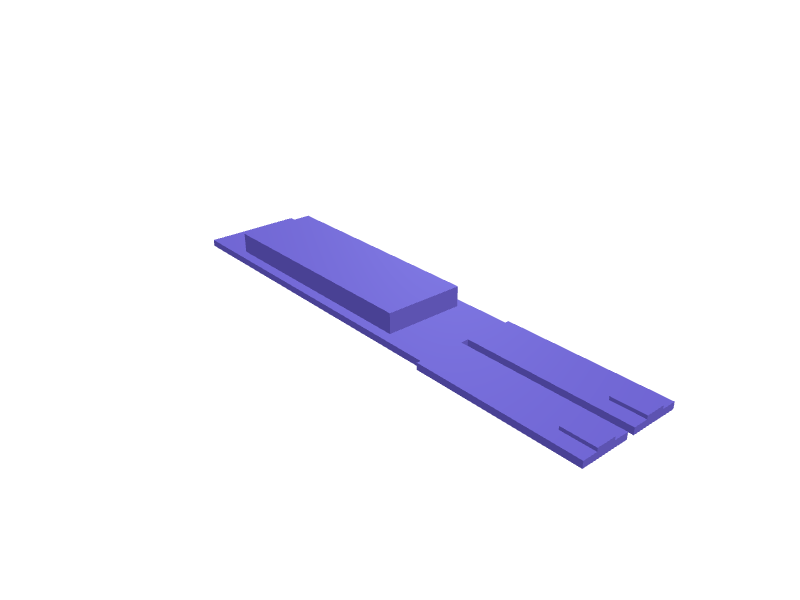
A fork that parks in a 160–203 mm caliper mount and presents two 1 mm pads so you can true a rotor in the frame. Print in PETG. Open the ready-made model free, resize it on your phone or computer, then download a print-ready STL, 3MF or G-code sliced for your printer, free.Opening the ready-made model and downloading it as STL or 3MF are free, no card; AI changes use credits, from Maker at $7.99 a month.No printer? We print this part and ship it to your door. See its priceUpdated
2
Adjust
Change its numbers in the viewer for free, or ask the AI in the chat: wall thickness, hole size, the thing it clips onto. AI changes use 2 credits per request (1 for a quick edit, 3 for a redesign), paid with a plan from Maker at $7.99 a month, where the first 3 small changes are free.3Print
Download a watertight STL or 3MF free, with your numbers and hand edits, or G-code sliced for your printer at the same price. After an AI change the download is included in every plan (4 credits without one).
Dimensions of the ready-made model (editable)
| Parameter | Value |
|---|---|
| Fork/handle base thickness (PETG walls) | 2 mm |
| Handle length | 100 mm |
| Handle width | 30 mm |
| Extra grip boss thickness on top of base | 6 mm |
| Prong length (reach onto rotor, covers 160-203mm mounts) | 50 mm |
| Width of each prong | 15 mm |
| Contact pad length near tip | 10 mm |
| Contact pad width | 6 mm |
| Contact pad thickness (as specified) | 1 mm |
| Nominal rotor thickness the fork should straddle | 1.8 mm |
| Clearance per side around rotor | 0.3 mm |
Example prompt
Model a rotor-truing fork for 160–203 mm mounts, 1 mm pads, 2 mm PETG.
Fit notes
A park-tool stand is overkill in a driveway. Describe the mount in SpeakCAD, preview the fork in the browser, then download the STL.
Questions people ask about a rotor-truing fork 160 to 203 mm
A fork that parks in a 160–203 mm caliper mount and presents two 1 mm pads so you can true a rotor in the frame. Print in PETG.
Click Open it free on this page and create a free account (no card): the ready-made model opens in your browser, on your phone or computer, nothing to install. Change its numbers in the viewer for free and download a watertight STL or 3MF free, or G-code sliced for your printer at the same price. An AI change in the chat uses 2 credits per request (3 for a redesign), and the download after it is included in every plan (4 credits without one). Start with Maker: 50 credits a month for $7.99, cancel anytime.
On this page: open the ready-made model free in a SpeakCAD account (no card), change any dimension in the viewer, then download the STL or 3MF free, or G-code sliced for your printer at the same price.
A shared STL is modelled for someone else's measurements. Here you open the ready-made model free, change it to your measurements in the viewer, then download a file sized for the part you actually own, free as STL or 3MF.
Yes. SpeakCAD slices the part on its servers with OrcaSlicer and your printer's official profile (380+ printers, including Bambu Lab, Prusa, Creality and Elegoo), and you download the G-code (a sliced .gcode.3mf for Bambu Lab printers). G-code sliced for your printer costs the same as the STL: included in every plan, free for a part you shaped by hand, 4 credits without a plan for a part with AI work in it. Pick your printer on the printers page to see its profile.
No. SpeakCAD runs in the browser on your phone or computer: the chat, the 3D engine and the live viewer load in the tab. The only file you download is the finished STL, 3MF or sliced G-code.
Print it your way
More tools & jigs
Bladed spoke holder tool for wheel truingReady-made, opens free. Aero spokes such as Sapim CX-Ray (2.2 x 0.9 mm) and DT Aerolite twist when you turn the nipple, so a holder is essential during wheel building and truing.Bambu Lab build plate scraper handle with replaceable bladeReady-made, opens free. A comfortable scraper for lifting stubborn prints off a Bambu Lab X1C, P1S or A1 textured PEI plate, using a standard 100 mm plastic paint scraper blade or a…Elegoo Centauri Carbon purge bucketReady-made, opens free. A 110 × 70 × 50 mm bucket that clips onto the Centauri Carbon's right rail and catches purge before it hits the carbon-fibre bed.Soldering fume-arm 50 mm hose clampReady-made, opens free. A bench clamp that holds a 50 mm extractor hose 200 mm above a soldering iron rest.Shimano flat-mount bleed blockReady-made, opens free. A block that keeps Shimano flat-mount pistons from popping out during a bleed, 22 × 10 × 8 mm.Ergonomic sanding block for hook-and-loop discsReady-made, opens free. This hand sanding block accepts the same 125 mm hook-and-loop discs you use on a random orbit sander, so leftover discs get a second life on edges and profiles.