1
Replacement parts
Roomba j9+ cliff-sensor shim
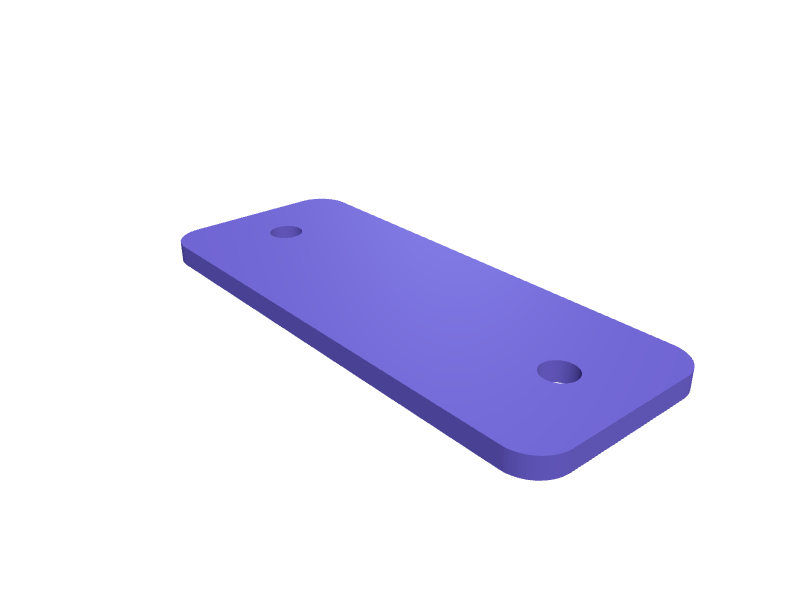
A 1.2 mm shim that sits under a j9+ cliff sensor so dark hardwood is not read as a stair. The plate is 30 × 12 mm with the stock 2 mm holes. Print in PETG; use only if you have no real stairs. Open the ready-made model free, resize it on your phone or computer, then download a print-ready STL, 3MF or G-code sliced for your printer, free.Opening the ready-made model and downloading it as STL or 3MF are free, no card; AI changes use credits, from Maker at $7.99 a month.No printer? We print this part and ship it to your door. See its priceUpdated
2
Adjust
Change its numbers in the viewer for free, or ask the AI in the chat: wall thickness, hole size, the thing it clips onto. AI changes use 2 credits per request (1 for a quick edit, 3 for a redesign), paid with a plan from Maker at $7.99 a month, where the first 3 small changes are free.3Print
Download a watertight STL or 3MF free, with your numbers and hand edits, or G-code sliced for your printer at the same price. After an AI change the download is included in every plan (4 credits without one).
Dimensions of the ready-made model (editable)
| Parameter | Value |
|---|---|
| mm, overall length | 30 mm |
| mm, overall width | 12 mm |
| mm, plate thickness | 1.2 mm |
| mm, mounting hole diameter | 2 mm |
| mm, hole center distance from each short end | 4 mm |
| mm, corner rounding radius | 2 mm |
Example prompt
Create a j9+ cliff shim 30×12×1.2 mm with 2 mm holes, PETG. Not for homes with real drop-offs.
Fit notes
Dark floors park the j9 in the hall. In SpeakCAD you confirm the sensor, preview the shim in the browser, then download the STL.
Questions people ask about a Roomba j9+ cliff-sensor shim
A 1.2 mm shim that sits under a j9+ cliff sensor so dark hardwood is not read as a stair. The plate is 30 × 12 mm with the stock 2 mm holes. Print in PETG; use only if you have no real stairs.
Click Open it free on this page and create a free account (no card): the ready-made model opens in your browser, on your phone or computer, nothing to install. Change its numbers in the viewer for free and download a watertight STL or 3MF free, or G-code sliced for your printer at the same price. An AI change in the chat uses 2 credits per request (3 for a redesign), and the download after it is included in every plan (4 credits without one). Start with Maker: 50 credits a month for $7.99, cancel anytime.
On this page: open the ready-made model free in a SpeakCAD account (no card), change any dimension in the viewer, then download the STL or 3MF free, or G-code sliced for your printer at the same price.
A shared STL is modelled for someone else's measurements. Here you open the ready-made model free, change it to your measurements in the viewer, then download a file sized for the part you actually own, free as STL or 3MF.
Yes. SpeakCAD slices the part on its servers with OrcaSlicer and your printer's official profile (380+ printers, including Bambu Lab, Prusa, Creality and Elegoo), and you download the G-code (a sliced .gcode.3mf for Bambu Lab printers). G-code sliced for your printer costs the same as the STL: included in every plan, free for a part you shaped by hand, 4 credits without a plan for a part with AI work in it. Pick your printer on the printers page to see its profile.
No. SpeakCAD runs in the browser on your phone or computer: the chat, the 3D engine and the live viewer load in the tab. The only file you download is the finished STL, 3MF or sliced G-code.
Print it your way
More replacement parts
IKEA KALLAX 40 mm foot riser with caster bossReady-made, opens free. A 40 mm riser that replaces a KALLAX foot and adds a 10 mm boss for a plate caster so the unit rolls.Dishwasher rack wheel replacementReady-made, opens free. When a lower rack wheel cracks the whole basket drags and jams, yet the original spare often costs more than a set of four printed ones.Toy car wheel and axle replacementReady-made, opens free. Ride-on and push-along toy cars lose wheels when the axle cap or hub snaps, and spare parts are rarely sold separately.Ironing board leg end capReady-made, opens free. Ironing board feet wear through and the bare steel tube scratches floors and slides on tile.Creality Ender 3 V3 bed leveling knob replacementReady-made, opens free. A replacement thumbwheel for the bed leveling screws on a Creality Ender 3 V3 SE and KE, Ender 3 V2 and Neo, which use M4 screws with a knurled 34 mm plastic…Stryd foot-pod shoe-clip spareReady-made, opens free. A spare clip that holds a Stryd running pod (about 28 × 25 × 10 mm) on a lacing pattern 8–14 mm wide.