1
Organizers & storage
Charging cable organizer with wrap posts
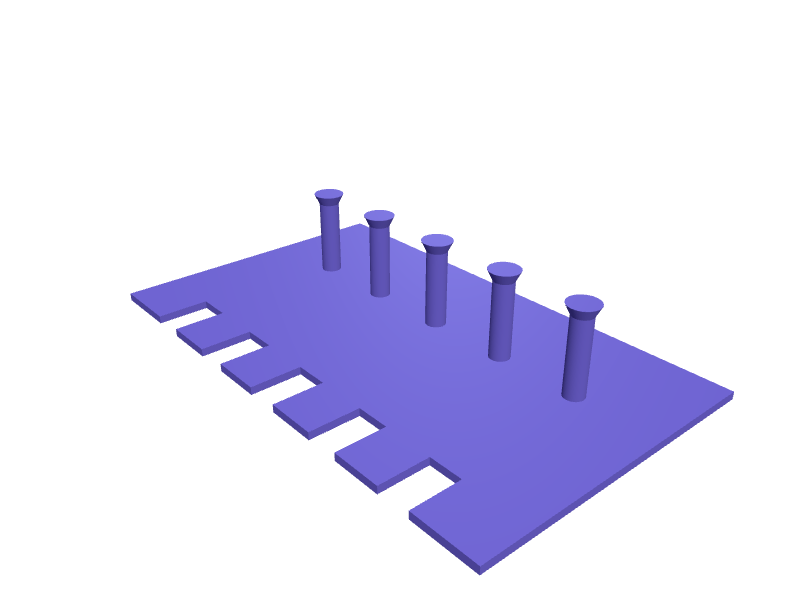
A flat plate with staggered posts that lets you coil USB-C, Lightning and micro-USB cables in figure eights and park the connectors in labelled pockets so they are not tangled in a drawer. Posts are 8 mm in diameter with mushroom caps 12 mm across so loops cannot slip off, and each connector pocket is sized for the plug body with 0.4 mm clearance. Print the plate flat; 3 mm thickness with a 45 degree chamfer keeps it rigid without warping. Open the ready-made model free, resize it on your phone or computer, then download a print-ready STL, 3MF or G-code sliced for your printer, free.Opening the ready-made model and downloading it as STL or 3MF are free, no card; AI changes use credits, from Maker at $7.99 a month.No printer? We print this part and ship it to your door. See its priceUpdated
2
Adjust
Change its numbers in the viewer for free, or ask the AI in the chat: wall thickness, hole size, the thing it clips onto. AI changes use 2 credits per request (1 for a quick edit, 3 for a redesign), paid with a plan from Maker at $7.99 a month.3Print
Download a watertight STL or 3MF free, with your numbers and hand edits, or G-code sliced for your printer at the same price. After an AI change the download is included in every plan (4 credits without one).
Dimensions of the ready-made model (editable)
| Parameter | Value |
|---|---|
| slot length along Y from front edge | 20 mm |
Example prompt
Make a cable organizer plate 200 mm by 120 mm and 3 mm thick with five pairs of 8 mm wrap posts 30 mm tall topped by 12 mm mushroom caps, five connector pockets 13 x 7 x 20 mm along the front edge with 0.4 mm clearance.
Fit notes
You choose how many cables the organizer holds and how long they are, so the posts sit at the right spacing for your coils instead of a guessed average. SpeakCAD renders the plate in the browser, you refine pocket sizes in plain English, and the STL download happens only once it fits your cable collection.
Questions people ask about a charging cable organizer with wrap posts
A flat plate with staggered posts that lets you coil USB-C, Lightning and micro-USB cables in figure eights and park the connectors in labelled pockets so they are not tangled in a drawer. Posts are 8 mm in diameter with mushroom caps 12 mm across so loops cannot slip off, and each connector pocket is sized for the plug body with 0.4 mm clearance. Print the plate flat; 3 mm thickness with a 45 degree chamfer keeps it rigid without warping.
Click Open it free on this page and create a free account (no card): the ready-made model opens in your browser, on your phone or computer, nothing to install. Change its numbers in the viewer for free and download a watertight STL or 3MF free, or G-code sliced for your printer at the same price. An AI change in the chat uses 2 credits per request (3 for a redesign), and the download after it is included in every plan (4 credits without one). Start with Maker: 50 credits a month for $7.99, cancel anytime.
On this page: open the ready-made model free in a SpeakCAD account (no card), change any dimension in the viewer, then download the STL or 3MF free, or G-code sliced for your printer at the same price.
A shared STL is modelled for someone else's measurements. Here you open the ready-made model free, change it to your measurements in the viewer, then download a file sized for the part you actually own, free as STL or 3MF.
Yes. SpeakCAD slices the part on its servers with OrcaSlicer and your printer's official profile (380+ printers, including Bambu Lab, Prusa, Creality and Elegoo), and you download the G-code (a sliced .gcode.3mf for Bambu Lab printers). G-code sliced for your printer costs the same as the STL: included in every plan, free for a part you shaped by hand, 4 credits without a plan for a part with AI work in it. Pick your printer on the printers page to see its profile.
No. SpeakCAD runs in the browser on your phone or computer: the chat, the 3D engine and the live viewer load in the tab. The only file you download is the finished STL, 3MF or sliced G-code.
Print it your way
More organizers & storage
Gridfinity 5×4 magnet-only baseplateReady-made, opens free. A 5 by 4 Gridfinity baseplate (210 × 168 mm) with 6 × 2 mm magnet pockets and no screw holes, for a drawer that cannot be drilled.Folding hex-key set wall holderReady-made, opens free. A wall plate that holds two folding hex sets (metric and imperial) in 22 × 10 mm pockets with a 4.5 mm hole pair.Stackable drawer organizer tray with dividersReady-made, opens free. A shallow open tray that drops into a desk or kitchen drawer and splits it into compartments for pens, batteries, clips and other loose items.SIM eject tool and nano SIM card holder keychainReady-made, opens free. A keychain tag that stores a SIM eject pin and up to two spare nano SIM cards (12.3 x 8.8 x 0.67 mm) for travel, so swapping an eSIM-less iPhone 15 or Galaxy…Festool Systainer insert for Domino cutters and drill bitsReady-made, opens free. A foam-free insert that sits in the bottom of a Festool Systainer SYS3 M 137 and keeps Domino DF 500 cutters, spare bits and the wrench in fixed pockets.Ninja Creami pint lid and cup holder rackReady-made, opens free. A rack that stores the spare pint containers and lids for a Ninja Creami NC300 or NC500 so they are not stacked loose in the freezer door.