1
Organizers & storage
Stackable drawer organizer tray with dividers
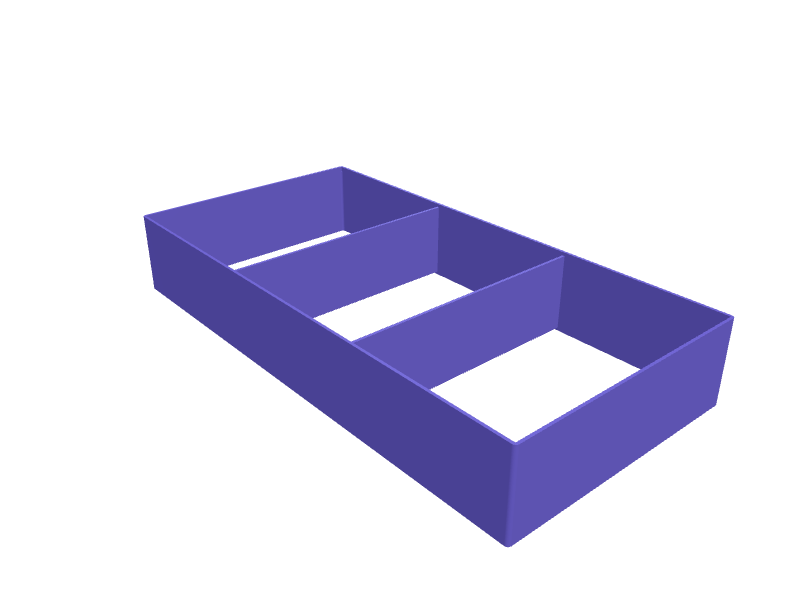
A shallow open tray that drops into a desk or kitchen drawer and splits it into compartments for pens, batteries, clips and other loose items. Interlocking lips on the rim let identical trays stack when the drawer is closed, so nothing rattles. A solid version prints flat on its base with 1.6 mm walls, a 2 mm floor and small internal fillets that keep the corners easy to wipe clean and strong enough to survive being yanked out. Open the ready-made model free, resize it on your phone or computer, then download a print-ready STL, 3MF or G-code sliced for your printer, free.Opening the ready-made model and downloading it as STL or 3MF are free, no card; AI changes use credits, from Maker at $7.99 a month.No printer? We print this part and ship it to your door. See its priceUpdated
2
Adjust
Change its numbers in the viewer for free, or ask the AI in the chat: wall thickness, hole size, the thing it clips onto. AI changes use 2 credits per request (1 for a quick edit, 3 for a redesign), paid with a plan from Maker at $7.99 a month.3Print
Download a watertight STL or 3MF free, with your numbers and hand edits, or G-code sliced for your printer at the same price. After an AI change the download is included in every plan (4 credits without one).
Dimensions of the ready-made model (editable)
| Parameter | Value |
|---|---|
| outer length (X) | 300 mm |
| outer width (Y) | 150 mm |
| outer height (Z) | 45 mm |
| wall thickness | 1.6 mm |
| floor thickness | 2 mm |
| stacking lip height | 3 mm |
| internal fillet radius | 1 mm |
| number of compartments | 3 |
Example prompt
Design a stackable drawer organizer tray 300 mm long, 150 mm wide and 45 mm tall with 1.6 mm walls, a 2 mm floor, three equal compartments along the length, 1 mm internal fillets and a 3 mm stacking lip around the top rim.
Fit notes
Drawers are never a standard size, which is why downloaded trays leave awkward gaps. Describe your drawer's interior in SpeakCAD, choose how many compartments you want, and the generator builds a tray that fits wall to wall. Preview it in the browser, tweak the layout in the chat, then download the STL when you are happy.
Questions people ask about a stackable drawer organizer tray with dividers
A shallow open tray that drops into a desk or kitchen drawer and splits it into compartments for pens, batteries, clips and other loose items. Interlocking lips on the rim let identical trays stack when the drawer is closed, so nothing rattles. A solid version prints flat on its base with 1.6 mm walls, a 2 mm floor and small internal fillets that keep the corners easy to wipe clean and strong enough to survive being yanked out.
Click Open it free on this page and create a free account (no card): the ready-made model opens in your browser, on your phone or computer, nothing to install. Change its numbers in the viewer for free and download a watertight STL or 3MF free, or G-code sliced for your printer at the same price. An AI change in the chat uses 2 credits per request (3 for a redesign), and the download after it is included in every plan (4 credits without one). Start with Maker: 50 credits a month for $7.99, cancel anytime.
On this page: open the ready-made model free in a SpeakCAD account (no card), change any dimension in the viewer, then download the STL or 3MF free, or G-code sliced for your printer at the same price.
A shared STL is modelled for someone else's measurements. Here you open the ready-made model free, change it to your measurements in the viewer, then download a file sized for the part you actually own, free as STL or 3MF.
Yes. SpeakCAD slices the part on its servers with OrcaSlicer and your printer's official profile (380+ printers, including Bambu Lab, Prusa, Creality and Elegoo), and you download the G-code (a sliced .gcode.3mf for Bambu Lab printers). G-code sliced for your printer costs the same as the STL: included in every plan, free for a part you shaped by hand, 4 credits without a plan for a part with AI work in it. Pick your printer on the printers page to see its profile.
No. SpeakCAD runs in the browser on your phone or computer: the chat, the 3D engine and the live viewer load in the tab. The only file you download is the finished STL, 3MF or sliced G-code.
Print it your way
More organizers & storage
KitchenAid attachment holder rack for pasta roller and grinderReady-made, opens free. A rack that stores KitchenAid power hub attachments upright by their drive shafts so the pasta roller, fettuccine cutter and food grinder stop rattling loose…Bose QC Ultra 2 travel case insertReady-made, opens free. A drop-in insert that turns a generic hard case into a Bose QC Ultra 2 (about 170 × 170 × 80 mm folded) nest with a 40 × 20 mm well for the USB-C cable and a…IKEA SKÅDIS holder for Festool Domino tenonsReady-made, opens free. A SKÅDIS box that holds Domino tenons in four labelled wells (4, 5, 6, 8 / 10 mm) with a 5 mm hook pair.Dyson Airwrap smoothing-brush caddyReady-made, opens free. A caddy that holds the firm and soft Airwrap smoothing brushes plus the flyaway attachment in labelled wells so the magnets do not click together in a drawer.Hair tie and claw clip organizer standReady-made, opens free. A bathroom counter stand with a vertical 25 mm post for stacking elastic hair ties, a slotted rail that grips claw clips by their hinges, and a small cup for…Raspberry Pi Pico breadboard holder with jumper wire trayReady-made, opens free. A baseplate that holds a half-size breadboard and a Raspberry Pi Pico side by side, with a tray for the jumper wires that otherwise end up in a knot.