1
Hobby & gaming
PlayStation 5 Pro vertical-stand feet
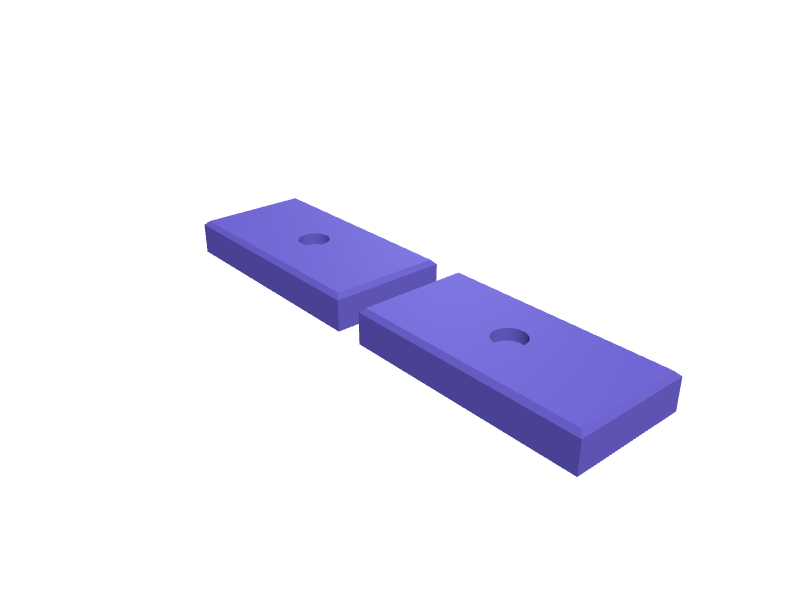
A pair of 80 × 40 × 12 mm feet that widen a PS5 Pro vertical stand so it does not rock on carpet. 10 mm recesses take the stock feet. Print in PETG. Open the ready-made model free, resize it on your phone or computer, then download a print-ready STL, 3MF or G-code sliced for your printer, free.Opening the ready-made model and downloading it as STL or 3MF are free, no card; AI changes use credits, from Maker at $7.99 a month.No printer? We print this part and ship it to your door. See its priceUpdated
2
Adjust
Change its numbers in the viewer for free, or ask the AI in the chat: wall thickness, hole size, the thing it clips onto. AI changes use 2 credits per request (1 for a quick edit, 3 for a redesign), paid with a plan from Maker at $7.99 a month, where the first 3 small changes are free.3Print
Download a watertight STL or 3MF free, with your numbers and hand edits, or G-code sliced for your printer at the same price. After an AI change the download is included in every plan (4 credits without one).
Dimensions of the ready-made model (editable)
| Parameter | Value |
|---|---|
| Length of each foot | 80 mm |
| Width of each foot | 40 mm |
| Height of each foot | 12 mm |
| Top edge chamfer size | 1.5 mm |
| Stock foot diameter | 10 mm |
| Recess depth | 4 mm |
| Clearance around stock foot | 0.3 mm |
Example prompt
Design PS5 Pro stand feet 80×40×12 mm with 10 mm stock-foot recesses, PETG, printed as a pair.
Fit notes
The official stand is narrow on shag. In SpeakCAD you measure the stock feet, preview the pair in the browser, then download the STL.
Questions people ask about PlayStation 5 Pro vertical-stand feet
A pair of 80 × 40 × 12 mm feet that widen a PS5 Pro vertical stand so it does not rock on carpet. 10 mm recesses take the stock feet. Print in PETG.
Click Open it free on this page and create a free account (no card): the ready-made model opens in your browser, on your phone or computer, nothing to install. Change its numbers in the viewer for free and download a watertight STL or 3MF free, or G-code sliced for your printer at the same price. An AI change in the chat uses 2 credits per request (3 for a redesign), and the download after it is included in every plan (4 credits without one). Start with Maker: 50 credits a month for $7.99, cancel anytime.
On this page: open the ready-made model free in a SpeakCAD account (no card), change any dimension in the viewer, then download the STL or 3MF free, or G-code sliced for your printer at the same price.
A shared STL is modelled for someone else's measurements. Here you open the ready-made model free, change it to your measurements in the viewer, then download a file sized for the part you actually own, free as STL or 3MF.
Yes. SpeakCAD slices the part on its servers with OrcaSlicer and your printer's official profile (380+ printers, including Bambu Lab, Prusa, Creality and Elegoo), and you download the G-code (a sliced .gcode.3mf for Bambu Lab printers). G-code sliced for your printer costs the same as the STL: included in every plan, free for a part you shaped by hand, 4 credits without a plan for a part with AI work in it. Pick your printer on the printers page to see its profile.
No. SpeakCAD runs in the browser on your phone or computer: the chat, the 3D engine and the live viewer load in the tab. The only file you download is the finished STL, 3MF or sliced G-code.
Print it your way
More hobby & gaming
Apple Vision Pro travel battery pocketReady-made, opens free. A pocket that straps the Vision Pro battery pack (about 70 × 40 × 20 mm) to the official travel case so the cable does not yank the headset in a bag.RC car body post extensionReady-made, opens free. Body post extensions raise an RC car shell to clear larger tyres or a taller chassis, and the stock posts are rarely long enough.Steam Deck OLED clip-on kickstand for tabletop playReady-made, opens free. A removable kickstand that clips over the bottom edge of a Steam Deck LCD or OLED (298 x 117 x 49 mm) and props it at 60 degrees for docked-style play with a…Vallejo 17 ml dropper bottle tiered rackReady-made, opens free. A tiered rack for Vallejo Model Color and Game Color 17 ml dropper bottles, which are 27 mm across and about 65 mm tall, and equally at home with Army Painte…WLED hex-panel stand for six cellsReady-made, opens free. A stand that holds a six-cell WLED hex (about 300 mm across) at 15 degrees with a 20 mm USB-C well in the base.Nintendo Switch 2 game-card display rail 24Ready-made, opens free. A 280 mm rail that displays 24 Switch / Switch 2 game cards in 22 × 4 mm slots at 15 degrees.