1
Hobby & gaming
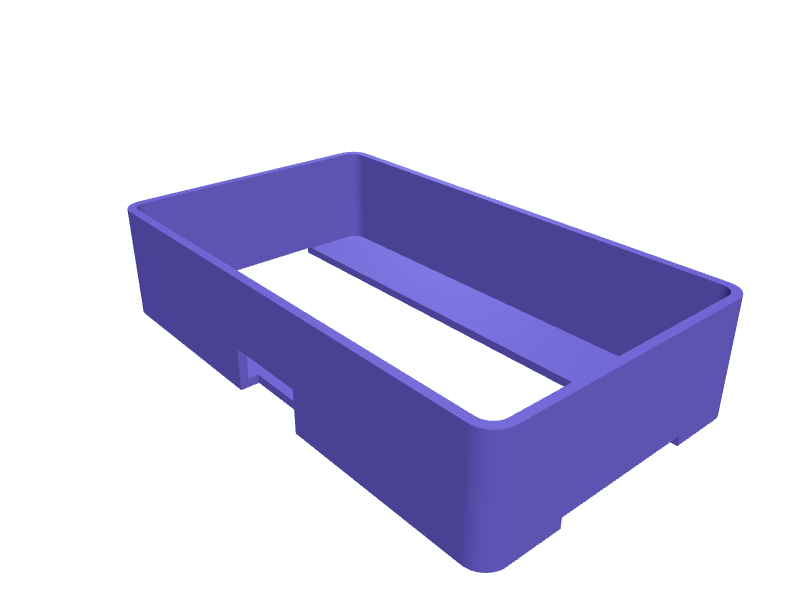
Apple Vision Pro travel battery pocket
A pocket that straps the Vision Pro battery pack (about 70 × 40 × 20 mm) to the official travel case so the cable does not yank the headset in a bag. The saddle is 72 × 42 mm with a 20 mm elastic-band slot and a 12 mm cable exit. Print in TPU with 1.2 mm walls. Open the ready-made model free, resize it on your phone or computer, then download a print-ready STL, 3MF or G-code sliced for your printer, free.Opening the ready-made model and downloading it as STL or 3MF are free, no card; AI changes use credits, from Maker at $7.99 a month.No printer? We print this part and ship it to your door. See its priceUpdated
2
Adjust
Change its numbers in the viewer for free, or ask the AI in the chat: wall thickness, hole size, the thing it clips onto. AI changes use 2 credits per request (1 for a quick edit, 3 for a redesign), paid with a plan from Maker at $7.99 a month, where the first 3 small changes are free.3Print
Download a watertight STL or 3MF free, with your numbers and hand edits, or G-code sliced for your printer at the same price. After an AI change the download is included in every plan (4 credits without one).
Dimensions of the ready-made model (editable)
| Parameter | Value |
|---|---|
| outer length X | 72 mm |
| outer width Y | 42 mm |
| outer height Z | 16 mm |
| wall thickness | 1.2 mm |
| width of strap slot | 20 mm |
| distance from top edge of pocket to slot | 8 mm |
| width of cable exit notch | 12 mm |
| height of cable exit notch | 6 mm |
| clearance around band for sliding fit | 0.4 mm |
Example prompt
Create a Vision Pro travel battery pocket 72×42×16 mm, 20 mm band slot, 12 mm cable exit, 1.2 mm TPU.
Fit notes
The belt clip is for wearing, not packing. In SpeakCAD you measure the pack, preview the pocket in the browser, then download the STL.
Questions people ask about an Apple Vision Pro travel battery pocket
A pocket that straps the Vision Pro battery pack (about 70 × 40 × 20 mm) to the official travel case so the cable does not yank the headset in a bag. The saddle is 72 × 42 mm with a 20 mm elastic-band slot and a 12 mm cable exit. Print in TPU with 1.2 mm walls.
Click Open it free on this page and create a free account (no card): the ready-made model opens in your browser, on your phone or computer, nothing to install. Change its numbers in the viewer for free and download a watertight STL or 3MF free, or G-code sliced for your printer at the same price. An AI change in the chat uses 2 credits per request (3 for a redesign), and the download after it is included in every plan (4 credits without one). Start with Maker: 50 credits a month for $7.99, cancel anytime.
On this page: open the ready-made model free in a SpeakCAD account (no card), change any dimension in the viewer, then download the STL or 3MF free, or G-code sliced for your printer at the same price.
A shared STL is modelled for someone else's measurements. Here you open the ready-made model free, change it to your measurements in the viewer, then download a file sized for the part you actually own, free as STL or 3MF.
Yes. SpeakCAD slices the part on its servers with OrcaSlicer and your printer's official profile (380+ printers, including Bambu Lab, Prusa, Creality and Elegoo), and you download the G-code (a sliced .gcode.3mf for Bambu Lab printers). G-code sliced for your printer costs the same as the STL: included in every plan, free for a part you shaped by hand, 4 credits without a plan for a part with AI work in it. Pick your printer on the printers page to see its profile.
No. SpeakCAD runs in the browser on your phone or computer: the chat, the 3D engine and the live viewer load in the tab. The only file you download is the finished STL, 3MF or sliced G-code.
Print it your way
More hobby & gaming
DJI Mini 5 Pro prop holderReady-made, opens free. A holder that clips Mini 5 Pro props in pairs so they do not bend in a bag, 80 × 20 × 12 mm.GameSir G8 Galileo phone-stopReady-made, opens free. A pair of stops that keep a 70–85 mm phone from sliding out of a G8 Galileo, 2 mm TPU lips.Game controller stand for two padsReady-made, opens free. A controller stand keeps two gamepads upright on a shelf instead of sliding around in a drawer, and it stops the analogue sticks getting crushed.Wall-mounted SD card and battery holderReady-made, opens free. Camera batteries and SD cards pile up fast, and a wall-mounted holder keeps charged batteries and empty cards separate from used ones.LEGO minifigure display shelf for 24 figuresReady-made, opens free. A stepped, wall-hanging shelf with four tiers of six LEGO minifigures each, every figure standing on a pair of real 4.8 mm studs at the 8 mm LEGO pitch so it…Steam Deck 2 travel kickstand with case lipReady-made, opens free. A clip-on kickstand for a Steam Deck 2 (about 300 × 120 × 50 mm) that still clips over a Jsaux or dbrand case.