1
Hobby & gaming
Steam Deck OLED clip-on kickstand for tabletop play
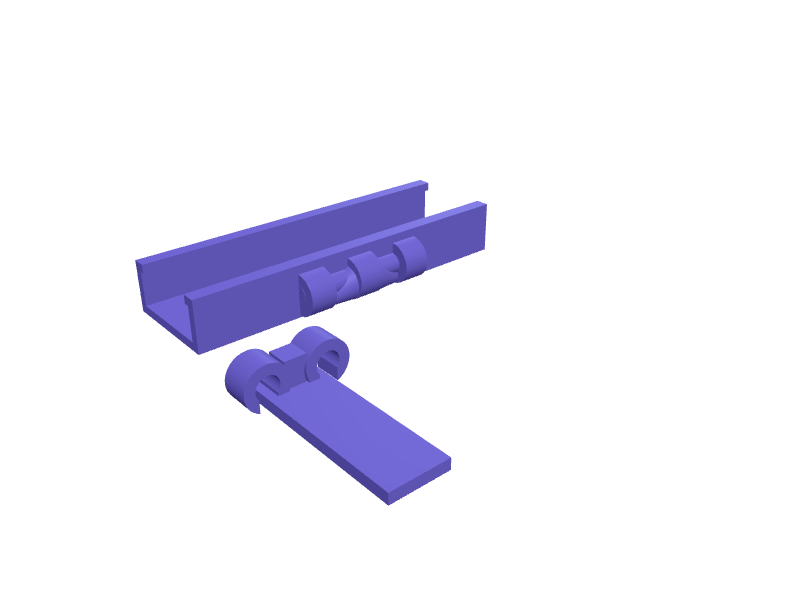
A removable kickstand that clips over the bottom edge of a Steam Deck LCD or OLED (298 x 117 x 49 mm) and props it at 60 degrees for docked-style play with a Bluetooth controller. The clip wraps the 25 mm thick central body between the grips with a 0.3 mm clearance and 1.5 mm lips that engage the back panel without touching the vents or the rear microSD slot. A 50 mm leg folds out on a 6 mm pin hinge with a friction stop, and the whole part prints in two pieces, leg and clip, flat on the bed with 2.5 mm walls. Open the ready-made model free, resize it on your phone or computer, then download a print-ready STL, 3MF or G-code sliced for your printer, free.Opening the ready-made model and downloading it as STL or 3MF are free, no card; AI changes use credits, from Maker at $7.99 a month.No printer? We print this part and ship it to your door. See its priceUpdated
2
Adjust
Change its numbers in the viewer for free, or ask the AI in the chat: wall thickness, hole size, the thing it clips onto. AI changes use 2 credits per request (1 for a quick edit, 3 for a redesign), paid with a plan from Maker at $7.99 a month.3Print
Download a watertight STL or 3MF free, with your numbers and hand edits, or G-code sliced for your printer at the same price. After an AI change the download is included in every plan (4 credits without one).
Dimensions of the ready-made model (editable)
| Parameter | Value |
|---|---|
| width of clip along device edge | 100 mm |
| device thickness at clip location | 25 mm |
| clearance each side of body | 0.3 mm |
| wall thickness | 2.5 mm |
| inward retention lip | 1.5 mm |
| how far the arms wrap along each face | 15 mm |
| folding leg length | 50 mm |
| leg bar width | 16 mm |
| leg bar thickness | 3 mm |
| hinge pin diameter | 6 mm |
| ring clearance on pin (snap-fit / friction) | 0.3 mm |
| hinge knuckle outer diameter | 12 mm |
| total width of hinge knuckle row | 40 mm |
Example prompt
Create a clip-on kickstand for a Steam Deck OLED: a 100 mm wide clip wrapping a 25 mm thick body with 0.3 mm clearance and 1.5 mm retention lips, a 50 mm folding leg on a 6 mm pin hinge with friction stop, 60 degree resting angle, 2.5 mm walls, printed as two flat parts.
Fit notes
Universal stands wobble on the Deck's curved shell. In SpeakCAD you describe the section of the case the clip grabs and the angle you like, view the model in the browser without spending anything, request a shallower stance or a cutout for a case in the chat, and download the STL.
Questions people ask about a Steam Deck OLED clip-on kickstand for tabletop play
A removable kickstand that clips over the bottom edge of a Steam Deck LCD or OLED (298 x 117 x 49 mm) and props it at 60 degrees for docked-style play with a Bluetooth controller. The clip wraps the 25 mm thick central body between the grips with a 0.3 mm clearance and 1.5 mm lips that engage the back panel without touching the vents or the rear microSD slot. A 50 mm leg folds out on a 6 mm pin hinge with a friction stop, and the whole part prints in two pieces, leg and clip, flat on the bed with 2.5 mm walls.
Click Open it free on this page and create a free account (no card): the ready-made model opens in your browser, on your phone or computer, nothing to install. Change its numbers in the viewer for free and download a watertight STL or 3MF free, or G-code sliced for your printer at the same price. An AI change in the chat uses 2 credits per request (3 for a redesign), and the download after it is included in every plan (4 credits without one). Start with Maker: 50 credits a month for $7.99, cancel anytime.
On this page: open the ready-made model free in a SpeakCAD account (no card), change any dimension in the viewer, then download the STL or 3MF free, or G-code sliced for your printer at the same price.
A shared STL is modelled for someone else's measurements. Here you open the ready-made model free, change it to your measurements in the viewer, then download a file sized for the part you actually own, free as STL or 3MF.
Yes. SpeakCAD slices the part on its servers with OrcaSlicer and your printer's official profile (380+ printers, including Bambu Lab, Prusa, Creality and Elegoo), and you download the G-code (a sliced .gcode.3mf for Bambu Lab printers). G-code sliced for your printer costs the same as the STL: included in every plan, free for a part you shaped by hand, 4 credits without a plan for a part with AI work in it. Pick your printer on the printers page to see its profile.
No. SpeakCAD runs in the browser on your phone or computer: the chat, the 3D engine and the live viewer load in the tab. The only file you download is the finished STL, 3MF or sliced G-code.
Print it your way
More hobby & gaming
Board game token tray with scoopsReady-made, opens free. Token trays sort cardboard chits and wooden cubes into compartments with sloped scoop bottoms so you can pick pieces up with a fingertip.Desktop microphone shock mount ringReady-made, opens free. A shock mount isolates a condenser microphone from desk thumps and keyboard rumble that travel up the arm.Meta Quest 3 head strap battery pack mountReady-made, opens free. A counterweight cradle that straps a slim USB power bank to the rear of a Meta Quest 3 or Quest 3S standard head strap, extending play time and balancing the…Kindle Colorsoft one-hand page-turn gripReady-made, opens free. A palm grip that clips onto a Kindle Colorsoft (about 175 × 124 × 8 mm) so you can hold it one-handed and tap the page-turn zone with the thumb.Pokémon ETB deck-box insertReady-made, opens free. An insert that turns an Elite Trainer Box into two 80-card deck wells plus a 20 mm token tray.Flydigi Vader 4 Pro display standReady-made, opens free. A stand that holds a Vader 4 Pro at 25 degrees with the RGB face visible and a 14 mm USB-C slot.