1
Hobby & gaming
Flydigi Vader 4 Pro display stand
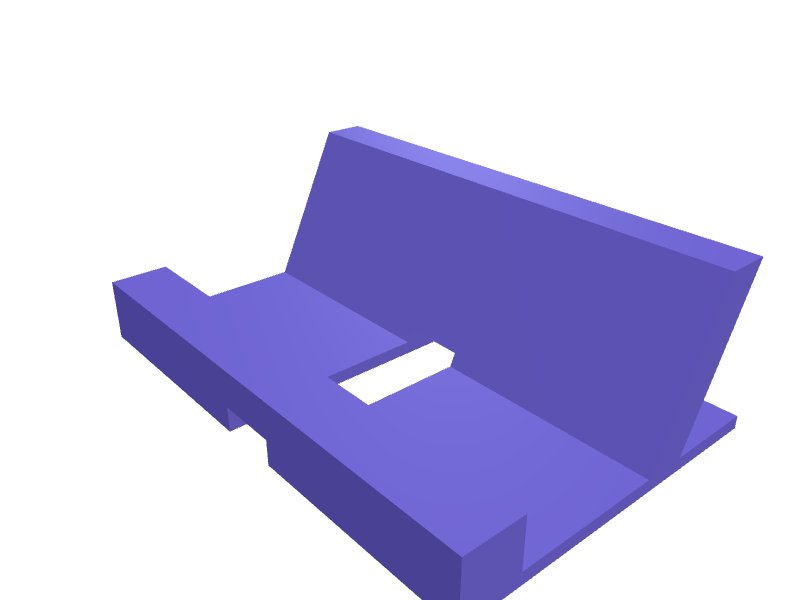
A stand that holds a Vader 4 Pro at 25 degrees with the RGB face visible and a 14 mm USB-C slot. Print in PLA. Open the ready-made model free, resize it on your phone or computer, then download a print-ready STL, 3MF or G-code sliced for your printer, free.Opening the ready-made model and downloading it as STL or 3MF are free, no card; AI changes use credits, from Maker at $7.99 a month.No printer? We print this part and ship it to your door. See its priceUpdated
2
Adjust
Change its numbers in the viewer for free, or ask the AI in the chat: wall thickness, hole size, the thing it clips onto. AI changes use 2 credits per request (1 for a quick edit, 3 for a redesign), paid with a plan from Maker at $7.99 a month, where the first 3 small changes are free.3Print
Download a watertight STL or 3MF free, with your numbers and hand edits, or G-code sliced for your printer at the same price. After an AI change the download is included in every plan (4 credits without one).
Dimensions of the ready-made model (editable)
| Parameter | Value |
|---|---|
| Overall width (x) | 120 mm |
| Overall depth (y) | 80 mm |
| Overall height (z) | 40 mm |
| Base plate thickness | 3 mm |
| Lip depth (front to back) | 14 mm |
| Lip height above base | 12 mm |
| Back wall base footprint depth | 10 mm |
| Nominal cable slot width | 14 mm |
| Slot cut height (through base + lip) | 6 mm |
| Clearance around USB-C cable, per side | 0.3 mm |
Example prompt
Design a Vader 4 Pro stand, 25 degree lean, 14 mm USB-C slot, 120×80×40 mm, 1.6 mm walls.
Fit notes
A generic stand covers the light bar. Describe the pad in SpeakCAD, preview the stand in the browser, then download the STL.
Questions people ask about a Flydigi Vader 4 Pro display stand
A stand that holds a Vader 4 Pro at 25 degrees with the RGB face visible and a 14 mm USB-C slot. Print in PLA.
Click Open it free on this page and create a free account (no card): the ready-made model opens in your browser, on your phone or computer, nothing to install. Change its numbers in the viewer for free and download a watertight STL or 3MF free, or G-code sliced for your printer at the same price. An AI change in the chat uses 2 credits per request (3 for a redesign), and the download after it is included in every plan (4 credits without one). Start with Maker: 50 credits a month for $7.99, cancel anytime.
On this page: open the ready-made model free in a SpeakCAD account (no card), change any dimension in the viewer, then download the STL or 3MF free, or G-code sliced for your printer at the same price.
A shared STL is modelled for someone else's measurements. Here you open the ready-made model free, change it to your measurements in the viewer, then download a file sized for the part you actually own, free as STL or 3MF.
Yes. SpeakCAD slices the part on its servers with OrcaSlicer and your printer's official profile (380+ printers, including Bambu Lab, Prusa, Creality and Elegoo), and you download the G-code (a sliced .gcode.3mf for Bambu Lab printers). G-code sliced for your printer costs the same as the STL: included in every plan, free for a part you shaped by hand, 4 credits without a plan for a part with AI work in it. Pick your printer on the printers page to see its profile.
No. SpeakCAD runs in the browser on your phone or computer: the chat, the 3D engine and the live viewer load in the tab. The only file you download is the finished STL, 3MF or sliced G-code.
Print it your way
More hobby & gaming
Wingspan board game card and token insertReady-made, opens free. A drop-in insert for the Stonemaier Wingspan base box (interior about 292 x 218 x 65 mm) that holds the 170 sleeved bird cards, bonus cards, food tokens, egg…LEGO minifig wall bar for 36 figuresReady-made, opens free. A 300 mm bar with 36 studs in two rows that hangs minifigs by the legs.AYANEO KUN travel standReady-made, opens free. A folding stand that holds an AYANEO KUN at 50 degrees with a 14 mm USB-C slot, two pieces on a 6 mm pin.Card deck box with sliding lidReady-made, opens free. A deck box protects sleeved trading cards during transport and stops the stack spilling in a backpack.Tripod phone clamp with quarter-inch threadReady-made, opens free. A phone clamp turns any tripod into a video rig, and a printed one can be sized for a phone in a thick case that commercial clamps refuse.Xbox Elite Series 2 controller display standReady-made, opens free. A display stand for the Xbox Elite Series 2 controller that shows off its rubberised grips and paddles while keeping it within reach of the console.