1
Desk & office
Novation Launchpad X angled desk stand
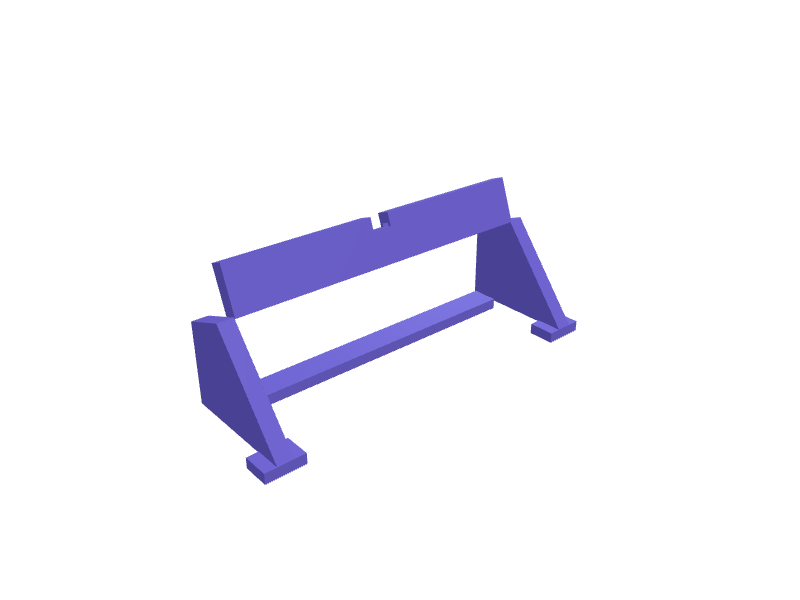
An angled stand that tilts a Novation Launchpad X, Launchpad Mini MK3 or Launchpad Pro MK3 towards you at 20 degrees so the RGB pad grid is readable standing at a DJ table or seated at a desk. The Launchpad X measures 241 x 241 x 17.5 mm, so the stand cradles the bottom edge in a 243 mm wide groove 6 mm deep with 0.5 mm clearance and a 10 mm front lip, supports the back with two 30 mm pads that avoid the rear USB-C port, and has a 15 mm cable notch centred behind. The two side frames print flat with 2.5 mm walls and lock together with a 240 mm cross bar; rubber-foot recesses stop it sliding on a laminate desk. Open the ready-made model free, resize it on your phone or computer, then download a print-ready STL, 3MF or G-code sliced for your printer, free.Opening the ready-made model and downloading it as STL or 3MF are free, no card; AI changes use credits, from Maker at $7.99 a month.No printer? We print this part and ship it to your door. See its priceUpdated
2
Adjust
Change its numbers in the viewer for free, or ask the AI in the chat: wall thickness, hole size, the thing it clips onto. AI changes use 2 credits per request (1 for a quick edit, 3 for a redesign), paid with a plan from Maker at $7.99 a month.3Print
Download a watertight STL or 3MF free, with your numbers and hand edits, or G-code sliced for your printer at the same price. After an AI change the download is included in every plan (4 credits without one).
Dimensions of the ready-made model (editable)
| Parameter | Value |
|---|---|
| Launchpad X width | 243 mm |
| groove depth (front-to-back) | 6 mm |
| front lip height holding device in place | 10 mm |
| rear support pad width | 30 mm |
| rear support pad depth | 20 mm |
| rear support pad height | 8 mm |
| centred cable notch width | 15 mm |
| cable notch depth (vertical cut) | 10 mm |
| wall thickness | 2.5 mm |
| length of connecting cross bar | 240 mm |
| cross bar width (front-back) | 20 mm |
| cross bar height | 8 mm |
| side frame thickness (in device-width direction) | 12 mm |
| base depth of side frame footprint | 90 mm |
Example prompt
Design an angled desk stand for a Novation Launchpad X with a 243 mm wide, 6 mm deep front groove and 0.5 mm clearance, a 10 mm front lip, 20 degree tilt, two 30 mm rear support pads, a 15 mm centred cable notch, two side frames joined by a 240 mm cross bar, 2.5 mm walls, rubber foot recesses.
Fit notes
Stands for 61-key controllers are far too big for a 24 cm pad grid. Tell SpeakCAD your controller model and tilt angle, preview the stand in the browser, ask for an Ableton Push version in the chat and download the STL.
Questions people ask about a Novation Launchpad X angled desk stand
An angled stand that tilts a Novation Launchpad X, Launchpad Mini MK3 or Launchpad Pro MK3 towards you at 20 degrees so the RGB pad grid is readable standing at a DJ table or seated at a desk. The Launchpad X measures 241 x 241 x 17.5 mm, so the stand cradles the bottom edge in a 243 mm wide groove 6 mm deep with 0.5 mm clearance and a 10 mm front lip, supports the back with two 30 mm pads that avoid the rear USB-C port, and has a 15 mm cable notch centred behind. The two side frames print flat with 2.5 mm walls and lock together with a 240 mm cross bar; rubber-foot recesses stop it sliding on a laminate desk.
Click Open it free on this page and create a free account (no card): the ready-made model opens in your browser, on your phone or computer, nothing to install. Change its numbers in the viewer for free and download a watertight STL or 3MF free, or G-code sliced for your printer at the same price. An AI change in the chat uses 2 credits per request (3 for a redesign), and the download after it is included in every plan (4 credits without one). Start with Maker: 50 credits a month for $7.99, cancel anytime.
On this page: open the ready-made model free in a SpeakCAD account (no card), change any dimension in the viewer, then download the STL or 3MF free, or G-code sliced for your printer at the same price.
A shared STL is modelled for someone else's measurements. Here you open the ready-made model free, change it to your measurements in the viewer, then download a file sized for the part you actually own, free as STL or 3MF.
Yes. SpeakCAD slices the part on its servers with OrcaSlicer and your printer's official profile (380+ printers, including Bambu Lab, Prusa, Creality and Elegoo), and you download the G-code (a sliced .gcode.3mf for Bambu Lab printers). G-code sliced for your printer costs the same as the STL: included in every plan, free for a part you shaped by hand, 4 credits without a plan for a part with AI work in it. Pick your printer on the printers page to see its profile.
No. SpeakCAD runs in the browser on your phone or computer: the chat, the 3D engine and the live viewer load in the tab. The only file you download is the finished STL, 3MF or sliced G-code.
Print it your way
More desk & office
Samsung Galaxy Z Flip 6 desk stand for Flex modeReady-made, opens free. A desk dock for the Samsung Galaxy Z Flip 6 that cradles the lower half so the phone sits in Flex mode with the top screen angled toward you for video calls…Garmin Forerunner 970 bedside charger standReady-made, opens free. A small bedside stand for a Garmin Forerunner 970 (about 47 mm) that holds the watch on its clip charger at 25 degrees so the display is readable from the pi…Suunto Vertical charger-cable standReady-made, opens free. A stand that holds a Suunto Vertical on its pogo cable at 25 degrees, 50 mm nest.MacBook Air 13-inch M4 vertical dockReady-made, opens free. A vertical dock that holds a 13-inch MacBook Air M4 (about 11.3 mm closed, 304 mm wide) on its side so MagSafe and the two Thunderbolt ports stay clear.Mac mini M4 HDMI and SD dongle trayReady-made, opens free. A tray that sits beside a Mac mini M4 (about 127 × 127 × 50 mm) and holds an HDMI/SD dongle plus two SD cards so they do not dangle from the rear ports.Monitor riser with under-shelf storageReady-made, opens free. A platform that lifts a monitor 90 mm to eye height while the space beneath stores a keyboard, notebook or external drive.