1
Hobby & gaming
Lenovo Legion Go 2 kickstand extension
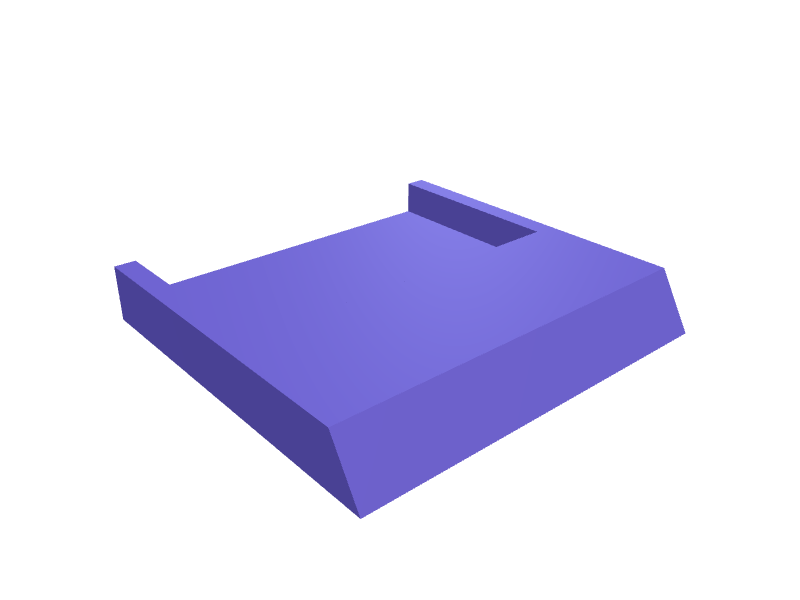
An extension that adds 20 mm to a Legion Go 2 kickstand so the screen sits at 60 degrees on a couch. Clip-on, PETG. Open the ready-made model free, resize it on your phone or computer, then download a print-ready STL, 3MF or G-code sliced for your printer, free.Opening the ready-made model and downloading it as STL or 3MF are free, no card; AI changes use credits, from Maker at $7.99 a month.No printer? We print this part and ship it to your door. See its priceUpdated
2
Adjust
Change its numbers in the viewer for free, or ask the AI in the chat: wall thickness, hole size, the thing it clips onto. AI changes use 2 credits per request (1 for a quick edit, 3 for a redesign), paid with a plan from Maker at $7.99 a month, where the first 3 small changes are free.3Print
Download a watertight STL or 3MF free, with your numbers and hand edits, or G-code sliced for your printer at the same price. After an AI change the download is included in every plan (4 credits without one).
Dimensions of the ready-made model (editable)
| Parameter | Value |
|---|---|
| wall/plate thickness, mm (PETG) | 2 mm |
| width of kickstand blade | 32 mm |
| thickness of kickstand blade | 3 mm |
| length of clip channel | 18 mm |
| added length beyond clip | 20 mm |
| clearance around kickstand blade | 0.3 mm |
Example prompt
Design a Legion Go 2 kickstand extension +20 mm, clip-on, 60 degree rest, 2 mm PETG.
Fit notes
The stock stand is 45 degrees and glarey. In SpeakCAD you measure the stand, preview the extension in the browser, then download the STL.
Questions people ask about a Lenovo Legion Go 2 kickstand extension
An extension that adds 20 mm to a Legion Go 2 kickstand so the screen sits at 60 degrees on a couch. Clip-on, PETG.
Click Open it free on this page and create a free account (no card): the ready-made model opens in your browser, on your phone or computer, nothing to install. Change its numbers in the viewer for free and download a watertight STL or 3MF free, or G-code sliced for your printer at the same price. An AI change in the chat uses 2 credits per request (3 for a redesign), and the download after it is included in every plan (4 credits without one). Start with Maker: 50 credits a month for $7.99, cancel anytime.
On this page: open the ready-made model free in a SpeakCAD account (no card), change any dimension in the viewer, then download the STL or 3MF free, or G-code sliced for your printer at the same price.
A shared STL is modelled for someone else's measurements. Here you open the ready-made model free, change it to your measurements in the viewer, then download a file sized for the part you actually own, free as STL or 3MF.
Yes. SpeakCAD slices the part on its servers with OrcaSlicer and your printer's official profile (380+ printers, including Bambu Lab, Prusa, Creality and Elegoo), and you download the G-code (a sliced .gcode.3mf for Bambu Lab printers). G-code sliced for your printer costs the same as the STL: included in every plan, free for a part you shaped by hand, 4 credits without a plan for a part with AI work in it. Pick your printer on the printers page to see its profile.
No. SpeakCAD runs in the browser on your phone or computer: the chat, the 3D engine and the live viewer load in the tab. The only file you download is the finished STL, 3MF or sliced G-code.
Print it your way
More hobby & gaming
Pedaltrain Nano Plus power-supply mountReady-made, opens free. A mount that hangs a 9 V brick under a Nano Plus with two 6 mm zip-tie slots matching the rail.Model kit sprue cutter holder and parts trayReady-made, opens free. Building plastic model kits means dozens of tiny parts and a few sharp tools that roll off the bench.Nintendo Switch Joy-Con comfort grip for single controllerReady-made, opens free. A palm-filling grip that a single Joy-Con slides onto for sideways two-player sessions in Mario Kart or Smash.Warhammer 40k 32 mm round base movement trayReady-made, opens free. A skirmish movement tray that carries ten Warhammer 40,000 infantry on 32 mm round bases in two ranks of five, so a whole squad of Intercessors or Necron War…Meta Quest 3S Elite strap wall dockReady-made, opens free. A wall dock that holds a Quest 3S with the Elite battery strap hanging on a 40 mm hook and the headset sitting in a 180 mm wide cradle.PlayStation 5 Pro vertical-stand feetReady-made, opens free. A pair of 80 × 40 × 12 mm feet that widen a PS5 Pro vertical stand so it does not rock on carpet.