1
Kitchen & home
Gaggia Classic Pro steam-wand tip clip
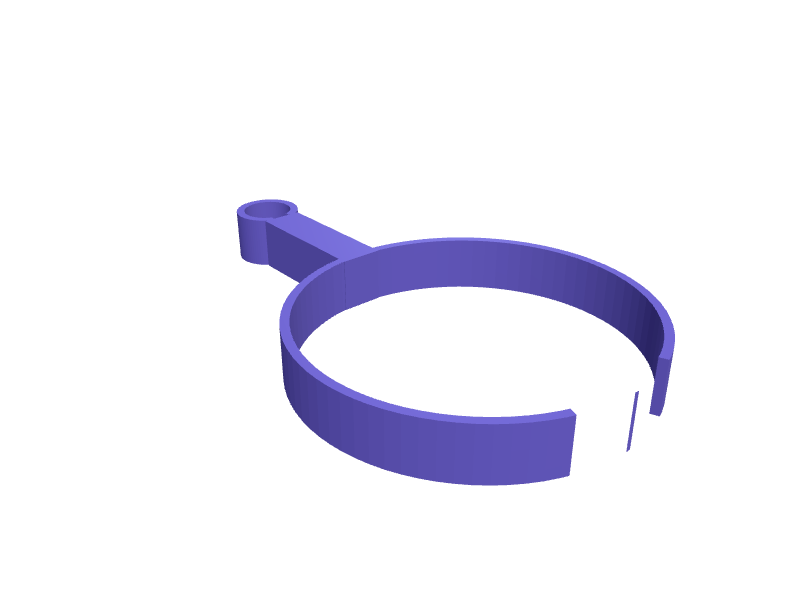
A clip that parks a Classic Pro steam wand over a 60 mm rinse cup so the tip does not drip on the cup warmer. The ring is 10 mm ID with a 0.3 mm snap. Print in PETG. Open the ready-made model free, resize it on your phone or computer, then download a print-ready STL, 3MF or G-code sliced for your printer, free.Opening the ready-made model and downloading it as STL or 3MF are free, no card; AI changes use credits, from Maker at $7.99 a month.No printer? We print this part and ship it to your door. See its priceUpdated
2
Adjust
Change its numbers in the viewer for free, or ask the AI in the chat: wall thickness, hole size, the thing it clips onto. AI changes use 2 credits per request (1 for a quick edit, 3 for a redesign), paid with a plan from Maker at $7.99 a month, where the first 3 small changes are free.3Print
Download a watertight STL or 3MF free, with your numbers and hand edits, or G-code sliced for your printer at the same price. After an AI change the download is included in every plan (4 credits without one).
Dimensions of the ready-made model (editable)
| Parameter | Value |
|---|---|
| PETG wall thickness | 1.6 mm |
| snap undersize for grip | 0.3 mm |
| steam wand inner diameter (snap grip) | 10 mm |
| cup/pitcher ring inner diameter | 60 mm |
| arm length between ring centers | 25 mm |
| arm width | 8 mm |
| height/depth of both rings (extrusion height) | 10 mm |
Example prompt
Design a steam-wand clip, 10 mm ID, 0.3 mm snap, 25 mm arm to a 60 mm cup ring, 1.6 mm PETG.
Fit notes
The wand resting on the tray bakes milk on. Describe the wand in SpeakCAD, preview the clip in the browser, then download the STL.
Questions people ask about a Gaggia Classic Pro steam-wand tip clip
A clip that parks a Classic Pro steam wand over a 60 mm rinse cup so the tip does not drip on the cup warmer. The ring is 10 mm ID with a 0.3 mm snap. Print in PETG.
Click Open it free on this page and create a free account (no card): the ready-made model opens in your browser, on your phone or computer, nothing to install. Change its numbers in the viewer for free and download a watertight STL or 3MF free, or G-code sliced for your printer at the same price. An AI change in the chat uses 2 credits per request (3 for a redesign), and the download after it is included in every plan (4 credits without one). Start with Maker: 50 credits a month for $7.99, cancel anytime.
On this page: open the ready-made model free in a SpeakCAD account (no card), change any dimension in the viewer, then download the STL or 3MF free, or G-code sliced for your printer at the same price.
A shared STL is modelled for someone else's measurements. Here you open the ready-made model free, change it to your measurements in the viewer, then download a file sized for the part you actually own, free as STL or 3MF.
Yes. SpeakCAD slices the part on its servers with OrcaSlicer and your printer's official profile (380+ printers, including Bambu Lab, Prusa, Creality and Elegoo), and you download the G-code (a sliced .gcode.3mf for Bambu Lab printers). G-code sliced for your printer costs the same as the STL: included in every plan, free for a part you shaped by hand, 4 credits without a plan for a part with AI work in it. Pick your printer on the printers page to see its profile.
No. SpeakCAD runs in the browser on your phone or computer: the chat, the 3D engine and the live viewer load in the tab. The only file you download is the finished STL, 3MF or sliced G-code.
Print it your way
More kitchen & home
Dreame L20 Ultra mop drying rackReady-made, opens free. A rack that holds two L20 Ultra mop pads upright so they dry beside the dock, 180 × 40 × 80 mm with 6 mm slots.Tea bag dispenser box with front slotReady-made, opens free. A countertop box that holds a stack of wrapped tea bags and dispenses one at a time from a slot at the bottom.Razor stand with drip trayReady-made, opens free. A small stand that holds a cartridge razor head-up so the blades dry between shaves and last longer.Keurig K-Cup drawer insert with 24 pod slotsReady-made, opens free. A flat insert that drops into an existing kitchen drawer and holds 24 K-Cup pods upright in a four by six grid.Instant Pot lid holder that hooks on the side handleReady-made, opens free. A hook that slides over the side handle of an Instant Pot Duo or Ninja Foodi and holds the lid upright at the side of the base while you stir or serve, so co…Hario Switch 02 paper-filter caddyReady-made, opens free. A 110 × 40 × 80 mm caddy that holds a pack of 02 paper filters upright and dry next to a Hario Switch.