1
Desk & office
Framework Laptop 13 vertical dock
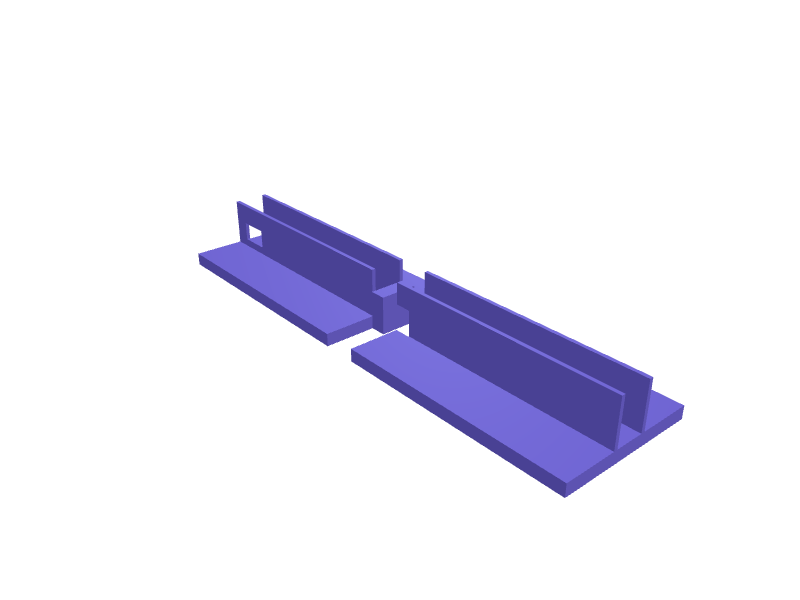
A vertical dock that holds a Framework Laptop 13 (about 16 mm thick closed, 297 mm wide) on its side so the expansion cards stay accessible. The slot is 18 × 300 mm with 0.5 mm clearance, a 20 mm USB-C cutout on the right, and a 140 × 90 mm base that will not tip a 1.3 kg machine. Print in two halves in PETG with 2.4 mm walls so each half fits a 220 mm bed. Open the ready-made model free, resize it on your phone or computer, then download a print-ready STL, 3MF or G-code sliced for your printer, free.Opening the ready-made model and downloading it as STL or 3MF are free, no card; AI changes use credits, from Maker at $7.99 a month.No printer? We print this part and ship it to your door. See its priceUpdated
2
Adjust
Change its numbers in the viewer for free, or ask the AI in the chat: wall thickness, hole size, the thing it clips onto. AI changes use 2 credits per request (1 for a quick edit, 3 for a redesign), paid with a plan from Maker at $7.99 a month, where the first 3 small changes are free.3Print
Download a watertight STL or 3MF free, with your numbers and hand edits, or G-code sliced for your printer at the same price. After an AI change the download is included in every plan (4 credits without one).
Dimensions of the ready-made model (editable)
| Parameter | Value |
|---|---|
| wall thickness | 2.4 mm |
| fit clearance | 0.5 mm |
| per-half base length (approx. 140mm spec, rounded for joint math) | 150 mm |
| base width | 90 mm |
| floor thickness | 8 mm |
| slot side-wall height | 30 mm |
| joint tongue length | 10 mm |
| joint tongue width | 24 mm |
| USB-C cutout width | 20 mm |
| USB-C cutout height | 12 mm |
Example prompt
Model a Framework 13 vertical dock: 18×300 mm slot with 0.5 mm clearance, 20 mm USB-C cutout, 140×90 mm base, two PETG halves under 220 mm, 2.4 mm walls.
Fit notes
Generic laptop docks pinch Framework's hinged expansion bays. Describe the thickness with your case in SpeakCAD, preview the dock in the browser, then download the STL.
Questions people ask about a Framework Laptop 13 vertical dock
A vertical dock that holds a Framework Laptop 13 (about 16 mm thick closed, 297 mm wide) on its side so the expansion cards stay accessible. The slot is 18 × 300 mm with 0.5 mm clearance, a 20 mm USB-C cutout on the right, and a 140 × 90 mm base that will not tip a 1.3 kg machine. Print in two halves in PETG with 2.4 mm walls so each half fits a 220 mm bed.
Click Open it free on this page and create a free account (no card): the ready-made model opens in your browser, on your phone or computer, nothing to install. Change its numbers in the viewer for free and download a watertight STL or 3MF free, or G-code sliced for your printer at the same price. An AI change in the chat uses 2 credits per request (3 for a redesign), and the download after it is included in every plan (4 credits without one). Start with Maker: 50 credits a month for $7.99, cancel anytime.
On this page: open the ready-made model free in a SpeakCAD account (no card), change any dimension in the viewer, then download the STL or 3MF free, or G-code sliced for your printer at the same price.
A shared STL is modelled for someone else's measurements. Here you open the ready-made model free, change it to your measurements in the viewer, then download a file sized for the part you actually own, free as STL or 3MF.
Yes. SpeakCAD slices the part on its servers with OrcaSlicer and your printer's official profile (380+ printers, including Bambu Lab, Prusa, Creality and Elegoo), and you download the G-code (a sliced .gcode.3mf for Bambu Lab printers). G-code sliced for your printer costs the same as the STL: included in every plan, free for a part you shaped by hand, 4 credits without a plan for a part with AI work in it. Pick your printer on the printers page to see its profile.
No. SpeakCAD runs in the browser on your phone or computer: the chat, the 3D engine and the live viewer load in the tab. The only file you download is the finished STL, 3MF or sliced G-code.
Print it your way
More desk & office
MacBook Pro M4 left-side SD shelfReady-made, opens free. A clip-on shelf that hangs from the left edge of a 14 or 16-inch MacBook Pro M4 and holds an SD reader flush with the HDMI port.Angled desk phone stand with cable slotReady-made, opens free. A 60 degree cradle that holds a phone upright for video calls while a charging cable passes up through a slot in the base.Kindle Paperwhite desk reading stand with USB-C cable slotReady-made, opens free. A reclining stand that holds a Kindle Paperwhite (176.7 x 127.6 x 7.8 mm for the 2024 model, 174.2 x 124.6 x 8.1 mm for the 2021) at 60 degrees for hands-fre…Pixel 10 Pro desk stand with USB-C passthroughReady-made, opens free. A low desk cradle for a Google Pixel 10 Pro (about 153 × 72 × 8.5 mm) that holds the phone at 55 degrees with a 14 mm rear slot so a USB-C cable stays plugge…Aqara Cube T1 Pro desk cradleReady-made, opens free. A 50 mm cradle that parks an Aqara Cube T1 Pro at 15 degrees so it does not roll off a desk, with a 1 mm lip.NuPhy Air75 V3 tenting feetReady-made, opens free. A set of 8 degree tenting feet that replace Air75 V3 stock feet, 20 × 10 × 8 mm with the official pin.