1
Replacement parts
Track-saw splinter-guard replacement strip
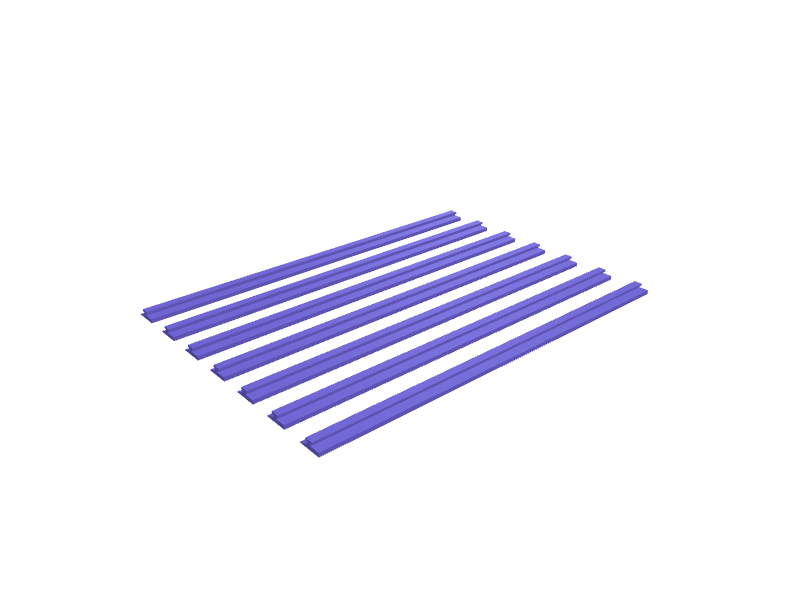
A 1400 mm splinter-guard strip in 200 mm sections that clip onto a Festool / Makita style track's 4 mm T-slot. Each section is 200 × 12 × 2 mm with a 4.1 mm barb. Print in TPU. Open the ready-made model free, resize it on your phone or computer, then download a print-ready STL, 3MF or G-code sliced for your printer, free.Opening the ready-made model and downloading it as STL or 3MF are free, no card; AI changes use credits, from Maker at $7.99 a month.No printer? We print this part and ship it to your door. See its priceUpdated
2
Adjust
Change its numbers in the viewer for free, or ask the AI in the chat: wall thickness, hole size, the thing it clips onto. AI changes use 2 credits per request (1 for a quick edit, 3 for a redesign), paid with a plan from Maker at $7.99 a month, where the first 3 small changes are free.3Print
Download a watertight STL or 3MF free, with your numbers and hand edits, or G-code sliced for your printer at the same price. After an AI change the download is included in every plan (4 credits without one).
Dimensions of the ready-made model (editable)
| Parameter | Value |
|---|---|
| section length | 200 mm |
| section width | 12 mm |
| base thickness | 2 mm |
| barb neck width | 2 mm |
| barb neck height | 1.2 mm |
| barb head width (T-slot capture) | 4.1 mm |
| barb head height | 1 mm |
| number of sections for 1400mm track (7 x 200mm) | 7 |
Example prompt
Create splinter-guard sections 200×12×2 mm with a 4.1 mm T-slot barb, TPU, printed as seven pieces for a 1400 mm track.
Fit notes
The official strip is a consumable. Tell SpeakCAD your track length, preview a section in the browser, then download the STL.
Questions people ask about a track-saw splinter-guard replacement strip
A 1400 mm splinter-guard strip in 200 mm sections that clip onto a Festool / Makita style track's 4 mm T-slot. Each section is 200 × 12 × 2 mm with a 4.1 mm barb. Print in TPU.
Click Open it free on this page and create a free account (no card): the ready-made model opens in your browser, on your phone or computer, nothing to install. Change its numbers in the viewer for free and download a watertight STL or 3MF free, or G-code sliced for your printer at the same price. An AI change in the chat uses 2 credits per request (3 for a redesign), and the download after it is included in every plan (4 credits without one). Start with Maker: 50 credits a month for $7.99, cancel anytime.
On this page: open the ready-made model free in a SpeakCAD account (no card), change any dimension in the viewer, then download the STL or 3MF free, or G-code sliced for your printer at the same price.
A shared STL is modelled for someone else's measurements. Here you open the ready-made model free, change it to your measurements in the viewer, then download a file sized for the part you actually own, free as STL or 3MF.
Yes. SpeakCAD slices the part on its servers with OrcaSlicer and your printer's official profile (380+ printers, including Bambu Lab, Prusa, Creality and Elegoo), and you download the G-code (a sliced .gcode.3mf for Bambu Lab printers). G-code sliced for your printer costs the same as the STL: included in every plan, free for a part you shaped by hand, 4 credits without a plan for a part with AI work in it. Pick your printer on the printers page to see its profile.
No. SpeakCAD runs in the browser on your phone or computer: the chat, the 3D engine and the live viewer load in the tab. The only file you download is the finished STL, 3MF or sliced G-code.
Print it your way
More replacement parts
Cabinet hinge mounting plate replacementReady-made, opens free. Concealed cabinet hinges clip onto a small mounting plate screwed to the carcass, and when the plate cracks the door sags or falls off.Headset spacer set for 1 1/8 inch 28.6 mm steererReady-made, opens free. Stack-height spacers for a 1 1/8 inch fork steerer, 28.6 mm nominal, in 2.5, 5, 10 and 15 mm thicknesses so you can dial in bar height on a Canyon, Trek or S…DeWalt TSTAK lid latch clip replacementReady-made, opens free. A replacement side latch for DeWalt TSTAK II, IV and VI cases, whose clear polycarbonate latches crack at the pivot when the case is carried by one handle.ecobee Smart Thermostat Enhanced wall shimReady-made, opens free. A 6–12 mm stepped shim that sits behind an ecobee Smart Thermostat Enhanced (about 109 mm round) so the unit sits flush on a tiled wall.IKEA ALEX drawer-stop clip pairReady-made, opens free. A pair of clips that stop an ALEX drawer from rolling all the way out on a slightly uneven floor.Dishwasher rack wheel replacementReady-made, opens free. When a lower rack wheel cracks the whole basket drags and jams, yet the original spare often costs more than a set of four printed ones.