1
Organizers & storage
RIDGID Pro Gear stack bit caddy
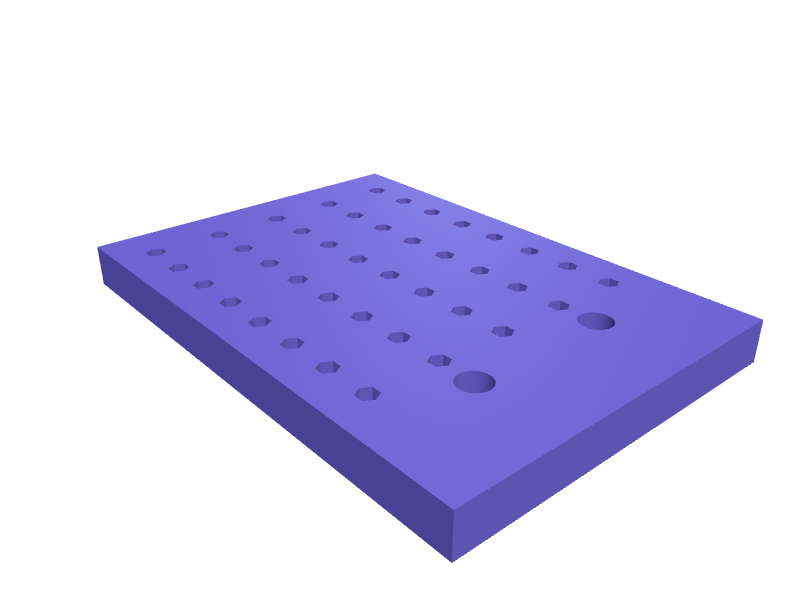
A caddy that drops into a RIDGID Pro Gear stack drawer and holds 40 hex bits in 6.6 mm pockets plus two 12 mm driver shafts. The plate is 200 × 140 × 16 mm. Print flat in PETG. Open the ready-made model free, resize it on your phone or computer, then download a print-ready STL, 3MF or G-code sliced for your printer, free.Opening the ready-made model and downloading it as STL or 3MF are free, no card; AI changes use credits, from Maker at $7.99 a month.No printer? We print this part and ship it to your door. See its priceUpdated
2
Adjust
Change its numbers in the viewer for free, or ask the AI in the chat: wall thickness, hole size, the thing it clips onto. AI changes use 2 credits per request (1 for a quick edit, 3 for a redesign), paid with a plan from Maker at $7.99 a month, where the first 3 small changes are free.3Print
Download a watertight STL or 3MF free, with your numbers and hand edits, or G-code sliced for your printer at the same price. After an AI change the download is included in every plan (4 credits without one).
Dimensions of the ready-made model (editable)
| Parameter | Value |
|---|---|
| length X | 200 mm |
| width Y | 140 mm |
| height | 16 mm |
| wall/floor thickness | 1.6 mm |
| across-flats width | 6.6 mm |
| pocket depth | 12 mm |
Example prompt
Create a RIDGID Pro Gear bit caddy 200×140×16 mm with 40 hex pockets 6.6×12 mm and two 12 mm shaft bores, 1.6 mm PETG walls.
Fit notes
Bits rolling in a Pro Gear drawer is how you lose the Torx. Tell SpeakCAD the drawer size, preview the caddy in the browser, then download the STL.
Questions people ask about a RIDGID Pro Gear stack bit caddy
A caddy that drops into a RIDGID Pro Gear stack drawer and holds 40 hex bits in 6.6 mm pockets plus two 12 mm driver shafts. The plate is 200 × 140 × 16 mm. Print flat in PETG.
Click Open it free on this page and create a free account (no card): the ready-made model opens in your browser, on your phone or computer, nothing to install. Change its numbers in the viewer for free and download a watertight STL or 3MF free, or G-code sliced for your printer at the same price. An AI change in the chat uses 2 credits per request (3 for a redesign), and the download after it is included in every plan (4 credits without one). Start with Maker: 50 credits a month for $7.99, cancel anytime.
On this page: open the ready-made model free in a SpeakCAD account (no card), change any dimension in the viewer, then download the STL or 3MF free, or G-code sliced for your printer at the same price.
A shared STL is modelled for someone else's measurements. Here you open the ready-made model free, change it to your measurements in the viewer, then download a file sized for the part you actually own, free as STL or 3MF.
Yes. SpeakCAD slices the part on its servers with OrcaSlicer and your printer's official profile (380+ printers, including Bambu Lab, Prusa, Creality and Elegoo), and you download the G-code (a sliced .gcode.3mf for Bambu Lab printers). G-code sliced for your printer costs the same as the STL: included in every plan, free for a part you shaped by hand, 4 credits without a plan for a part with AI work in it. Pick your printer on the printers page to see its profile.
No. SpeakCAD runs in the browser on your phone or computer: the chat, the 3D engine and the live viewer load in the tab. The only file you download is the finished STL, 3MF or sliced G-code.
Print it your way
More organizers & storage
Dyson Big+Quiet Formaldehyde remote cradleReady-made, opens free. A cradle that holds the larger Big+Quiet Formaldehyde remote (about 130 × 50 × 14 mm) on the top of the cylinder so it does not slide off the curved lid.Stepped rack for craft paint bottlesReady-made, opens free. A tiered display that holds 2 oz craft paint bottles and dropper bottles at an angle so labels face forward.Apple TV, Roku and Fire TV remote holderReady-made, opens free. A sofa-side caddy with three angled slots sized to the remotes that come with streaming boxes.IKEA Pax clothes rail hook for bags and beltsReady-made, opens free. A hook that hangs from the Komplement clothes rail inside an IKEA Pax wardrobe and holds handbags, belts, ties or a laundry bag without taking a hanger slot.Boss pedal patch cable and 9V power lead organizerReady-made, opens free. A gig-bag tray that keeps the small stuff behind a pedalboard sorted: 15 cm patch cables, 5.5 x 2.1 mm 9 V daisy-chain leads for Boss and Strymon pedals, spa…IKEA SKÅDIS holder for Festool Domino tenonsReady-made, opens free. A SKÅDIS box that holds Domino tenons in four labelled wells (4, 5, 6, 8 / 10 mm) with a 5 mm hook pair.