1
Replacement parts
Marking-gauge wheel-fence replacement
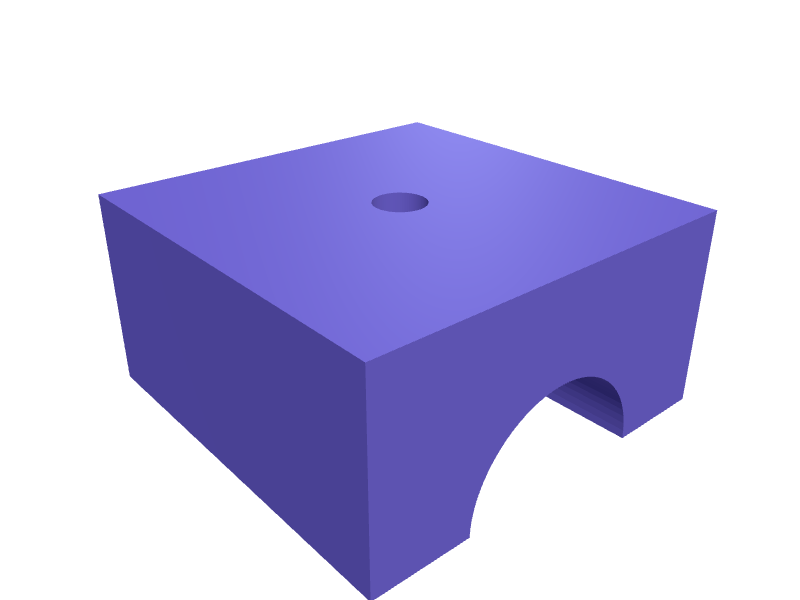
A 40 mm fence that replaces a cracked marking-gauge head, 20 mm stem bore with an M5 pinch, and a 0.4 mm wheel slot. Print in PETG. Open the ready-made model free, resize it on your phone or computer, then download a print-ready STL, 3MF or G-code sliced for your printer, free.Opening the ready-made model and downloading it as STL or 3MF are free, no card; AI changes use credits, from Maker at $7.99 a month.No printer? We print this part and ship it to your door. See its priceUpdated
2
Adjust
Change its numbers in the viewer for free, or ask the AI in the chat: wall thickness, hole size, the thing it clips onto. AI changes use 2 credits per request (1 for a quick edit, 3 for a redesign), paid with a plan from Maker at $7.99 a month, where the first 3 small changes are free.3Print
Download a watertight STL or 3MF free, with your numbers and hand edits, or G-code sliced for your printer at the same price. After an AI change the download is included in every plan (4 credits without one).
Dimensions of the ready-made model (editable)
| Parameter | Value |
|---|---|
| width (X) | 40 mm |
| depth (Y) | 40 mm |
| height (Z) | 20 mm |
| clearance hole diameter | 5.2 mm |
| width of slot | 0.4 mm |
| length along X (direction bore runs) | 15 mm |
| min wall reference, PETG | 2 mm |
Example prompt
Model a marking-gauge fence 40 mm across, 20 mm stem bore, M5 pinch, 0.4 mm wheel slot, 2 mm PETG.
Fit notes
A split fence walks off the stem. Describe the stem in SpeakCAD, preview the fence in the browser, then download the STL.
Questions people ask about a marking-gauge wheel-fence replacement
A 40 mm fence that replaces a cracked marking-gauge head, 20 mm stem bore with an M5 pinch, and a 0.4 mm wheel slot. Print in PETG.
Click Open it free on this page and create a free account (no card): the ready-made model opens in your browser, on your phone or computer, nothing to install. Change its numbers in the viewer for free and download a watertight STL or 3MF free, or G-code sliced for your printer at the same price. An AI change in the chat uses 2 credits per request (3 for a redesign), and the download after it is included in every plan (4 credits without one). Start with Maker: 50 credits a month for $7.99, cancel anytime.
On this page: open the ready-made model free in a SpeakCAD account (no card), change any dimension in the viewer, then download the STL or 3MF free, or G-code sliced for your printer at the same price.
A shared STL is modelled for someone else's measurements. Here you open the ready-made model free, change it to your measurements in the viewer, then download a file sized for the part you actually own, free as STL or 3MF.
Yes. SpeakCAD slices the part on its servers with OrcaSlicer and your printer's official profile (380+ printers, including Bambu Lab, Prusa, Creality and Elegoo), and you download the G-code (a sliced .gcode.3mf for Bambu Lab printers). G-code sliced for your printer costs the same as the STL: included in every plan, free for a part you shaped by hand, 4 credits without a plan for a part with AI work in it. Pick your printer on the printers page to see its profile.
No. SpeakCAD runs in the browser on your phone or computer: the chat, the 3D engine and the live viewer load in the tab. The only file you download is the finished STL, 3MF or sliced G-code.
Print it your way
More replacement parts
CamelBak bite valve dust cover cap replacementReady-made, opens free. The hinged dust cover on a CamelBak Big Bite valve or Crux tube gets chewed off or lost on the first ride, leaving the valve to collect trail grit.IKEA Bekvam step stool anti-slip foot replacementReady-made, opens free. A replacement foot for the IKEA Bekvam step stool that covers the raw end of each leg when the original plastic glide falls off or the wood starts scratching…File-handle replacement for a 4 mm tangReady-made, opens free. A 110 mm handle with a 4.2 mm tapered bore that a needle-file tang drives into, and a 16 mm palm swell.Thule EasyFold wheel-tray end capReady-made, opens free. A replacement end cap for a Thule EasyFold wheel tray, 40 × 25 mm with the stock 4 mm rib.Vacuum cleaner hose end cuffReady-made, opens free. The cuff where a vacuum hose meets the wand or floor head cracks from years of twisting, and once it splits the suction leaks away.Stroller wheel hub capReady-made, opens free. A lost hub cap lets grit into a stroller wheel bearing and exposes a sharp axle end, and manufacturers seldom sell the cap alone.