1
Organizers & storage
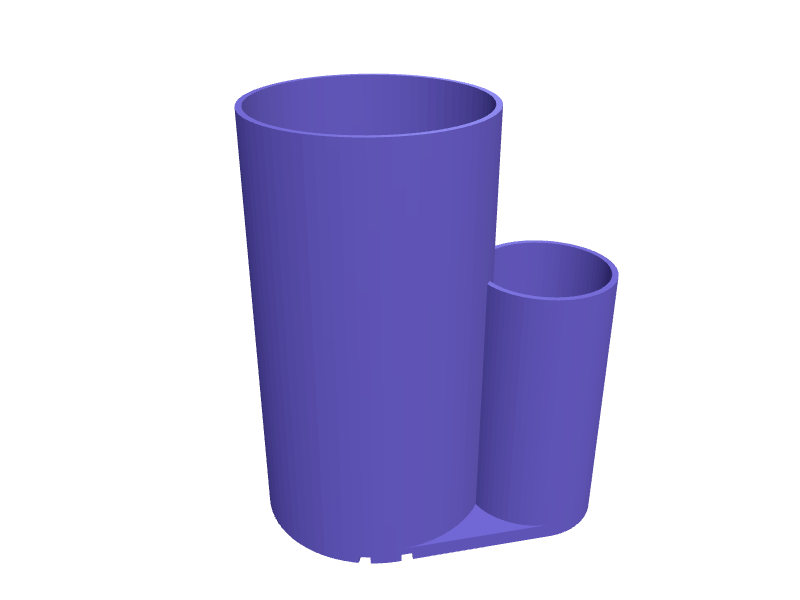
Makeup brush holder with divided cups
A tall cup split into three sections of different heights so face brushes, eye brushes and eyeliner pencils each stand at a useful height without disappearing. Sections are 60, 45 and 35 mm in diameter arranged in a cloverleaf, with 1.5 mm walls, a 4 mm base and drain slots in the floor so brushes washed the night before can dry. Print it upright; the rounded rims need no supports. Open the ready-made model free, resize it on your phone or computer, then download a print-ready STL, 3MF or G-code sliced for your printer, free.Opening the ready-made model and downloading it as STL or 3MF are free, no card; AI changes use credits, from Maker at $7.99 a month.No printer? We print this part and ship it to your door. See its priceUpdated
2
Adjust
Change its numbers in the viewer for free, or ask the AI in the chat: wall thickness, hole size, the thing it clips onto. AI changes use 2 credits per request (1 for a quick edit, 3 for a redesign), paid with a plan from Maker at $7.99 a month.3Print
Download a watertight STL or 3MF free, with your numbers and hand edits, or G-code sliced for your printer at the same price. After an AI change the download is included in every plan (4 credits without one).
Dimensions of the ready-made model (editable)
| Parameter | Value |
|---|---|
| large cylinder | 60 mm |
| medium cylinder | 45 mm |
| small cylinder | 35 mm |
| tube wall thickness | 1.5 mm |
| shared base thickness | 4 mm |
| rim fillet radius | 1.2 mm |
| drain slot width | 3 mm |
| drain slot length (radial) | 14 mm |
Example prompt
Model a makeup brush holder with three joined cylinders of 60, 45 and 35 mm diameter and heights 110, 90 and 70 mm in a cloverleaf, 1.5 mm walls, a shared 4 mm thick base with 3 mm drain slots, rounded rims, footprint about 110 x 100 mm.
Fit notes
The exact brushes you own dictate the cup sizes, and no shared file was drawn for them. Give SpeakCAD your brush lengths and quantities and it proportions each section to match. You can see the result in the browser, ask for a fourth cup or a lower rim, and download the STL once it looks right.
Questions people ask about a makeup brush holder with divided cups
A tall cup split into three sections of different heights so face brushes, eye brushes and eyeliner pencils each stand at a useful height without disappearing. Sections are 60, 45 and 35 mm in diameter arranged in a cloverleaf, with 1.5 mm walls, a 4 mm base and drain slots in the floor so brushes washed the night before can dry. Print it upright; the rounded rims need no supports.
Click Open it free on this page and create a free account (no card): the ready-made model opens in your browser, on your phone or computer, nothing to install. Change its numbers in the viewer for free and download a watertight STL or 3MF free, or G-code sliced for your printer at the same price. An AI change in the chat uses 2 credits per request (3 for a redesign), and the download after it is included in every plan (4 credits without one). Start with Maker: 50 credits a month for $7.99, cancel anytime.
On this page: open the ready-made model free in a SpeakCAD account (no card), change any dimension in the viewer, then download the STL or 3MF free, or G-code sliced for your printer at the same price.
A shared STL is modelled for someone else's measurements. Here you open the ready-made model free, change it to your measurements in the viewer, then download a file sized for the part you actually own, free as STL or 3MF.
Yes. SpeakCAD slices the part on its servers with OrcaSlicer and your printer's official profile (380+ printers, including Bambu Lab, Prusa, Creality and Elegoo), and you download the G-code (a sliced .gcode.3mf for Bambu Lab printers). G-code sliced for your printer costs the same as the STL: included in every plan, free for a part you shaped by hand, 4 credits without a plan for a part with AI work in it. Pick your printer on the printers page to see its profile.
No. SpeakCAD runs in the browser on your phone or computer: the chat, the 3D engine and the live viewer load in the tab. The only file you download is the finished STL, 3MF or sliced G-code.
Print it your way
More organizers & storage
Framework Laptop 16 GPU module storage trayReady-made, opens free. A padded tray that stores a Framework 16 GPU module (about 150 × 80 × 20 mm) plus two expansion cards in labelled 32 × 14 mm slots.25 mm French-cleat safety-glasses binReady-made, opens free. A 120 × 80 × 60 mm bin on a 25 mm French cleat that holds two pairs of safety glasses and a pack of earplugs.Dyson Supersonic nozzle magnetic caddyReady-made, opens free. A caddy that holds the four Supersonic magnetic nozzles (styling, diffuser, wide-tooth, flyaway) so they stay in one place next to the charger.Watch strap storage rack with numbered slotsReady-made, opens free. A rack that stores spare smartwatch or quick-release straps flat and separated so silicone and leather bands do not stick together or curl.Anker Nano charger and cable desk organizer trayReady-made, opens free. A tray that keeps two Anker Nano GaN chargers and their USB-C cables together on a desk or in a travel drawer.IKEA Alex drawer insert tray for pens and toolsReady-made, opens free. A modular tray that sits in the shallow top drawer of an IKEA Alex unit and gives pens, markers, USB sticks and small tools their own compartments.