1
Organizers & storage
Framework Laptop 16 GPU module storage tray
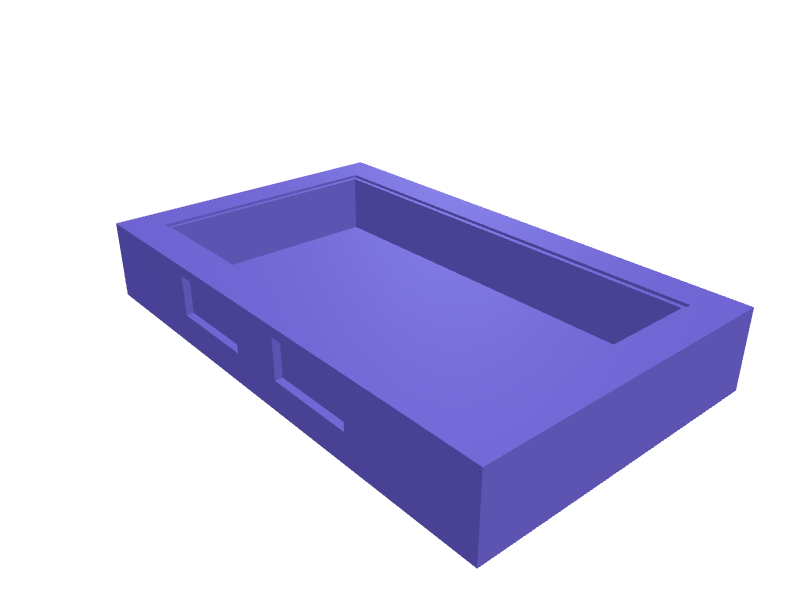
A padded tray that stores a Framework 16 GPU module (about 150 × 80 × 20 mm) plus two expansion cards in labelled 32 × 14 mm slots. The GPU well has 0.4 mm clearance and 2 mm TPU-style lips, the tray is 180 × 110 × 28 mm, and a 4 mm lid on a 1 mm hinge pin keeps dust off. Print the tray in PLA and the lips in TPU, or all PLA with thin lips. Open the ready-made model free, resize it on your phone or computer, then download a print-ready STL, 3MF or G-code sliced for your printer, free.Opening the ready-made model and downloading it as STL or 3MF are free, no card; AI changes use credits, from Maker at $7.99 a month.No printer? We print this part and ship it to your door. See its priceUpdated
2
Adjust
Change its numbers in the viewer for free, or ask the AI in the chat: wall thickness, hole size, the thing it clips onto. AI changes use 2 credits per request (1 for a quick edit, 3 for a redesign), paid with a plan from Maker at $7.99 a month, where the first 3 small changes are free.3Print
Download a watertight STL or 3MF free, with your numbers and hand edits, or G-code sliced for your printer at the same price. After an AI change the download is included in every plan (4 credits without one).
Dimensions of the ready-made model (editable)
| Parameter | Value |
|---|---|
| per side clearance added to well | 0.4 mm |
| wall thickness around well | 1.6 mm |
| height of locating pin/rim | 1 mm |
| width of rim step, matches wall thickness | 1.6 mm |
Example prompt
Create a Framework 16 GPU tray 180×110×28 mm with a 151×81×21 mm well, 0.4 mm clearance, two 32×14 mm card slots, a 4 mm lid on a 1 mm pin and 1.6 mm walls.
Fit notes
A generic electronics box lets the module slide and bend the connector. In SpeakCAD you list the cards you own, preview the tray in the browser, then download the STL.
Questions people ask about a Framework Laptop 16 GPU module storage tray
A padded tray that stores a Framework 16 GPU module (about 150 × 80 × 20 mm) plus two expansion cards in labelled 32 × 14 mm slots. The GPU well has 0.4 mm clearance and 2 mm TPU-style lips, the tray is 180 × 110 × 28 mm, and a 4 mm lid on a 1 mm hinge pin keeps dust off. Print the tray in PLA and the lips in TPU, or all PLA with thin lips.
Click Open it free on this page and create a free account (no card): the ready-made model opens in your browser, on your phone or computer, nothing to install. Change its numbers in the viewer for free and download a watertight STL or 3MF free, or G-code sliced for your printer at the same price. An AI change in the chat uses 2 credits per request (3 for a redesign), and the download after it is included in every plan (4 credits without one). Start with Maker: 50 credits a month for $7.99, cancel anytime.
On this page: open the ready-made model free in a SpeakCAD account (no card), change any dimension in the viewer, then download the STL or 3MF free, or G-code sliced for your printer at the same price.
A shared STL is modelled for someone else's measurements. Here you open the ready-made model free, change it to your measurements in the viewer, then download a file sized for the part you actually own, free as STL or 3MF.
Yes. SpeakCAD slices the part on its servers with OrcaSlicer and your printer's official profile (380+ printers, including Bambu Lab, Prusa, Creality and Elegoo), and you download the G-code (a sliced .gcode.3mf for Bambu Lab printers). G-code sliced for your printer costs the same as the STL: included in every plan, free for a part you shaped by hand, 4 credits without a plan for a part with AI work in it. Pick your printer on the printers page to see its profile.
No. SpeakCAD runs in the browser on your phone or computer: the chat, the 3D engine and the live viewer load in the tab. The only file you download is the finished STL, 3MF or sliced G-code.
Print it your way
More organizers & storage
LEGO Technic gear-tray insertReady-made, opens free. A tray insert that sorts Technic gears by tooth count in labelled wells (8, 12, 16, 20, 24, 40).Charging cable organizer with wrap postsReady-made, opens free. A flat plate with staggered posts that lets you coil USB-C, Lightning and micro-USB cables in figure eights and park the connectors in labelled pockets so th…iPad and iPhone family charging station rack with cable slotsReady-made, opens free. A countertop rack with upright slots for two iPads and three iPhones, so the family devices charge in one place overnight.Gridfinity holder for Knipex Pliers Wrench and CobraReady-made, opens free. A 2 by 2 Gridfinity block, 83.5 by 83.5 mm, with four angled slots that hold a Knipex Pliers Wrench 180 and 250 and Cobra 180 and 250 jaws-down so the handle…Tupperware and Pyrex lid organizer rack for the cabinetReady-made, opens free. A tiered rack that stores plastic and glass container lids on edge so Tupperware, Pyrex, Rubbermaid and Sistema lids stop avalanching out of the cabinet.Gridfinity 1×1 bin for SD, microSD and CFexpressReady-made, opens free. A 1×1 Gridfinity bin (41.5 × 41.5 mm, 3 units tall) that stands a CFexpress Type B card, two SD cards and two microSD cards on edge.