1
Organizers & storage
Jewelry tray with ring bars and earring holes
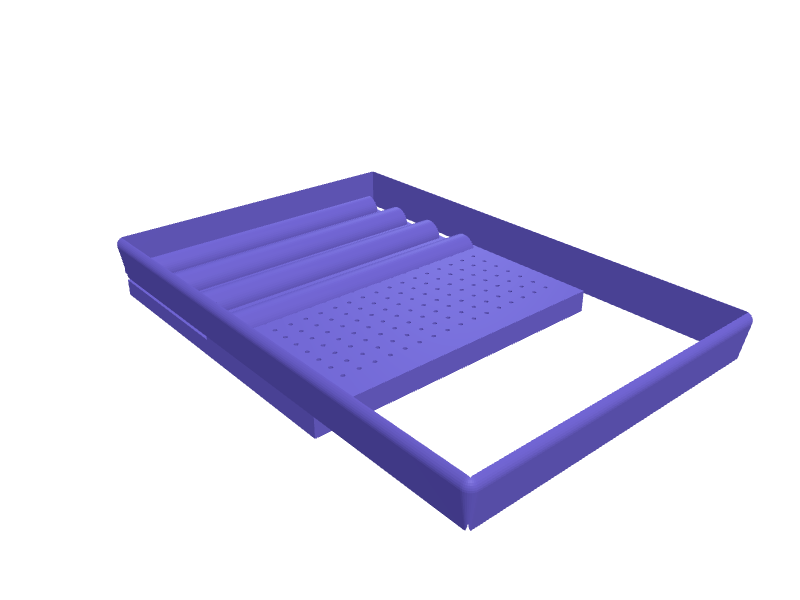
A dresser tray combining a ring bar section, a grid of 1.5 mm holes for stud earrings, and a shallow well for bracelets and necklaces. Ring bars are 12 mm wide half-round ridges spaced 8 mm apart so bands slot in without scratching, while the earring grid is a raised 3 mm plate on 6 mm spacing so the backs can be fitted from beneath. Soft 3 mm fillets on every edge make it comfortable to touch and clean. Open the ready-made model free, resize it on your phone or computer, then download a print-ready STL, 3MF or G-code sliced for your printer, free.Opening the ready-made model and downloading it as STL or 3MF are free, no card; AI changes use credits, from Maker at $7.99 a month.No printer? We print this part and ship it to your door. See its priceUpdated
2
Adjust
Change its numbers in the viewer for free, or ask the AI in the chat: wall thickness, hole size, the thing it clips onto. AI changes use 2 credits per request (1 for a quick edit, 3 for a redesign), paid with a plan from Maker at $7.99 a month.3Print
Download a watertight STL or 3MF free, with your numbers and hand edits, or G-code sliced for your printer at the same price. After an AI change the download is included in every plan (4 credits without one).
Dimensions of the ready-made model (editable)
| Parameter | Value |
|---|---|
| overall width (X) | 180 mm |
| overall depth (Y) | 120 mm |
| rim height | 25 mm |
| wall thickness | 2 mm |
| floor thickness | 2 mm |
| fillet radius | 3 mm |
| width of each half-round bar | 12 mm |
| height of bar above ledge | 14 mm |
| base ledge height for ring section | 6 mm |
| earring hole diameter | 1.5 mm |
| height of earring plate above floor | 8 mm |
Example prompt
Create a jewelry tray 180 x 120 mm with a 25 mm rim, four half-round ring bars 12 mm wide spaced 8 mm apart on the left, an earring plate with 1.5 mm holes on a 6 mm grid, an open well on the right, 3 mm fillets.
Fit notes
Instead of settling for whatever proportions a free file happens to use, tell SpeakCAD how much dresser space you have and how many rings and studs you own. Open the ready-made model free, change its numbers in the viewer and download the STL or 3MF free; AI changes use credits.
Questions people ask about a jewelry tray with ring bars and earring holes
A dresser tray combining a ring bar section, a grid of 1.5 mm holes for stud earrings, and a shallow well for bracelets and necklaces. Ring bars are 12 mm wide half-round ridges spaced 8 mm apart so bands slot in without scratching, while the earring grid is a raised 3 mm plate on 6 mm spacing so the backs can be fitted from beneath. Soft 3 mm fillets on every edge make it comfortable to touch and clean.
Click Open it free on this page and create a free account (no card): the ready-made model opens in your browser, on your phone or computer, nothing to install. Change its numbers in the viewer for free and download a watertight STL or 3MF free, or G-code sliced for your printer at the same price. An AI change in the chat uses 2 credits per request (3 for a redesign), and the download after it is included in every plan (4 credits without one). Start with Maker: 50 credits a month for $7.99, cancel anytime.
On this page: open the ready-made model free in a SpeakCAD account (no card), change any dimension in the viewer, then download the STL or 3MF free, or G-code sliced for your printer at the same price.
A shared STL is modelled for someone else's measurements. Here you open the ready-made model free, change it to your measurements in the viewer, then download a file sized for the part you actually own, free as STL or 3MF.
Yes. SpeakCAD slices the part on its servers with OrcaSlicer and your printer's official profile (380+ printers, including Bambu Lab, Prusa, Creality and Elegoo), and you download the G-code (a sliced .gcode.3mf for Bambu Lab printers). G-code sliced for your printer costs the same as the STL: included in every plan, free for a part you shaped by hand, 4 credits without a plan for a part with AI work in it. Pick your printer on the printers page to see its profile.
No. SpeakCAD runs in the browser on your phone or computer: the chat, the 3D engine and the live viewer load in the tab. The only file you download is the finished STL, 3MF or sliced G-code.
Print it your way
More organizers & storage
Framework Laptop 16 GPU module storage trayReady-made, opens free. A padded tray that stores a Framework 16 GPU module (about 150 × 80 × 20 mm) plus two expansion cards in labelled 32 × 14 mm slots.25 mm French-cleat safety-glasses binReady-made, opens free. A 120 × 80 × 60 mm bin on a 25 mm French cleat that holds two pairs of safety glasses and a pack of earplugs.Dyson Supersonic nozzle magnetic caddyReady-made, opens free. A caddy that holds the four Supersonic magnetic nozzles (styling, diffuser, wide-tooth, flyaway) so they stay in one place next to the charger.Watch strap storage rack with numbered slotsReady-made, opens free. A rack that stores spare smartwatch or quick-release straps flat and separated so silicone and leather bands do not stick together or curl.Anker Nano charger and cable desk organizer trayReady-made, opens free. A tray that keeps two Anker Nano GaN chargers and their USB-C cables together on a desk or in a travel drawer.IKEA Alex drawer insert tray for pens and toolsReady-made, opens free. A modular tray that sits in the shallow top drawer of an IKEA Alex unit and gives pens, markers, USB sticks and small tools their own compartments.