1
Organizers & storage
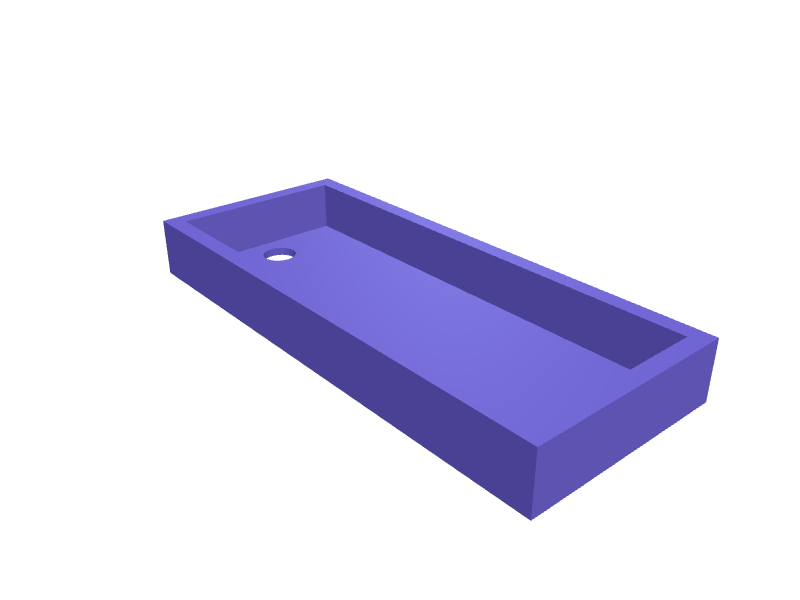
Dyson Purifier Cool Gen2 remote tray
A tray that parks the curved Purifier Cool Gen2 remote (about 110 × 40 × 12 mm) on the tower so it stops vanishing behind the sofa. The well is 112 × 42 mm with 0.4 mm clearance and a 8 mm magnet pocket that sits on the official remote recess. Print in PLA with 1.6 mm walls. Open the ready-made model free, resize it on your phone or computer, then download a print-ready STL, 3MF or G-code sliced for your printer, free.Opening the ready-made model and downloading it as STL or 3MF are free, no card; AI changes use credits, from Maker at $7.99 a month.No printer? We print this part and ship it to your door. See its priceUpdated
2
Adjust
Change its numbers in the viewer for free, or ask the AI in the chat: wall thickness, hole size, the thing it clips onto. AI changes use 2 credits per request (1 for a quick edit, 3 for a redesign), paid with a plan from Maker at $7.99 a month, where the first 3 small changes are free.3Print
Download a watertight STL or 3MF free, with your numbers and hand edits, or G-code sliced for your printer at the same price. After an AI change the download is included in every plan (4 credits without one).
Dimensions of the ready-made model (editable)
| Parameter | Value |
|---|---|
| Tray outer length | 120 mm |
| Tray outer width | 50 mm |
| Tray outer height | 14 mm |
| Floor thickness under well | 2 mm |
| Well length (remote) | 112 mm |
| Well width (remote) | 42 mm |
| Magnet diameter | 8 mm |
| Magnet pocket depth | 6 mm |
| Clearance around magnet | 0.3 mm |
Example prompt
Design a Purifier Cool Gen2 remote tray 120×50×14 mm, 112×42 mm well, 8 mm magnet pocket, 1.6 mm walls.
Fit notes
A flat remote cup lets the curved Dyson remote rock. In SpeakCAD you confirm Cool vs Hot+Cool, preview the tray in the browser, then download the STL.
Questions people ask about a Dyson Purifier Cool Gen2 remote tray
A tray that parks the curved Purifier Cool Gen2 remote (about 110 × 40 × 12 mm) on the tower so it stops vanishing behind the sofa. The well is 112 × 42 mm with 0.4 mm clearance and a 8 mm magnet pocket that sits on the official remote recess. Print in PLA with 1.6 mm walls.
Click Open it free on this page and create a free account (no card): the ready-made model opens in your browser, on your phone or computer, nothing to install. Change its numbers in the viewer for free and download a watertight STL or 3MF free, or G-code sliced for your printer at the same price. An AI change in the chat uses 2 credits per request (3 for a redesign), and the download after it is included in every plan (4 credits without one). Start with Maker: 50 credits a month for $7.99, cancel anytime.
On this page: open the ready-made model free in a SpeakCAD account (no card), change any dimension in the viewer, then download the STL or 3MF free, or G-code sliced for your printer at the same price.
A shared STL is modelled for someone else's measurements. Here you open the ready-made model free, change it to your measurements in the viewer, then download a file sized for the part you actually own, free as STL or 3MF.
Yes. SpeakCAD slices the part on its servers with OrcaSlicer and your printer's official profile (380+ printers, including Bambu Lab, Prusa, Creality and Elegoo), and you download the G-code (a sliced .gcode.3mf for Bambu Lab printers). G-code sliced for your printer costs the same as the STL: included in every plan, free for a part you shaped by hand, 4 credits without a plan for a part with AI work in it. Pick your printer on the printers page to see its profile.
No. SpeakCAD runs in the browser on your phone or computer: the chat, the 3D engine and the live viewer load in the tab. The only file you download is the finished STL, 3MF or sliced G-code.
Print it your way
More organizers & storage
Roland SP-404MKII SD-card caddyReady-made, opens free. A caddy that clips under an SP-404MKII and holds four SD cards in 33 × 3 mm slots plus a 20 mm stylus well.Tiered thread spool rack for sewing tableReady-made, opens free. A stepped rack that holds sewing thread spools on angled pegs so the labels stay visible and the thread ends do not unravel into each other.Hex key holder rack for bike workshop toolsReady-made, opens free. A bench or pegboard rack that holds the hex keys, Torx keys and a Park Tool chain tool that every home bike mechanic reaches for: seven graduated hex slots f…Dremel accessory organizer tray for 3.2 mm shank bitsReady-made, opens free. A desk tray that stands 40 Dremel accessories upright by their 3.2 mm (1/8 inch) shanks so the cutting ends face you: grinding stones, cut-off wheel mandrels…Philips Sonicare brush head stand for four headsReady-made, opens free. A stand that holds four Philips Sonicare brush heads upright next to the charger so each family member's head dries in the air rather than lying on the sink.Milwaukee Packout Compact Organizer bit railsReady-made, opens free. Two drop-in rails that turn a Packout Compact Organizer (48-22-8435) into a 1/4 inch hex-bit station with 20 pockets per rail, 6.6 mm hex by 12 mm deep.