1
Adapters & couplers
Canon EOS R6 hot shoe dual cold shoe bar
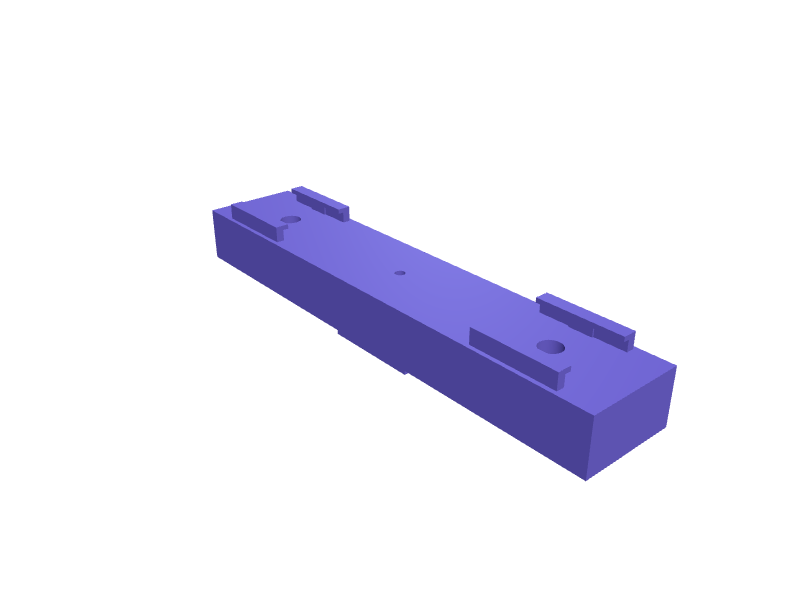
A T-shaped bar that slides into the hot shoe of a Canon EOS R6, R6 Mark II or R50 and offers two cold shoes side by side, so a Rode VideoMic GO II and a small Aputure MC or Godox LED can ride on top at once. The foot is a standard 18.7 mm ISO 518 shoe with 2 mm flanges and a thumb-tightened M3 locking screw, the bar is 130 mm wide and 14 mm thick with the cold shoes 90 mm apart, and each shoe has 0.2 mm clearance plus a 6 mm spring finger that stops accessories rattling. It fits any standard shoe, including Nikon Z and Fujifilm X-T5. Print it flat with 3 mm walls and 40 percent infill. Open the ready-made model free, resize it on your phone or computer, then download a print-ready STL, 3MF or G-code sliced for your printer, free.Opening the ready-made model and downloading it as STL or 3MF are free, no card; AI changes use credits, from Maker at $7.99 a month.No printer? We print this part and ship it to your door. See its priceUpdated
2
Adjust
Change its numbers in the viewer for free, or ask the AI in the chat: wall thickness, hole size, the thing it clips onto. AI changes use 2 credits per request (1 for a quick edit, 3 for a redesign), paid with a plan from Maker at $7.99 a month.3Print
Download a watertight STL or 3MF free, with your numbers and hand edits, or G-code sliced for your printer at the same price. After an AI change the download is included in every plan (4 credits without one).
Dimensions of the ready-made model (editable)
| Parameter | Value |
|---|---|
| thickness of main bar body | 14 mm |
| standard hot shoe rail width | 18.7 mm |
| total foot protrusion below bar | 4 mm |
| bottom flange lip thickness | 1.5 mm |
| inward overlap of flange each side | 2 mm |
| pilot for M3 self-tap | 2.5 mm |
| flange lip width | 2 mm |
| rail height above bar top | 4 mm |
| spring finger contact length | 6 mm |
| protrusion into slot | 0.4 mm |
| pilot for 1/4-20 tap | 5.5 mm |
Example prompt
Create a hot shoe accessory bar 130 x 25 x 14 mm with a standard 18.7 mm shoe foot and 2 mm flanges plus an M3 thumb locking screw, two cold shoes 90 mm apart with 0.2 mm clearance and 6 mm spring fingers, a 1/4-20 threaded boss under each shoe, and 3 mm walls, for a Canon EOS R6.
Fit notes
Bought brackets are either too short or fixed to the wrong side. In SpeakCAD you list the accessories and their spacing, preview the bar in the browser, add a 1/4-20 boss underneath in the chat, then download the STL.
Questions people ask about a Canon EOS R6 hot shoe dual cold shoe bar
A T-shaped bar that slides into the hot shoe of a Canon EOS R6, R6 Mark II or R50 and offers two cold shoes side by side, so a Rode VideoMic GO II and a small Aputure MC or Godox LED can ride on top at once. The foot is a standard 18.7 mm ISO 518 shoe with 2 mm flanges and a thumb-tightened M3 locking screw, the bar is 130 mm wide and 14 mm thick with the cold shoes 90 mm apart, and each shoe has 0.2 mm clearance plus a 6 mm spring finger that stops accessories rattling. It fits any standard shoe, including Nikon Z and Fujifilm X-T5. Print it flat with 3 mm walls and 40 percent infill.
Click Open it free on this page and create a free account (no card): the ready-made model opens in your browser, on your phone or computer, nothing to install. Change its numbers in the viewer for free and download a watertight STL or 3MF free, or G-code sliced for your printer at the same price. An AI change in the chat uses 2 credits per request (3 for a redesign), and the download after it is included in every plan (4 credits without one). Start with Maker: 50 credits a month for $7.99, cancel anytime.
On this page: open the ready-made model free in a SpeakCAD account (no card), change any dimension in the viewer, then download the STL or 3MF free, or G-code sliced for your printer at the same price.
A shared STL is modelled for someone else's measurements. Here you open the ready-made model free, change it to your measurements in the viewer, then download a file sized for the part you actually own, free as STL or 3MF.
Yes. SpeakCAD slices the part on its servers with OrcaSlicer and your printer's official profile (380+ printers, including Bambu Lab, Prusa, Creality and Elegoo), and you download the G-code (a sliced .gcode.3mf for Bambu Lab printers). G-code sliced for your printer costs the same as the STL: included in every plan, free for a part you shaped by hand, 4 credits without a plan for a part with AI work in it. Pick your printer on the printers page to see its profile.
No. SpeakCAD runs in the browser on your phone or computer: the chat, the 3D engine and the live viewer load in the tab. The only file you download is the finished STL, 3MF or sliced G-code.
Print it your way
More adapters & couplers
Knog Blinder light to GoPro mount adapterReady-made, opens free. Knog Blinder and Plus lights strap around a handlebar with an integrated silicone band, which means they cannot use the GoPro mount under most out-front comp…UniFi Flex Mini switch DIN rail adapterReady-made, opens free. An adapter that clips a Ubiquiti UniFi Flex Mini five-port switch onto a 35 mm DIN rail inside a network cabinet or smart home panel.IKEA Raskog cart hook and cup holder clipReady-made, opens free. A clip-on accessory for the IKEA Raskog trolley that snaps over the wire rail and adds a cup holder for a drink or pen pot and a hook for scissors or headpho…Sony ZV-E10 II cage with Arca plateReady-made, opens free. A three-sided cage for a Sony ZV-E10 II (about 121 × 68 × 54 mm body) with a 38 mm Arca-Swiss dovetail on the base, a cold shoe on top, and cutouts for the f…RØDE Wireless ME dual cold-shoe sledReady-made, opens free. A sled that holds two Wireless ME transmitters on one camera shoe, 70 × 18 × 12 mm with two ISO 518 pockets.AA to D cell battery adapterReady-made, opens free. A hollow shell the size of a D cell that carries a single AA battery, letting you run a lantern, radio or toy on the smaller cells you already have.