1
Brackets & mounts
Aqara Hub M3 under-shelf clip
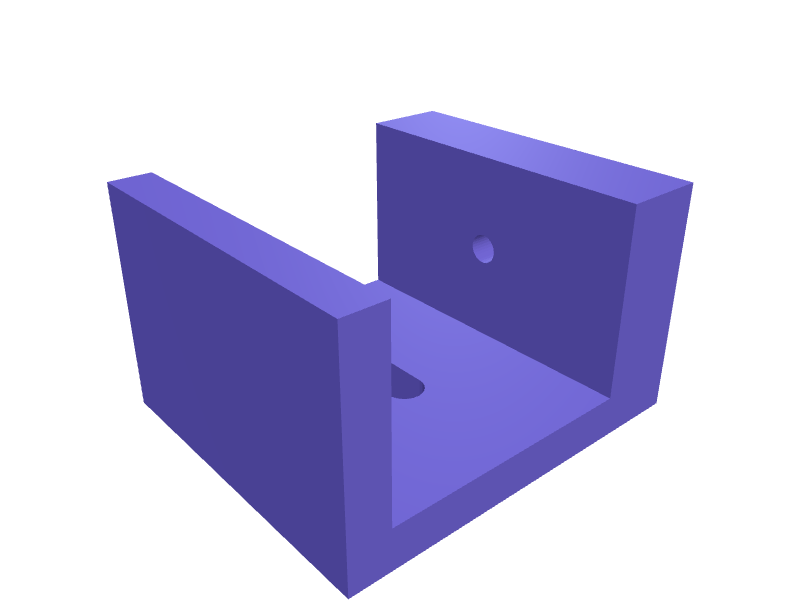
A clip that hides an Aqara Hub M3 under a 12–24 mm shelf with the USB-C facing out. Print in PETG. Open the ready-made model free, resize it on your phone or computer, then download a print-ready STL, 3MF or G-code sliced for your printer, free.Opening the ready-made model and downloading it as STL or 3MF are free, no card; AI changes use credits, from Maker at $7.99 a month.No printer? We print this part and ship it to your door. See its priceUpdated
2
Adjust
Change its numbers in the viewer for free, or ask the AI in the chat: wall thickness, hole size, the thing it clips onto. AI changes use 2 credits per request (1 for a quick edit, 3 for a redesign), paid with a plan from Maker at $7.99 a month, where the first 3 small changes are free.3Print
Download a watertight STL or 3MF free, with your numbers and hand edits, or G-code sliced for your printer at the same price. After an AI change the download is included in every plan (4 credits without one).
Dimensions of the ready-made model (editable)
| Parameter | Value |
|---|---|
| Overall width | 32 mm |
| Back plate thickness (also base thickness) | 4 mm |
| Jaw rib thickness | 4 mm |
| Jaw rib height (how far it hooks over shelf top) | 18 mm |
| Boss rib thickness (screw thread engagement) | 8 mm |
| Boss rib height | 18 mm |
| Thickest shelf this clip fits | 24 mm |
| Extra room above max thickness | 1 mm |
| USB-C cutout width | 9.5 mm |
| USB-C cutout height | 3.7 mm |
| Clearance added to self-tapping M3 pilot hole | 0.2 mm |
Example prompt
Model an M3 under-shelf clip for 12–24 mm shelves, USB-C facing out, 1.6 mm PETG.
Fit notes
The hub on the router is ugly. In SpeakCAD you measure the shelf, preview the clip in the browser, then download the STL.
Questions people ask about an Aqara Hub M3 under-shelf clip
A clip that hides an Aqara Hub M3 under a 12–24 mm shelf with the USB-C facing out. Print in PETG.
Click Open it free on this page and create a free account (no card): the ready-made model opens in your browser, on your phone or computer, nothing to install. Change its numbers in the viewer for free and download a watertight STL or 3MF free, or G-code sliced for your printer at the same price. An AI change in the chat uses 2 credits per request (3 for a redesign), and the download after it is included in every plan (4 credits without one). Start with Maker: 50 credits a month for $7.99, cancel anytime.
On this page: open the ready-made model free in a SpeakCAD account (no card), change any dimension in the viewer, then download the STL or 3MF free, or G-code sliced for your printer at the same price.
A shared STL is modelled for someone else's measurements. Here you open the ready-made model free, change it to your measurements in the viewer, then download a file sized for the part you actually own, free as STL or 3MF.
Yes. SpeakCAD slices the part on its servers with OrcaSlicer and your printer's official profile (380+ printers, including Bambu Lab, Prusa, Creality and Elegoo), and you download the G-code (a sliced .gcode.3mf for Bambu Lab printers). G-code sliced for your printer costs the same as the STL: included in every plan, free for a part you shaped by hand, 4 credits without a plan for a part with AI work in it. Pick your printer on the printers page to see its profile.
No. SpeakCAD runs in the browser on your phone or computer: the chat, the 3D engine and the live viewer load in the tab. The only file you download is the finished STL, 3MF or sliced G-code.
Print it your way
More brackets & mounts
reMarkable Paper Pro wall dock with Marker slotReady-made, opens free. A wall dock that holds a reMarkable Paper Pro (about 274 × 197 × 5.1 mm) and parks the Marker Plus in a 12 mm bore 140 mm deep.Studio Display iPhone Continuity Camera mountReady-made, opens free. A MagSafe clip that hangs an iPhone 16 or 17 on the top bezel of a Studio Display for Continuity Camera, 8–14 mm bezel clamp and a 56 mm MagSafe disc.Saddle clamp for 20 mm electrical conduitReady-made, opens free. A single-screw saddle that fixes 20 mm PVC electrical conduit to a wall or joist, handy when a run needs one more clip and the shop is closed.Garmin Edge 840 out-front mount for 31.8 mm barsReady-made, opens free. An out-front mount that clamps a 31.8 mm road handlebar and holds a Garmin Edge 840 (or the identically sized Edge 540) level with the stem, roughly 75 mm ah…Philips Hue Play light bar monitor clip mountReady-made, opens free. A clip that hangs a Philips Hue Play light bar on the back of a monitor without the stock adhesive feet.Elegoo Neptune 4 build plate wall hanger rackReady-made, opens free. A wall rack that stores three spare Elegoo Neptune 4 or Neptune 4 Pro flexible PEI plates (235 by 235 mm) on edge so the coating never touches another plate.