1
Brackets & mounts
Studio Display iPhone Continuity Camera mount
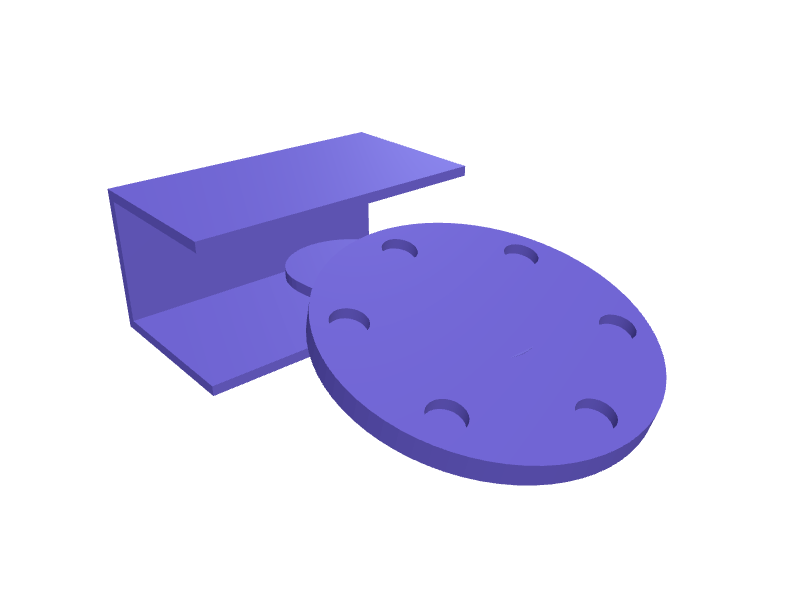
A MagSafe clip that hangs an iPhone 16 or 17 on the top bezel of a Studio Display for Continuity Camera, 8–14 mm bezel clamp and a 56 mm MagSafe disc. Print in PETG. Open the ready-made model free, resize it on your phone or computer, then download a print-ready STL, 3MF or G-code sliced for your printer, free.Opening the ready-made model and downloading it as STL or 3MF are free, no card; AI changes use credits, from Maker at $7.99 a month.No printer? We print this part and ship it to your door. See its priceUpdated
2
Adjust
Change its numbers in the viewer for free, or ask the AI in the chat: wall thickness, hole size, the thing it clips onto. AI changes use 2 credits per request (1 for a quick edit, 3 for a redesign), paid with a plan from Maker at $7.99 a month, where the first 3 small changes are free.3Print
Download a watertight STL or 3MF free, with your numbers and hand edits, or G-code sliced for your printer at the same price. After an AI change the download is included in every plan (4 credits without one).
Dimensions of the ready-made model (editable)
| Parameter | Value |
|---|---|
| Wall thickness | 2 mm |
| Bezel thickness (8-14mm) | 11 mm |
| Clamp width along bezel | 60 mm |
| Height of clamp opening | 25 mm |
| How far clamp jaws extend | 20 mm |
| MagSafe disc diameter | 56 mm |
| Disc thickness | 4 mm |
| Magnet pocket diameter | 6 mm |
| Magnet pocket depth | 2 mm |
| Arm length from clamp to disc | 35 mm |
| Clearance around bezel | 0.4 mm |
Example prompt
Create a Studio Display Continuity mount: 8–14 mm bezel clamp, 56 mm MagSafe disc with six 6×2 mm magnet pockets, 2 mm PETG.
Fit notes
The built-in camera is wide; a phone on a sticky pad falls. In SpeakCAD you measure the bezel, preview the clip in the browser, then download the STL.
Questions people ask about a Studio Display iPhone Continuity Camera mount
A MagSafe clip that hangs an iPhone 16 or 17 on the top bezel of a Studio Display for Continuity Camera, 8–14 mm bezel clamp and a 56 mm MagSafe disc. Print in PETG.
Click Open it free on this page and create a free account (no card): the ready-made model opens in your browser, on your phone or computer, nothing to install. Change its numbers in the viewer for free and download a watertight STL or 3MF free, or G-code sliced for your printer at the same price. An AI change in the chat uses 2 credits per request (3 for a redesign), and the download after it is included in every plan (4 credits without one). Start with Maker: 50 credits a month for $7.99, cancel anytime.
On this page: open the ready-made model free in a SpeakCAD account (no card), change any dimension in the viewer, then download the STL or 3MF free, or G-code sliced for your printer at the same price.
A shared STL is modelled for someone else's measurements. Here you open the ready-made model free, change it to your measurements in the viewer, then download a file sized for the part you actually own, free as STL or 3MF.
Yes. SpeakCAD slices the part on its servers with OrcaSlicer and your printer's official profile (380+ printers, including Bambu Lab, Prusa, Creality and Elegoo), and you download the G-code (a sliced .gcode.3mf for Bambu Lab printers). G-code sliced for your printer costs the same as the STL: included in every plan, free for a part you shaped by hand, 4 credits without a plan for a part with AI work in it. Pick your printer on the printers page to see its profile.
No. SpeakCAD runs in the browser on your phone or computer: the chat, the 3D engine and the live viewer load in the tab. The only file you download is the finished STL, 3MF or sliced G-code.
Print it your way
More brackets & mounts
Garmin Edge 840 out-front mount for 31.8 mm barsReady-made, opens free. An out-front mount that clamps a 31.8 mm road handlebar and holds a Garmin Edge 840 (or the identically sized Edge 540) level with the stem, roughly 75 mm ah…Philips Hue Play light bar monitor clip mountReady-made, opens free. A clip that hangs a Philips Hue Play light bar on the back of a monitor without the stock adhesive feet.Elegoo Neptune 4 build plate wall hanger rackReady-made, opens free. A wall rack that stores three spare Elegoo Neptune 4 or Neptune 4 Pro flexible PEI plates (235 by 235 mm) on edge so the coating never touches another plate.reMarkable Paper Pro wall dock with Marker slotReady-made, opens free. A wall dock that holds a reMarkable Paper Pro (about 274 × 197 × 5.1 mm) and parks the Marker Plus in a 12 mm bore 140 mm deep.Mac mini M4 Pro VESA 100 bracketReady-made, opens free. A VESA 100 bracket that hangs a Mac mini M4 Pro behind a monitor, 130 × 130 mm plate with 20 mm standoffs and four M4 holes.Saddle clamp for 20 mm electrical conduitReady-made, opens free. A single-screw saddle that fixes 20 mm PVC electrical conduit to a wall or joist, handy when a run needs one more clip and the shop is closed.