ChatGPT or Claude for designing 3D printable parts?
Both can hand a part to SpeakCAD and get an STL or G-code back. Where they differ: plans, the 3D card, remembering your printer, phone apps and Claude Code.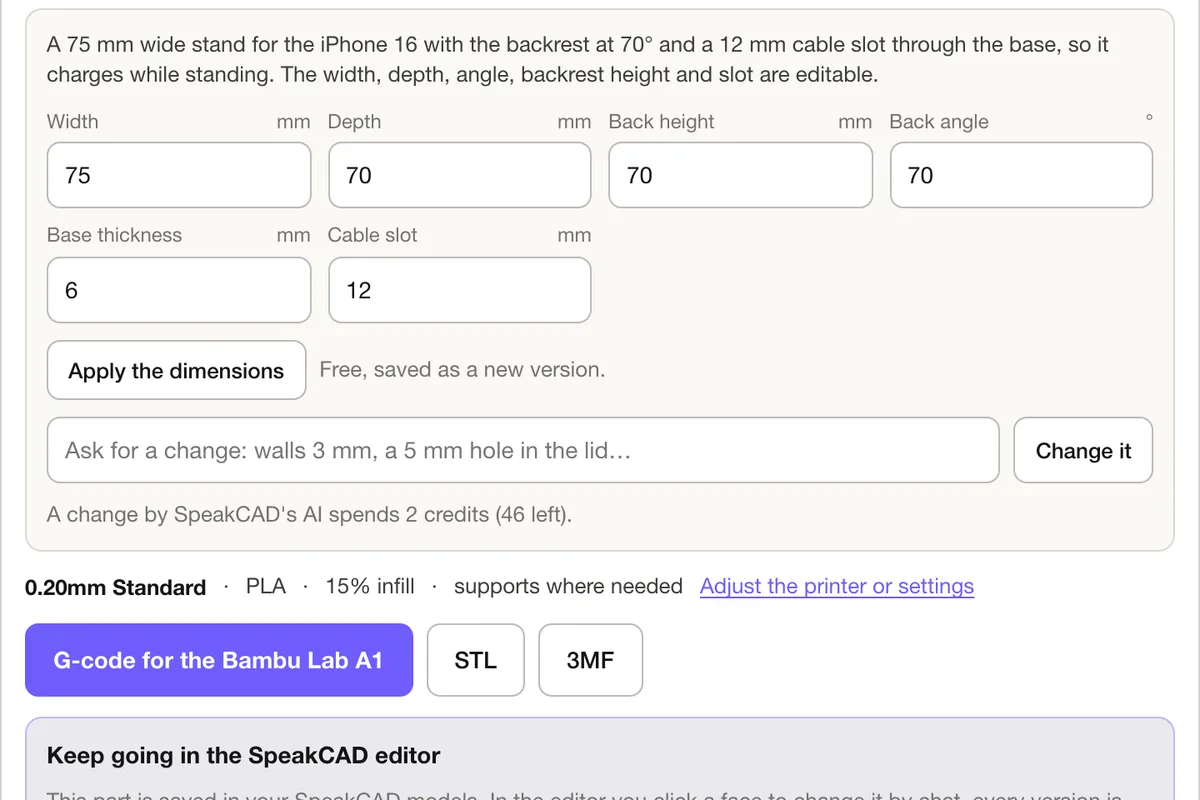
Short answer: use the one you already pay for. With SpeakCAD connected, neither assistant draws the part; SpeakCAD's own CAD AI does, the same way in both, so the geometry, the print rules and the file are identical. What differs is everything around it: how you set it up, what the chat shows, what the assistant remembers and where you can use it.
What is the same in both
- The part. ChatGPT and Claude send SpeakCAD a description with your measurements; SpeakCAD designs it in about one to two minutes, in your SpeakCAD account. Same AI, same design rules, same price as on speakcad.com.
- The files. STL or 3MF download links, or G-code sliced with the OrcaSlicer profile of your printer (380+ printers).
- The account. One SpeakCAD account works in both, and on the site: a part started in ChatGPT shows up in your models, opens in the editor, and Claude can change it later.
- The cost. 2 credits per AI request, 10 credits per download, from the same balance.
So the question is really which assistant asks better questions for you, and which setup suits you.
Setting it up
ChatGPT calls it a plugin. Search for SpeakCAD in Settings, Plugins and connect it. Where it is not listed for you, developer mode adds it by its server address; OpenAI offers developer mode on Plus, Pro, Business, Enterprise and Edu, on the web. Step by step.
Claude calls it a connector. Search for SpeakCAD in Customize, Connectors, or add it as a custom connector with the server address. Custom connectors work on every Claude plan, and the free plan allows one. Step by step.
If you are on a free plan of both, Claude is the quicker way to try the connector itself; on ChatGPT's free plan, the paste route (ask ChatGPT for the spec, paste it into SpeakCAD) gives the same part.
What the chat shows
Both render SpeakCAD's card: the part in 3D while it is designed and after, the named dimensions as number fields, the STL, 3MF and G-code buttons, and the slicer for your printer. Typing a new dimension in the card is free and saves a new version. Where an app version shows no card, the assistant still gets the size, the dimensions and the links and gives them to you in its reply.
Remembering your printer
You will slice more than one part for the same printer, so tell the assistant once:
- ChatGPT: with memory on, "remember that my printer is a Bambu Lab A1 with a 0.4 mm nozzle and I print PLA and PETG".
- Claude: put the same sentence in your profile preferences or in a Project's instructions.
Later slices start from it.
On your phone
Both phone apps use what is connected to your account. A ChatGPT plugin added through developer mode may only show on the web, depending on the version; one connected from the directory follows you to the app. Claude's connectors, once added on claude.ai or Claude Desktop, are in the iPhone and Android apps. Either way, every part is also in your SpeakCAD models, and the SpeakCAD editor runs in a phone browser.
If you write code
Claude Code takes the same server from the terminal (claude mcp add --transport http speakcad https://speakcad.com/api/mcp), and Cursor and VS Code take it in their MCP settings: handy when the firmware you are writing needs a case for the board. The MCP server page has the set-ups.
Side by side
| ChatGPT | Claude | |
|---|---|---|
| Called | Plugin | Connector |
| Add it | Settings, Plugins (or developer mode) | Customize, Connectors (or custom connector) |
| Plans for the manual route | Plus, Pro, Business, Enterprise, Edu | Every plan; free = one custom connector |
| 3D card in the chat | Yes, where the version shows it | Yes, where the app shows it |
| Remember the printer | Memory | Profile preferences or Project instructions |
| For coders | Through other MCP clients | Claude Code |
| The part and its cost | Same | Same |
The verdict
Pick the assistant you already use every day: the conversation is where it earns its place, by asking what the part holds, how it mounts and which printer you have. SpeakCAD does the CAD either way. SpeakCAD for ChatGPT and SpeakCAD for Claude have the details.
Questions
With SpeakCAD connected, the part is the same in both: SpeakCAD's own CAD AI designs it and exports the STL, 3MF or G-code. Use the assistant you already pay for; Claude allows one custom connector on its free plan, and ChatGPT's developer mode needs a paid plan.
Yes. Connect the same SpeakCAD account to both: parts made in one show up in your SpeakCAD models and can be changed from the other, or in the editor on speakcad.com.
For Claude, no: custom connectors work on every plan, the free one allows one. For ChatGPT, developer mode needs Plus, Pro, Business, Enterprise or Edu; the plugin directory follows OpenAI's availability for your plan. SpeakCAD's own work is paid from your SpeakCAD credits either way.