1
Kitchen & home
Sofa arm remote control caddy
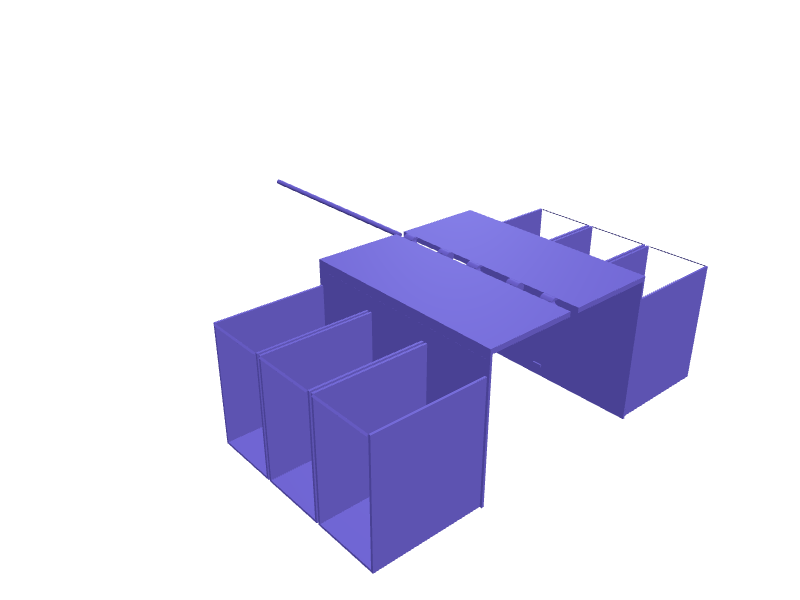
A saddle that drapes over the arm of a sofa or chair and holds remotes and a phone within reach. The saddle spans a 150 mm wide arm with 2 mm of clearance and 120 mm drops on each side, the outer face carries three pockets 55 mm wide and 90 mm deep with 1.8 mm walls, and a 4 mm fillet at every edge stops the plastic marking upholstery. It prints in two hinged halves that print flat and snap together. Open the ready-made model free, resize it on your phone or computer, then download a print-ready STL, 3MF or G-code sliced for your printer, free.Opening the ready-made model and downloading it as STL or 3MF are free, no card; AI changes use credits, from Maker at $7.99 a month.No printer? We print this part and ship it to your door. See its priceUpdated
2
Adjust
Change its numbers in the viewer for free, or ask the AI in the chat: wall thickness, hole size, the thing it clips onto. AI changes use 2 credits per request (1 for a quick edit, 3 for a redesign), paid with a plan from Maker at $7.99 a month.3Print
Download a watertight STL or 3MF free, with your numbers and hand edits, or G-code sliced for your printer at the same price. After an AI change the download is included in every plan (4 credits without one).
Dimensions of the ready-made model (editable)
| Parameter | Value |
|---|---|
| sofa arm width | 150 mm |
| extra clearance across arm | 2 mm |
| length of hanging legs | 120 mm |
| thickness of the top bridge | 4 mm |
| wall thickness everywhere | 1.8 mm |
| pocket width | 55 mm |
| pocket depth (outward) | 90 mm |
| pocket height (open top) | 100 mm |
| number of pockets | 3 |
| fillet radius on main edges | 4 mm |
Example prompt
Design a sofa arm caddy spanning a 150 mm arm with 2 mm clearance, 120 mm drops each side, three pockets 55 mm wide and 90 mm deep on the outer face, 1.8 mm walls, 4 mm fillets, split into two halves with a hinge and 0.3 mm snap.
Fit notes
Sofa arms are anything from 80 to 250 mm wide, so a caddy generated around yours sits level while a downloaded one slides. Give SpeakCAD the arm width and how many remotes you own, preview the caddy in the browser, add a cup recess, then download the STL and print.
Questions people ask about a sofa arm remote control caddy
A saddle that drapes over the arm of a sofa or chair and holds remotes and a phone within reach. The saddle spans a 150 mm wide arm with 2 mm of clearance and 120 mm drops on each side, the outer face carries three pockets 55 mm wide and 90 mm deep with 1.8 mm walls, and a 4 mm fillet at every edge stops the plastic marking upholstery. It prints in two hinged halves that print flat and snap together.
Click Open it free on this page and create a free account (no card): the ready-made model opens in your browser, on your phone or computer, nothing to install. Change its numbers in the viewer for free and download a watertight STL or 3MF free, or G-code sliced for your printer at the same price. An AI change in the chat uses 2 credits per request (3 for a redesign), and the download after it is included in every plan (4 credits without one). Start with Maker: 50 credits a month for $7.99, cancel anytime.
On this page: open the ready-made model free in a SpeakCAD account (no card), change any dimension in the viewer, then download the STL or 3MF free, or G-code sliced for your printer at the same price.
A shared STL is modelled for someone else's measurements. Here you open the ready-made model free, change it to your measurements in the viewer, then download a file sized for the part you actually own, free as STL or 3MF.
Yes. SpeakCAD slices the part on its servers with OrcaSlicer and your printer's official profile (380+ printers, including Bambu Lab, Prusa, Creality and Elegoo), and you download the G-code (a sliced .gcode.3mf for Bambu Lab printers). G-code sliced for your printer costs the same as the STL: included in every plan, free for a part you shaped by hand, 4 credits without a plan for a part with AI work in it. Pick your printer on the printers page to see its profile.
No. SpeakCAD runs in the browser on your phone or computer: the chat, the 3D engine and the live viewer load in the tab. The only file you download is the finished STL, 3MF or sliced G-code.
Print it your way
More kitchen & home
In-drawer knife block with angled slotsReady-made, opens free. A low block that lies in a drawer and holds kitchen knives by their blades in angled slots.Custom shape cookie cutter with stampReady-made, opens free. A cookie cutter made from any outline you describe, with a sharp cutting edge on one side and a wide pressing flange on the other so dough releases cleanly.AeroPress stand with paper filter holder and cap slotReady-made, opens free. A countertop stand that keeps an AeroPress Original or Clear chamber, plunger, filter cap and paper filters together in one spot.Nespresso Vertuo Next drip-tray extensionReady-made, opens free. An extension that raises a Vertuo Next drip tray 25 mm so a 12 oz mug fits under the spout.Cosori Dual Blaze basket-divider clipReady-made, opens free. A clip that holds a silicone liner halfway across a Dual Blaze basket so two foods do not mix.Dyson Airwrap Complete Long standReady-made, opens free. A counter stand that holds a Dyson Airwrap Complete Long (about 41 mm handle, 270 mm long) barrel-up so the cord does not yank it over.