1
Organizers & storage
Small parts sorting bins with label slot
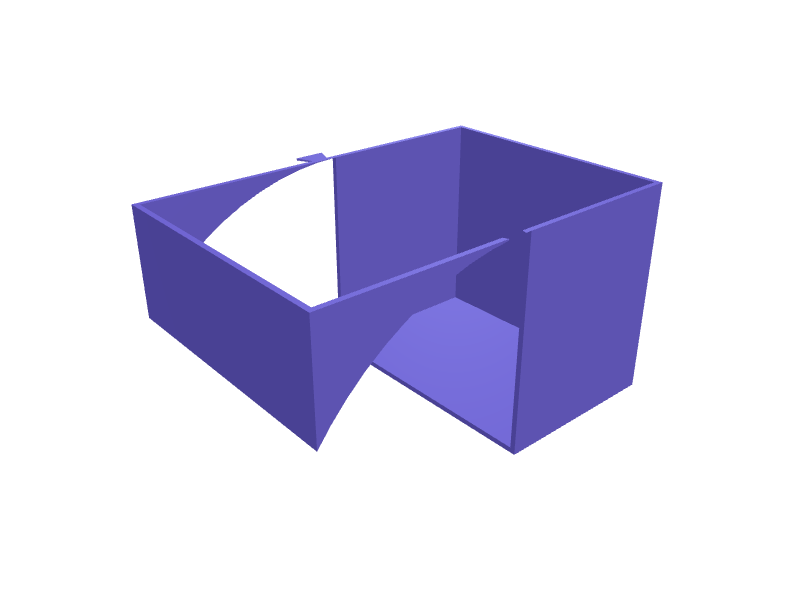
Open-fronted bins for screws, nuts, LEDs, beads or any tiny hardware that otherwise ends up loose in a jar. Each bin has a scooped front so parts can be tipped into your hand, a recessed label slot for a strip of paper, and dovetail rails on the sides so a row of bins clips together on a shelf. Print them upright with 1.2 mm walls and a 45 degree chamfer under the front lip to avoid overhang sag. Open the ready-made model free, resize it on your phone or computer, then download a print-ready STL, 3MF or G-code sliced for your printer, free.Opening the ready-made model and downloading it as STL or 3MF are free, no card; AI changes use credits, from Maker at $7.99 a month.No printer? We print this part and ship it to your door. See its priceUpdated
2
Adjust
Change its numbers in the viewer for free, or ask the AI in the chat: wall thickness, hole size, the thing it clips onto. AI changes use 2 credits per request (1 for a quick edit, 3 for a redesign), paid with a plan from Maker at $7.99 a month.3Print
Download a watertight STL or 3MF free, with your numbers and hand edits, or G-code sliced for your printer at the same price. After an AI change the download is included in every plan (4 credits without one).
Dimensions of the ready-made model (editable)
| Parameter | Value |
|---|---|
| outer width (X) | 60 mm |
| outer depth (Y) | 90 mm |
| outer height (Z) | 50 mm |
| wall thickness | 1.2 mm |
| floor thickness | 1.2 mm |
| height of front opening above floor | 25 mm |
| scoop cylinder radius | 60 mm |
| recess depth | 0.6 mm |
Example prompt
Create a small parts bin 60 mm wide, 90 mm deep and 50 mm tall with 1.2 mm walls, a scooped open front 25 mm high, a 40 x 12 mm recessed label slot on the front face and dovetail rails on both sides for clipping bins together.
Fit notes
Because you tell SpeakCAD the exact footprint, the bins can be sized to the shelf or drawer they will live in rather than the other way round. Open the ready-made model free, change its numbers in the viewer and download the STL or 3MF free; AI changes use credits.
Questions people ask about small parts sorting bins with label slot
Open-fronted bins for screws, nuts, LEDs, beads or any tiny hardware that otherwise ends up loose in a jar. Each bin has a scooped front so parts can be tipped into your hand, a recessed label slot for a strip of paper, and dovetail rails on the sides so a row of bins clips together on a shelf. Print them upright with 1.2 mm walls and a 45 degree chamfer under the front lip to avoid overhang sag.
Click Open it free on this page and create a free account (no card): the ready-made model opens in your browser, on your phone or computer, nothing to install. Change its numbers in the viewer for free and download a watertight STL or 3MF free, or G-code sliced for your printer at the same price. An AI change in the chat uses 2 credits per request (3 for a redesign), and the download after it is included in every plan (4 credits without one). Start with Maker: 50 credits a month for $7.99, cancel anytime.
On this page: open the ready-made model free in a SpeakCAD account (no card), change any dimension in the viewer, then download the STL or 3MF free, or G-code sliced for your printer at the same price.
A shared STL is modelled for someone else's measurements. Here you open the ready-made model free, change it to your measurements in the viewer, then download a file sized for the part you actually own, free as STL or 3MF.
Yes. SpeakCAD slices the part on its servers with OrcaSlicer and your printer's official profile (380+ printers, including Bambu Lab, Prusa, Creality and Elegoo), and you download the G-code (a sliced .gcode.3mf for Bambu Lab printers). G-code sliced for your printer costs the same as the STL: included in every plan, free for a part you shaped by hand, 4 credits without a plan for a part with AI work in it. Pick your printer on the printers page to see its profile.
No. SpeakCAD runs in the browser on your phone or computer: the chat, the 3D engine and the live viewer load in the tab. The only file you download is the finished STL, 3MF or sliced G-code.
Print it your way
More organizers & storage
Philips Sonicare brush head stand for four headsReady-made, opens free. A stand that holds four Philips Sonicare brush heads upright next to the charger so each family member's head dries in the air rather than lying on the sink.Milwaukee Packout Compact Organizer bit railsReady-made, opens free. Two drop-in rails that turn a Packout Compact Organizer (48-22-8435) into a 1/4 inch hex-bit station with 20 pockets per rail, 6.6 mm hex by 12 mm deep.Sonicare DiamondClean travel-case insertReady-made, opens free. An insert that holds a DiamondClean handle and two heads in a 180 × 50 mm hard case with 0.4 mm clearance.Charging cable organizer with wrap postsReady-made, opens free. A flat plate with staggered posts that lets you coil USB-C, Lightning and micro-USB cables in figure eights and park the connectors in labelled pockets so th…iPad and iPhone family charging station rack with cable slotsReady-made, opens free. A countertop rack with upright slots for two iPads and three iPhones, so the family devices charge in one place overnight.Gridfinity holder for Knipex Pliers Wrench and CobraReady-made, opens free. A 2 by 2 Gridfinity block, 83.5 by 83.5 mm, with four angled slots that hold a Knipex Pliers Wrench 180 and 250 and Cobra 180 and 250 jaws-down so the handle…