1
Adapters & couplers
Peak Design Capture clip backing plate for thin straps
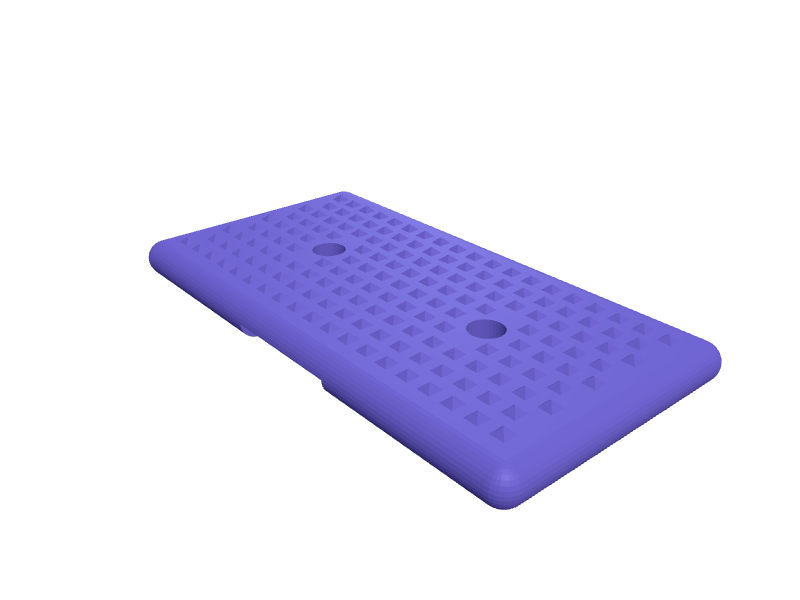
A spacer plate that sits behind a Peak Design Capture V3 clip so it clamps firmly onto thin backpack straps, seatbelt-style webbing or a 20 mm MOLLE row that the stock back plate cannot squeeze. The Capture clamp handles straps up to about 64 mm wide and 15 mm thick; this 84 x 44 mm plate is 6 mm thick with two 5.5 mm bolt holes (measure your clip's bolt spacing, roughly 36 mm) and a 1 mm textured grip pattern so the strap cannot creep under the weight of a Sony A6700 or Fujifilm X100VI. A 3 mm rounded edge keeps it comfortable against a shoulder. Print it flat in PETG with 100 percent infill. Open the ready-made model free, resize it on your phone or computer, then download a print-ready STL, 3MF or G-code sliced for your printer, free.Opening the ready-made model and downloading it as STL or 3MF are free, no card; AI changes use credits, from Maker at $7.99 a month.No printer? We print this part and ship it to your door. See its priceUpdated
2
Adjust
Change its numbers in the viewer for free, or ask the AI in the chat: wall thickness, hole size, the thing it clips onto. AI changes use 2 credits per request (1 for a quick edit, 3 for a redesign), paid with a plan from Maker at $7.99 a month.3Print
Download a watertight STL or 3MF free, with your numbers and hand edits, or G-code sliced for your printer at the same price. After an AI change the download is included in every plan (4 credits without one).
Dimensions of the ready-made model (editable)
| Parameter | Value |
|---|---|
| length (X) | 84 mm |
| width (Y) | 44 mm |
| thickness (Z) | 6 mm |
| edge rounding radius (= half thickness -> full rounding) | 3 mm |
| bolt hole diameter | 5.5 mm |
| channel width | 20 mm |
| channel depth | 2 mm |
| diamond height | 1 mm |
| pyramid base radius (diamond footprint) | 1.6 mm |
| keep texture away from plate edges | 6 mm |
| keep texture clear of bolt holes | 4.5 mm |
Example prompt
Model a backing plate 84 x 44 x 6 mm for a Peak Design Capture clip with two 5.5 mm bolt holes 36 mm apart, a 1 mm raised diamond grip texture on one face, 3 mm rounded edges and a 20 mm wide, 2 mm deep channel across the back for MOLLE webbing.
Fit notes
Instead of jamming folded card behind the clip, you give SpeakCAD your strap thickness and bolt spacing and it draws a plate that fits, previewable in the browser, adjustable in the chat and then downloadable as an STL.
Questions people ask about a Peak Design Capture clip backing plate for thin straps
A spacer plate that sits behind a Peak Design Capture V3 clip so it clamps firmly onto thin backpack straps, seatbelt-style webbing or a 20 mm MOLLE row that the stock back plate cannot squeeze. The Capture clamp handles straps up to about 64 mm wide and 15 mm thick; this 84 x 44 mm plate is 6 mm thick with two 5.5 mm bolt holes (measure your clip's bolt spacing, roughly 36 mm) and a 1 mm textured grip pattern so the strap cannot creep under the weight of a Sony A6700 or Fujifilm X100VI. A 3 mm rounded edge keeps it comfortable against a shoulder. Print it flat in PETG with 100 percent infill.
Click Open it free on this page and create a free account (no card): the ready-made model opens in your browser, on your phone or computer, nothing to install. Change its numbers in the viewer for free and download a watertight STL or 3MF free, or G-code sliced for your printer at the same price. An AI change in the chat uses 2 credits per request (3 for a redesign), and the download after it is included in every plan (4 credits without one). Start with Maker: 50 credits a month for $7.99, cancel anytime.
On this page: open the ready-made model free in a SpeakCAD account (no card), change any dimension in the viewer, then download the STL or 3MF free, or G-code sliced for your printer at the same price.
A shared STL is modelled for someone else's measurements. Here you open the ready-made model free, change it to your measurements in the viewer, then download a file sized for the part you actually own, free as STL or 3MF.
Yes. SpeakCAD slices the part on its servers with OrcaSlicer and your printer's official profile (380+ printers, including Bambu Lab, Prusa, Creality and Elegoo), and you download the G-code (a sliced .gcode.3mf for Bambu Lab printers). G-code sliced for your printer costs the same as the STL: included in every plan, free for a part you shaped by hand, 4 credits without a plan for a part with AI work in it. Pick your printer on the printers page to see its profile.
No. SpeakCAD runs in the browser on your phone or computer: the chat, the 3D engine and the live viewer load in the tab. The only file you download is the finished STL, 3MF or sliced G-code.
Print it your way
More adapters & couplers
DJI Mini 4 Pro landing gear extensions clip-onReady-made, opens free. A set of four clip-on leg extensions for the DJI Mini 4 Pro and Mini 3 Pro that raise the airframe 35 mm so the downward vision sensors and gimbal stay out o…Peak Design Travel Tripod phone clampReady-made, opens free. A clamp that puts a 70–85 mm phone on a Travel Tripod's cold shoe, 12 mm shoe and a 1/4-20 backup.Fan adapter, 80 mm frame to 120 mm fanReady-made, opens free. A funnel-shaped shroud that fits a quieter 120 mm fan onto a case or power supply opening designed for an 80 mm fan.Peak Design mobile SlimLink to 1/4-20 tripod adapterReady-made, opens free. A tripod adapter for Peak Design Everyday cases and Universal adapters that reproduces the square SlimLink mounting boss and adds a 1/4-20 socket underneath…Insta360 X3 to GoPro finger mount adapterReady-made, opens free. The Insta360 X3 and X4 use a 1/4-20 tripod thread on the base, while bike, helmet and chest mounts use the GoPro three-finger interface.Festool CT 27 mm hose to 32 mm adapterReady-made, opens free. A short adapter that lets the 27 mm anti-static hose from a Festool CT 26, CT 36 or CTL MIDI plug into 32 mm dust ports on non-Festool tools such as Makita s…