1
Brackets & mounts
Nintendo Switch OLED dock wall mount holder
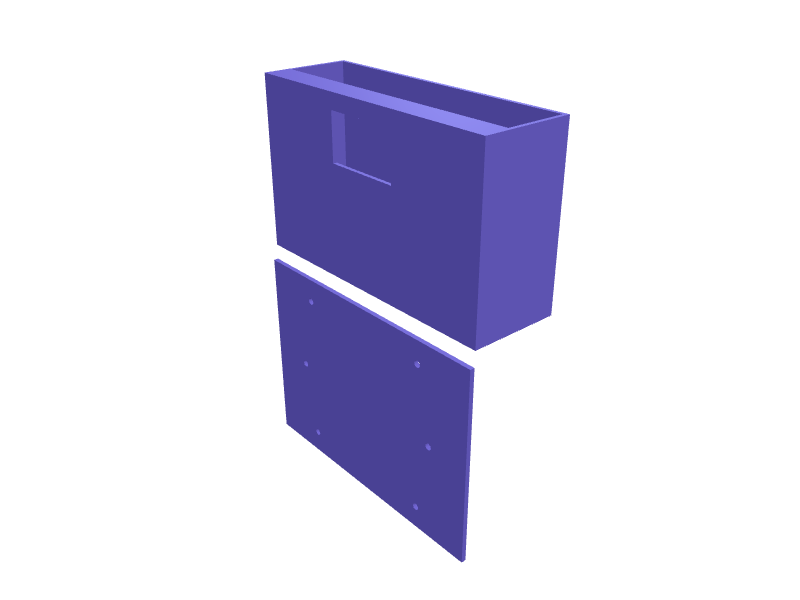
A wall bracket that holds the Nintendo Switch dock beside or behind a TV so the console docks vertically and the HDMI, power and USB cables stay hidden. The OLED dock measures 173 x 104 x 51 mm and the original is a fraction slimmer; both drop into a 175 x 53 mm channel with 0.5 mm clearance and a 15 mm front lip that keeps the dock captive while leaving the front USB ports reachable. A 50 x 30 mm cutout at the bottom lets the rear cable cover open, and two 4.5 mm screw holes at 120 mm spacing plus a 100 x 100 mm VESA pattern fix it to a wall or the back of the TV. Print it on its back with 2.5 mm walls. Open the ready-made model free, resize it on your phone or computer, then download a print-ready STL, 3MF or G-code sliced for your printer, free.Opening the ready-made model and downloading it as STL or 3MF are free, no card; AI changes use credits, from Maker at $7.99 a month.No printer? We print this part and ship it to your door. See its priceUpdated
2
Adjust
Change its numbers in the viewer for free, or ask the AI in the chat: wall thickness, hole size, the thing it clips onto. AI changes use 2 credits per request (1 for a quick edit, 3 for a redesign), paid with a plan from Maker at $7.99 a month.3Print
Download a watertight STL or 3MF free, with your numbers and hand edits, or G-code sliced for your printer at the same price. After an AI change the download is included in every plan (4 credits without one).
Dimensions of the ready-made model (editable)
| Parameter | Value |
|---|---|
| front lip depth (inward from front top edge) | 15 mm |
| height of lip flange | 10 mm |
Example prompt
Model a Nintendo Switch OLED dock wall mount: a 175 x 53 x 110 mm channel with 0.5 mm clearance and a 15 mm front lip, a 50 x 30 mm rear cable cutout, a 3 mm back plate with two 4.5 mm screw holes 120 mm apart and a 100 x 100 mm VESA M4 pattern, 2.5 mm walls.
Fit notes
TV set-ups differ, so a downloaded bracket rarely leaves the cable cover openable. Tell SpeakCAD which dock you own and where the cables exit, preview the mount in the browser, adjust it in the chat and download the STL.
Questions people ask about a Nintendo Switch OLED dock wall mount holder
A wall bracket that holds the Nintendo Switch dock beside or behind a TV so the console docks vertically and the HDMI, power and USB cables stay hidden. The OLED dock measures 173 x 104 x 51 mm and the original is a fraction slimmer; both drop into a 175 x 53 mm channel with 0.5 mm clearance and a 15 mm front lip that keeps the dock captive while leaving the front USB ports reachable. A 50 x 30 mm cutout at the bottom lets the rear cable cover open, and two 4.5 mm screw holes at 120 mm spacing plus a 100 x 100 mm VESA pattern fix it to a wall or the back of the TV. Print it on its back with 2.5 mm walls.
Click Open it free on this page and create a free account (no card): the ready-made model opens in your browser, on your phone or computer, nothing to install. Change its numbers in the viewer for free and download a watertight STL or 3MF free, or G-code sliced for your printer at the same price. An AI change in the chat uses 2 credits per request (3 for a redesign), and the download after it is included in every plan (4 credits without one). Start with Maker: 50 credits a month for $7.99, cancel anytime.
On this page: open the ready-made model free in a SpeakCAD account (no card), change any dimension in the viewer, then download the STL or 3MF free, or G-code sliced for your printer at the same price.
A shared STL is modelled for someone else's measurements. Here you open the ready-made model free, change it to your measurements in the viewer, then download a file sized for the part you actually own, free as STL or 3MF.
Yes. SpeakCAD slices the part on its servers with OrcaSlicer and your printer's official profile (380+ printers, including Bambu Lab, Prusa, Creality and Elegoo), and you download the G-code (a sliced .gcode.3mf for Bambu Lab printers). G-code sliced for your printer costs the same as the STL: included in every plan, free for a part you shaped by hand, 4 credits without a plan for a part with AI work in it. Pick your printer on the printers page to see its profile.
No. SpeakCAD runs in the browser on your phone or computer: the chat, the 3D engine and the live viewer load in the tab. The only file you download is the finished STL, 3MF or sliced G-code.
Print it your way
More brackets & mounts
Hidden AirTag mount under bike saddle railsReady-made, opens free. A small clamshell that bolts between the two 7 mm rails under a bicycle saddle and hides an Apple AirTag (31.9 mm diameter, 8 mm thick) where a thief will no…Philips Hue motion sensor corner mount bracketReady-made, opens free. A wedge that lets the Philips Hue motion sensor sit in the corner of a room, where its field of view covers the whole space.Bambu Lab A1 AMS Lite spool holder riser bracketReady-made, opens free. A riser that lifts the Bambu Lab AMS Lite 60 mm above the desk so the four spools clear the A1 or A1 mini bed when the printer sits on a shelf, and adds feet…reMarkable Paper Pro wall dock with Marker slotReady-made, opens free. A wall dock that holds a reMarkable Paper Pro (about 274 × 197 × 5.1 mm) and parks the Marker Plus in a 12 mm bore 140 mm deep.Mac mini M4 Pro VESA 100 bracketReady-made, opens free. A VESA 100 bracket that hangs a Mac mini M4 Pro behind a monitor, 130 × 130 mm plate with 20 mm standoffs and four M4 holes.Wall holder for a laptop power brickReady-made, opens free. A cradle that holds a power supply brick against the wall or under a shelf, keeping it off the carpet where it collects dust and overheats.