1
Kitchen & home
Measuring spoon and cup drawer rack
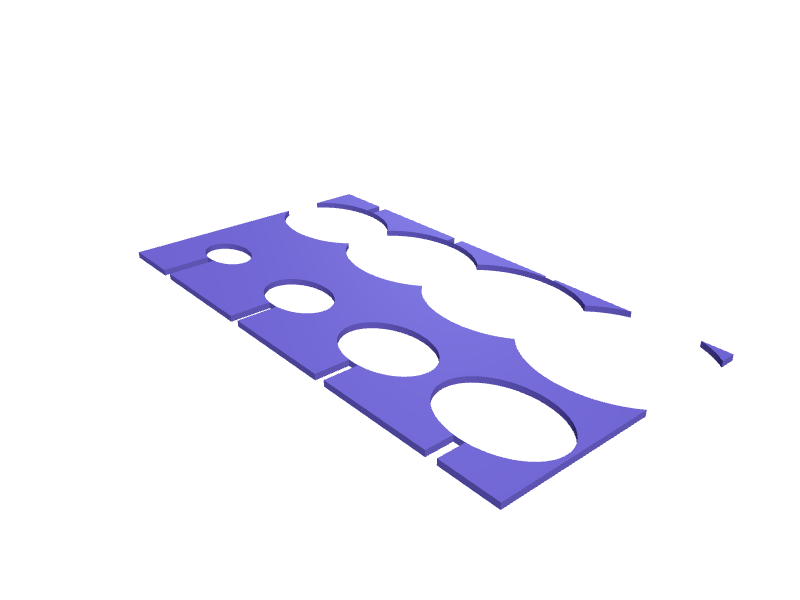
A flat rack that lays measuring spoons and cups in graduated nests inside a drawer so the set stays in order. Each nest is a shallow oval pocket matching the bowl of the spoon with 1 mm clearance, arranged from quarter teaspoon to one cup, with a 6 mm handle groove running toward the front. The rack is 3 mm thick with 1.2 mm pocket rims, embossed size labels beside each pocket, and prints flat with no supports. Open the ready-made model free, resize it on your phone or computer, then download a print-ready STL, 3MF or G-code sliced for your printer, free.Opening the ready-made model and downloading it as STL or 3MF are free, no card; AI changes use credits, from Maker at $7.99 a month.No printer? We print this part and ship it to your door. See its priceUpdated
2
Adjust
Change its numbers in the viewer for free, or ask the AI in the chat: wall thickness, hole size, the thing it clips onto. AI changes use 2 credits per request (1 for a quick edit, 3 for a redesign), paid with a plan from Maker at $7.99 a month.3Print
Download a watertight STL or 3MF free, with your numbers and hand edits, or G-code sliced for your printer at the same price. After an AI change the download is included in every plan (4 credits without one).
Dimensions of the ready-made model (editable)
| Parameter | Value |
|---|---|
| base thickness | 3 mm |
| rim between pockets / edges | 1.2 mm |
| clearance added to each pocket dimension | 1 mm |
| handle groove width to front edge | 6 mm |
Example prompt
Design a drawer rack 260 x 140 mm and 3 mm thick with eight graduated oval pockets for measuring spoons and cups from 30 x 20 mm up to 90 x 75 mm, 1 mm clearance, 1.2 mm pocket rims, 6 mm handle grooves to the front.
Fit notes
Every measuring set has slightly different bowl shapes, so a rack generated from your set's measurements holds them properly where a downloaded one rattles. Give SpeakCAD your pocket sizes, preview the rack in the browser, add a well for a kitchen timer or a magnet strip, and download the STL when everything nests correctly.
Questions people ask about a measuring spoon and cup drawer rack
A flat rack that lays measuring spoons and cups in graduated nests inside a drawer so the set stays in order. Each nest is a shallow oval pocket matching the bowl of the spoon with 1 mm clearance, arranged from quarter teaspoon to one cup, with a 6 mm handle groove running toward the front. The rack is 3 mm thick with 1.2 mm pocket rims, embossed size labels beside each pocket, and prints flat with no supports.
Click Open it free on this page and create a free account (no card): the ready-made model opens in your browser, on your phone or computer, nothing to install. Change its numbers in the viewer for free and download a watertight STL or 3MF free, or G-code sliced for your printer at the same price. An AI change in the chat uses 2 credits per request (3 for a redesign), and the download after it is included in every plan (4 credits without one). Start with Maker: 50 credits a month for $7.99, cancel anytime.
On this page: open the ready-made model free in a SpeakCAD account (no card), change any dimension in the viewer, then download the STL or 3MF free, or G-code sliced for your printer at the same price.
A shared STL is modelled for someone else's measurements. Here you open the ready-made model free, change it to your measurements in the viewer, then download a file sized for the part you actually own, free as STL or 3MF.
Yes. SpeakCAD slices the part on its servers with OrcaSlicer and your printer's official profile (380+ printers, including Bambu Lab, Prusa, Creality and Elegoo), and you download the G-code (a sliced .gcode.3mf for Bambu Lab printers). G-code sliced for your printer costs the same as the STL: included in every plan, free for a part you shaped by hand, 4 credits without a plan for a part with AI work in it. Pick your printer on the printers page to see its profile.
No. SpeakCAD runs in the browser on your phone or computer: the chat, the 3D engine and the live viewer load in the tab. The only file you download is the finished STL, 3MF or sliced G-code.
Print it your way
More kitchen & home
Bin bag roll dispenser for cabinet doorReady-made, opens free. A slim box that holds a roll of bin bags inside a cabinet door and feeds one out through a slot.Gaggia Classic 58 mm tamper stand and portafilter holderReady-made, opens free. A combined tamper stand and portafilter rest for the Gaggia Classic Pro or any machine using a 58 mm basket, including Rancilio Silvia and Lelit.Philips Avent baby bottle drying rack with nipple pegsReady-made, opens free. A compact drying rack for Philips Avent Natural bottles with pegs for the wide nipples, screw rings and caps that always end up in a puddle beside the sink.Instant Pot Pro Crisp lid standReady-made, opens free. A stand that parks a Pro Crisp air-fryer lid (about 280 mm) on its side so the element cools without scorching the counter.Dyson Airwrap i.d. barrel wall rackReady-made, opens free. A wall rack that parks the four Airwrap i.d. barrels (30 and 40 mm, left and right) plus the smoothing brush so they dry without rolling off a shelf.Snap-close chip bag sealing clipsReady-made, opens free. A set of bag clips that seal crisps, cereal and frozen vegetables shut.