1
Replacement parts
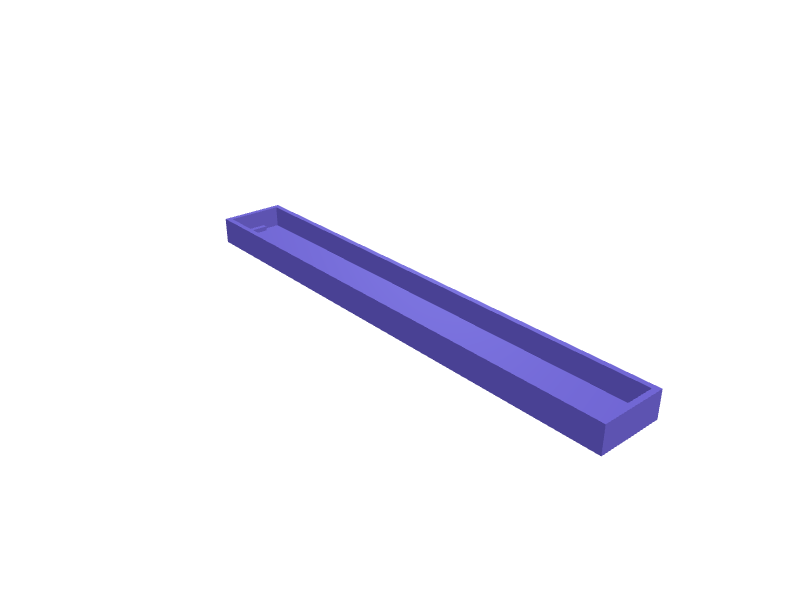
Framework Laptop 16 expansion-bay cover
A blank cover for a Framework 16 expansion bay when the GPU module is out, 150 × 20 × 8 mm with the official clips. Print in PETG. Open the ready-made model free, resize it on your phone or computer, then download a print-ready STL, 3MF or G-code sliced for your printer, free.Opening the ready-made model and downloading it as STL or 3MF are free, no card; AI changes use credits, from Maker at $7.99 a month.No printer? We print this part and ship it to your door. See its priceUpdated
2
Adjust
Change its numbers in the viewer for free, or ask the AI in the chat: wall thickness, hole size, the thing it clips onto. AI changes use 2 credits per request (1 for a quick edit, 3 for a redesign), paid with a plan from Maker at $7.99 a month, where the first 3 small changes are free.3Print
Download a watertight STL or 3MF free, with your numbers and hand edits, or G-code sliced for your printer at the same price. After an AI change the download is included in every plan (4 credits without one).
Dimensions of the ready-made model (editable)
| Parameter | Value |
|---|---|
| Overall length (X) | 150 mm |
| Overall width (Y) | 20 mm |
| Overall height (Z) | 8 mm |
| Shell wall thickness | 1.6 mm |
| Clip tab width (Y) | 6 mm |
| Clip tab thickness | 1.6 mm |
| How far clip extends below cover bottom | 3 mm |
| Retention bump protrusion | 0.8 mm |
| Clearance around bay opening (per side) | 0.3 mm |
Example prompt
Create a Framework 16 bay cover 150×20×8 mm with official clips, 1.6 mm PETG.
Fit notes
An open bay collects crumbs. In SpeakCAD you confirm the bay, preview the cover in the browser, then download the STL.
Questions people ask about a Framework Laptop 16 expansion-bay cover
A blank cover for a Framework 16 expansion bay when the GPU module is out, 150 × 20 × 8 mm with the official clips. Print in PETG.
Click Open it free on this page and create a free account (no card): the ready-made model opens in your browser, on your phone or computer, nothing to install. Change its numbers in the viewer for free and download a watertight STL or 3MF free, or G-code sliced for your printer at the same price. An AI change in the chat uses 2 credits per request (3 for a redesign), and the download after it is included in every plan (4 credits without one). Start with Maker: 50 credits a month for $7.99, cancel anytime.
On this page: open the ready-made model free in a SpeakCAD account (no card), change any dimension in the viewer, then download the STL or 3MF free, or G-code sliced for your printer at the same price.
A shared STL is modelled for someone else's measurements. Here you open the ready-made model free, change it to your measurements in the viewer, then download a file sized for the part you actually own, free as STL or 3MF.
Yes. SpeakCAD slices the part on its servers with OrcaSlicer and your printer's official profile (380+ printers, including Bambu Lab, Prusa, Creality and Elegoo), and you download the G-code (a sliced .gcode.3mf for Bambu Lab printers). G-code sliced for your printer costs the same as the STL: included in every plan, free for a part you shaped by hand, 4 credits without a plan for a part with AI work in it. Pick your printer on the printers page to see its profile.
No. SpeakCAD runs in the browser on your phone or computer: the chat, the 3D engine and the live viewer load in the tab. The only file you download is the finished STL, 3MF or sliced G-code.
Print it your way
More replacement parts
Salomon Quicklace cord lock replacementReady-made, opens free. Salomon Speedcross, Sense Ride and XA Pro trail shoes use a Quicklace system with a small two-hole cord lock that eventually cracks or loses its spring.Eheim filter intake pipe suction cup clip replacementReady-made, opens free. A replacement clip that holds the intake and outflow pipes of an Eheim Classic or Professionel canister filter against the aquarium glass when the original c…Combination-square head replacement 300 mmReady-made, opens free. A replacement head for a 300 mm combination square with a 1 mm rule slot, a 45 degree face, and an M5 lock.Osprey Talon sternum-magnet clipReady-made, opens free. A replacement magnet clip for an Osprey Talon / Tempest sternum strap, 20 × 12 mm with a 2 mm webbing slot.Fridge door shelf bracket supportReady-made, opens free. Refrigerator door shelves hang on small plastic supports that go brittle in the cold and crack under a full milk carton.Blender lid center capReady-made, opens free. The removable center cap of a blender lid gets lost or cracked, and without it every smoothie splashes the counter.