1
Kitchen & home
Coffee pod holder tray for a drawer or counter
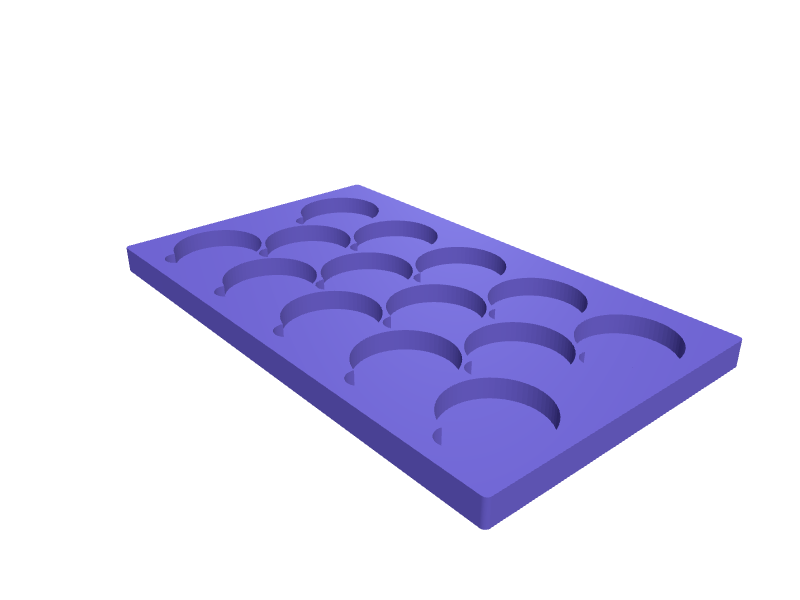
A tray that stands coffee capsules in tidy rows so you can see how many are left and grab a flavour without digging through a bag. Each pocket is a 38 mm diameter well 8 mm deep for Nespresso Original capsules with 0.6 mm clearance, spaced 42 mm apart in a staggered grid, with finger cut-outs between pockets so capsules lift out easily. The base is 3 mm with 1.5 mm pocket walls and prints flat in about an hour. Open the ready-made model free, resize it on your phone or computer, then download a print-ready STL, 3MF or G-code sliced for your printer, free.Opening the ready-made model and downloading it as STL or 3MF are free, no card; AI changes use credits, from Maker at $7.99 a month.No printer? We print this part and ship it to your door. See its priceUpdated
2
Adjust
Change its numbers in the viewer for free, or ask the AI in the chat: wall thickness, hole size, the thing it clips onto. AI changes use 2 credits per request (1 for a quick edit, 3 for a redesign), paid with a plan from Maker at $7.99 a month.3Print
Download a watertight STL or 3MF free, with your numbers and hand edits, or G-code sliced for your printer at the same price. After an AI change the download is included in every plan (4 credits without one).
Dimensions of the ready-made model (editable)
| Parameter | Value |
|---|---|
| length (X) | 220 mm |
| width (Y) | 130 mm |
| base thickness | 3 mm |
| outer edge rounding radius | 2 mm |
| capsule diameter | 38 mm |
| pocket depth | 8 mm |
| wall thickness between pockets | 1.5 mm |
| finger cutout diameter | 10 mm |
| 3 rows across 130mm | 3 |
Example prompt
Create a coffee capsule tray 220 x 130 mm with a 3 mm base and staggered pockets 38 mm in diameter and 8 mm deep at 42 mm spacing for Nespresso Original capsules, 1.5 mm pocket walls, 10 mm finger cut-outs between pockets, 2 mm rounded outer edges.
Fit notes
Nespresso, Vertuo, Dolce Gusto and K-Cup capsules all have different diameters, and SpeakCAD dimensions pockets to whichever you drink instead of guessing. Preview the tray in the browser, stretch it to your drawer width or stack a second layer, and download the STL when your capsule count fits.
Questions people ask about a coffee pod holder tray for a drawer or counter
A tray that stands coffee capsules in tidy rows so you can see how many are left and grab a flavour without digging through a bag. Each pocket is a 38 mm diameter well 8 mm deep for Nespresso Original capsules with 0.6 mm clearance, spaced 42 mm apart in a staggered grid, with finger cut-outs between pockets so capsules lift out easily. The base is 3 mm with 1.5 mm pocket walls and prints flat in about an hour.
Click Open it free on this page and create a free account (no card): the ready-made model opens in your browser, on your phone or computer, nothing to install. Change its numbers in the viewer for free and download a watertight STL or 3MF free, or G-code sliced for your printer at the same price. An AI change in the chat uses 2 credits per request (3 for a redesign), and the download after it is included in every plan (4 credits without one). Start with Maker: 50 credits a month for $7.99, cancel anytime.
On this page: open the ready-made model free in a SpeakCAD account (no card), change any dimension in the viewer, then download the STL or 3MF free, or G-code sliced for your printer at the same price.
A shared STL is modelled for someone else's measurements. Here you open the ready-made model free, change it to your measurements in the viewer, then download a file sized for the part you actually own, free as STL or 3MF.
Yes. SpeakCAD slices the part on its servers with OrcaSlicer and your printer's official profile (380+ printers, including Bambu Lab, Prusa, Creality and Elegoo), and you download the G-code (a sliced .gcode.3mf for Bambu Lab printers). G-code sliced for your printer costs the same as the STL: included in every plan, free for a part you shaped by hand, 4 credits without a plan for a part with AI work in it. Pick your printer on the printers page to see its profile.
No. SpeakCAD runs in the browser on your phone or computer: the chat, the 3D engine and the live viewer load in the tab. The only file you download is the finished STL, 3MF or sliced G-code.
Print it your way
More kitchen & home
AeroPress stand with paper filter holder and cap slotReady-made, opens free. A countertop stand that keeps an AeroPress Original or Clear chamber, plunger, filter cap and paper filters together in one spot.Nespresso Vertuo Next drip-tray extensionReady-made, opens free. An extension that raises a Vertuo Next drip tray 25 mm so a 12 oz mug fits under the spout.Cosori Dual Blaze basket-divider clipReady-made, opens free. A clip that holds a silicone liner halfway across a Dual Blaze basket so two foods do not mix.Dyson Airwrap Complete Long standReady-made, opens free. A counter stand that holds a Dyson Airwrap Complete Long (about 41 mm handle, 270 mm long) barrel-up so the cord does not yank it over.In-drawer knife block with angled slotsReady-made, opens free. A low block that lies in a drawer and holds kitchen knives by their blades in angled slots.Bin bag roll dispenser for cabinet doorReady-made, opens free. A slim box that holds a roll of bin bags inside a cabinet door and feeds one out through a slot.