1
Tools & jigs
Bambu Lab A1 AMS Lite PTFE guide clip
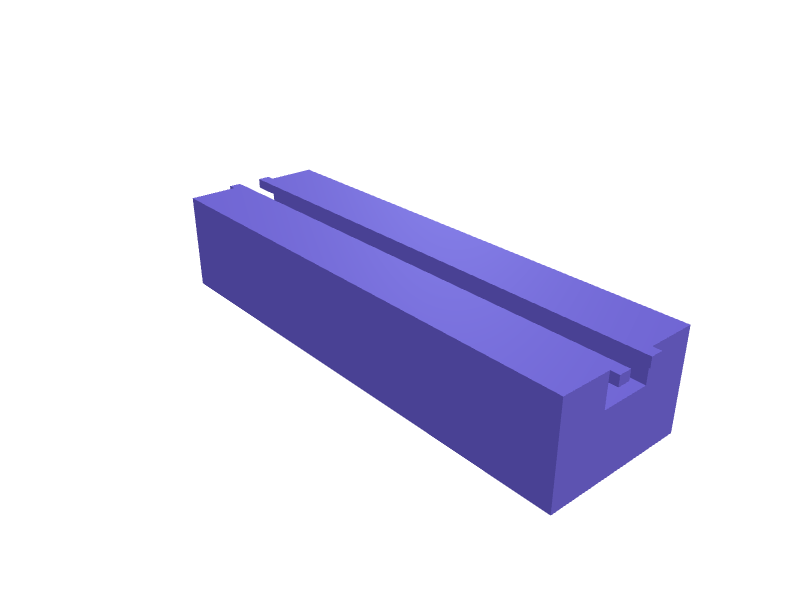
A clip that holds four 4 mm PTFE tubes in a tidy arc above a Bambu Lab A1 AMS Lite so they do not kink at the hub. The body is 60 × 18 × 12 mm with four 4.3 mm bores on 12 mm centres and a 6 mm snap that grabs the AMS Lite's top rail. Print two in PETG, no supports. Open the ready-made model free, resize it on your phone or computer, then download a print-ready STL, 3MF or G-code sliced for your printer, free.Opening the ready-made model and downloading it as STL or 3MF are free, no card; AI changes use credits, from Maker at $7.99 a month.No printer? We print this part and ship it to your door. See its priceUpdated
2
Adjust
Change its numbers in the viewer for free, or ask the AI in the chat: wall thickness, hole size, the thing it clips onto. AI changes use 2 credits per request (1 for a quick edit, 3 for a redesign), paid with a plan from Maker at $7.99 a month, where the first 3 small changes are free.3Print
Download a watertight STL or 3MF free, with your numbers and hand edits, or G-code sliced for your printer at the same price. After an AI change the download is included in every plan (4 credits without one).
Dimensions of the ready-made model (editable)
| Parameter | Value |
|---|---|
| X | 60 mm |
| Y | 18 mm |
| Z | 12 mm |
| PTFE tube bore diameter | 4.3 mm |
| min wall thickness | 1.6 mm |
| width of rail channel | 6 mm |
| depth into block from top | 4 mm |
| snap lip height | 1.2 mm |
| interference for snap retention | 0.3 mm |
Example prompt
Design an AMS Lite PTFE guide 60×18×12 mm with four 4.3 mm bores on 12 mm centres and a 6 mm snap for the top rail, PETG, 1.6 mm walls.
Fit notes
Loose PTFE tubes chafe on the A1's frame. In SpeakCAD you type the rail width you measured, preview the clip in the browser, then download the STL.
Questions people ask about a Bambu Lab A1 AMS Lite PTFE guide clip
A clip that holds four 4 mm PTFE tubes in a tidy arc above a Bambu Lab A1 AMS Lite so they do not kink at the hub. The body is 60 × 18 × 12 mm with four 4.3 mm bores on 12 mm centres and a 6 mm snap that grabs the AMS Lite's top rail. Print two in PETG, no supports.
Click Open it free on this page and create a free account (no card): the ready-made model opens in your browser, on your phone or computer, nothing to install. Change its numbers in the viewer for free and download a watertight STL or 3MF free, or G-code sliced for your printer at the same price. An AI change in the chat uses 2 credits per request (3 for a redesign), and the download after it is included in every plan (4 credits without one). Start with Maker: 50 credits a month for $7.99, cancel anytime.
On this page: open the ready-made model free in a SpeakCAD account (no card), change any dimension in the viewer, then download the STL or 3MF free, or G-code sliced for your printer at the same price.
A shared STL is modelled for someone else's measurements. Here you open the ready-made model free, change it to your measurements in the viewer, then download a file sized for the part you actually own, free as STL or 3MF.
Yes. SpeakCAD slices the part on its servers with OrcaSlicer and your printer's official profile (380+ printers, including Bambu Lab, Prusa, Creality and Elegoo), and you download the G-code (a sliced .gcode.3mf for Bambu Lab printers). G-code sliced for your printer costs the same as the STL: included in every plan, free for a part you shaped by hand, 4 credits without a plan for a part with AI work in it. Pick your printer on the printers page to see its profile.
No. SpeakCAD runs in the browser on your phone or computer: the chat, the 3D engine and the live viewer load in the tab. The only file you download is the finished STL, 3MF or sliced G-code.
Print it your way
More tools & jigs
Hex bit holder with magnet trayReady-made, opens free. A compact holder keeps 1/4 inch hex screwdriver bits sorted by type and within reach on the bench.Headset bearing press drift set for 1 1/8 inch steererReady-made, opens free. A pair of stepped drifts that turn an M8 threaded rod, two nuts and washers into a headset bearing press for integrated and zero-stack headsets.Fairphone 5 modular repair standReady-made, opens free. A bench stand that holds a Fairphone 5 (about 162 × 76 × 9.6 mm) face-down at 20 degrees so you can swap the battery, cameras or USB-C port without the phone…Crosscut-sled runner for 19 mm mitre slotsReady-made, opens free. A 19 × 10 × 400 mm runner that fits European 19 mm mitre slots with 0.1 mm side shims you snip to tune.Plane-blade sharpening jig 50 mmReady-made, opens free. A 50 mm honing jig that holds a plane iron at 25 or 30 degrees with a 4 mm clamp bar.Pinecil V2 stand with brass-tip wellReady-made, opens free. A stand that parks a Pinecil V2 at 45 degrees with a 10 mm brass-wool well and a 8 mm tip rack for three tips.