1
Hobby & gaming
Apple Vision Pro 2 Light Seal stand
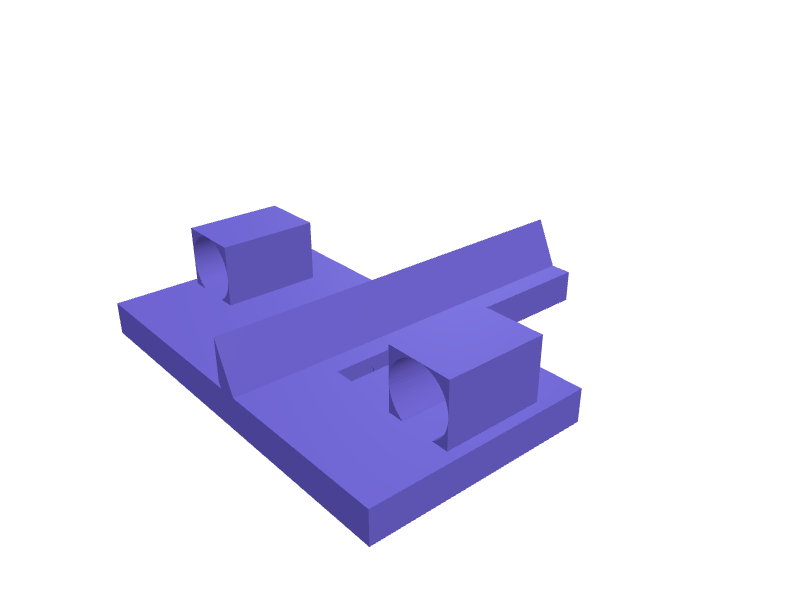
A desk stand that holds Apple Vision Pro 2 (about 200 mm wide) on its Light Seal so the displays stay off the desk. Two 30 mm padded saddles sit 140 mm apart, a 25 degree back rest, and a 20 mm well at the rear parks the battery pack and USB-C cable. The base is 180 × 120 mm and prints in two halves in PLA. Open the ready-made model free, resize it on your phone or computer, then download a print-ready STL, 3MF or G-code sliced for your printer, free.Opening the ready-made model and downloading it as STL or 3MF are free, no card; AI changes use credits, from Maker at $7.99 a month.No printer? We print this part and ship it to your door. See its priceUpdated
2
Adjust
Change its numbers in the viewer for free, or ask the AI in the chat: wall thickness, hole size, the thing it clips onto. AI changes use 2 credits per request (1 for a quick edit, 3 for a redesign), paid with a plan from Maker at $7.99 a month, where the first 3 small changes are free.3Print
Download a watertight STL or 3MF free, with your numbers and hand edits, or G-code sliced for your printer at the same price. After an AI change the download is included in every plan (4 credits without one).
Dimensions of the ready-made model (editable)
| Parameter | Value |
|---|---|
| base length (x) | 180 mm |
| base depth (y) | 120 mm |
| base plate thickness | 15 mm |
| total stand height incl base | 80 mm |
| backrest wall thickness | 8 mm |
| saddle block width along x | 30 mm |
| saddle block depth along y | 45 mm |
| saddle block height above base | 28 mm |
| groove radius (cradle) | 15 mm |
| battery well width | 60 mm |
| battery well depth | 40 mm |
| battery well depth (z) | 20 mm |
| joint peg radius | 4 mm |
| joint peg length | 6 mm |
Example prompt
Design a Vision Pro 2 stand 180×120×80 mm with two 30 mm saddles 140 mm apart, 25 degree back rest, 20 mm battery well and two PLA halves under 220 mm.
Fit notes
First-gen Vision Pro stands do not clear the new Seal geometry. In SpeakCAD you type the Seal size you wear, preview the stand in the browser, then download the STL.
Questions people ask about an Apple Vision Pro 2 Light Seal stand
A desk stand that holds Apple Vision Pro 2 (about 200 mm wide) on its Light Seal so the displays stay off the desk. Two 30 mm padded saddles sit 140 mm apart, a 25 degree back rest, and a 20 mm well at the rear parks the battery pack and USB-C cable. The base is 180 × 120 mm and prints in two halves in PLA.
Click Open it free on this page and create a free account (no card): the ready-made model opens in your browser, on your phone or computer, nothing to install. Change its numbers in the viewer for free and download a watertight STL or 3MF free, or G-code sliced for your printer at the same price. An AI change in the chat uses 2 credits per request (3 for a redesign), and the download after it is included in every plan (4 credits without one). Start with Maker: 50 credits a month for $7.99, cancel anytime.
On this page: open the ready-made model free in a SpeakCAD account (no card), change any dimension in the viewer, then download the STL or 3MF free, or G-code sliced for your printer at the same price.
A shared STL is modelled for someone else's measurements. Here you open the ready-made model free, change it to your measurements in the viewer, then download a file sized for the part you actually own, free as STL or 3MF.
Yes. SpeakCAD slices the part on its servers with OrcaSlicer and your printer's official profile (380+ printers, including Bambu Lab, Prusa, Creality and Elegoo), and you download the G-code (a sliced .gcode.3mf for Bambu Lab printers). G-code sliced for your printer costs the same as the STL: included in every plan, free for a part you shaped by hand, 4 credits without a plan for a part with AI work in it. Pick your printer on the printers page to see its profile.
No. SpeakCAD runs in the browser on your phone or computer: the chat, the 3D engine and the live viewer load in the tab. The only file you download is the finished STL, 3MF or sliced G-code.
Print it your way
More hobby & gaming
GameSir G8 Galileo phone-stopReady-made, opens free. A pair of stops that keep a 70–85 mm phone from sliding out of a G8 Galileo, 2 mm TPU lips.Modular board game insert binsReady-made, opens free. Insert bins fill a game box so components stay sorted and set-up drops from ten minutes to two.Guitar wall hanger with padded yokeReady-made, opens free. A wall hanger lifts a guitar off the floor and out of the way of feet and vacuum cleaners.Meta Quest 3 head strap battery pack mountReady-made, opens free. A counterweight cradle that straps a slim USB power bank to the rear of a Meta Quest 3 or Quest 3S standard head strap, extending play time and balancing the…Kindle Colorsoft one-hand page-turn gripReady-made, opens free. A palm grip that clips onto a Kindle Colorsoft (about 175 × 124 × 8 mm) so you can hold it one-handed and tap the page-turn zone with the thumb.DJI Mini 5 Pro prop holderReady-made, opens free. A holder that clips Mini 5 Pro props in pairs so they do not bend in a bag, 80 × 20 × 12 mm.