1
Tools & jigs
TS101 iron stand with brass well
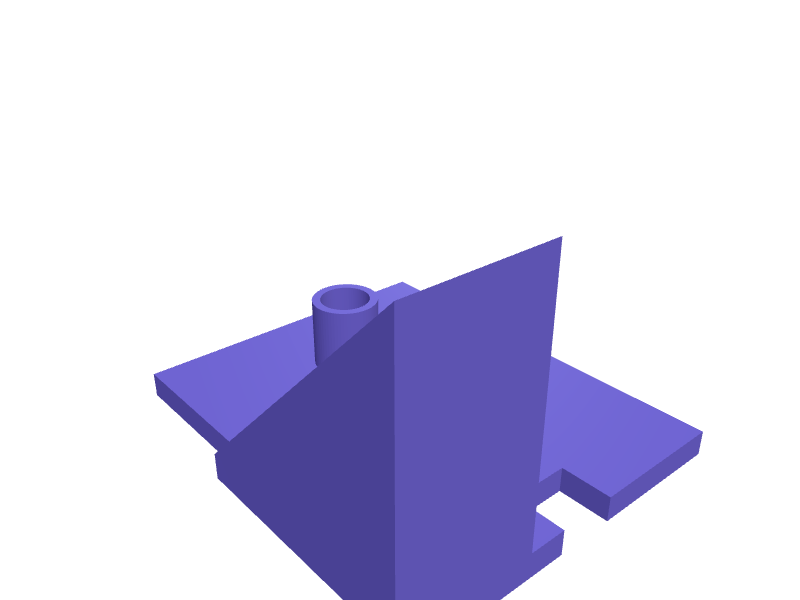
A stand that holds a TS101 at 45 degrees with a 12 mm brass-wool well and a 14 mm USB-C slot for the cable. Print in PETG. Open the ready-made model free, resize it on your phone or computer, then download a print-ready STL, 3MF or G-code sliced for your printer, free.Opening the ready-made model and downloading it as STL or 3MF are free, no card; AI changes use credits, from Maker at $7.99 a month.No printer? We print this part and ship it to your door. See its priceUpdated
2
Adjust
Change its numbers in the viewer for free, or ask the AI in the chat: wall thickness, hole size, the thing it clips onto. AI changes use 2 credits per request (1 for a quick edit, 3 for a redesign), paid with a plan from Maker at $7.99 a month, where the first 3 small changes are free.3Print
Download a watertight STL or 3MF free, with your numbers and hand edits, or G-code sliced for your printer at the same price. After an AI change the download is included in every plan (4 credits without one).
Dimensions of the ready-made model (editable)
| Parameter | Value |
|---|---|
| length | 100 mm |
| width | 80 mm |
| thickness | 6 mm |
| ramp footprint length | 55 mm |
| ramp width | 32 mm |
| TS101 barrel diameter | 14 mm |
| wool ball pocket diameter | 12 mm |
| pocket depth | 15 mm |
| slot width | 14 mm |
| slot height | 8 mm |
| Clearance around TS101 barrel (sliding fit) | 0.4 mm |
Example prompt
Create a TS101 stand, 45 degrees, 12 mm wool well, 14 mm USB-C slot, 2 mm PETG.
Fit notes
A TS100 stand is too short. Tell SpeakCAD TS101 vs TS100, preview the stand in the browser, then download the STL.
Questions people ask about a TS101 iron stand with brass well
A stand that holds a TS101 at 45 degrees with a 12 mm brass-wool well and a 14 mm USB-C slot for the cable. Print in PETG.
Click Open it free on this page and create a free account (no card): the ready-made model opens in your browser, on your phone or computer, nothing to install. Change its numbers in the viewer for free and download a watertight STL or 3MF free, or G-code sliced for your printer at the same price. An AI change in the chat uses 2 credits per request (3 for a redesign), and the download after it is included in every plan (4 credits without one). Start with Maker: 50 credits a month for $7.99, cancel anytime.
On this page: open the ready-made model free in a SpeakCAD account (no card), change any dimension in the viewer, then download the STL or 3MF free, or G-code sliced for your printer at the same price.
A shared STL is modelled for someone else's measurements. Here you open the ready-made model free, change it to your measurements in the viewer, then download a file sized for the part you actually own, free as STL or 3MF.
Yes. SpeakCAD slices the part on its servers with OrcaSlicer and your printer's official profile (380+ printers, including Bambu Lab, Prusa, Creality and Elegoo), and you download the G-code (a sliced .gcode.3mf for Bambu Lab printers). G-code sliced for your printer costs the same as the STL: included in every plan, free for a part you shaped by hand, 4 credits without a plan for a part with AI work in it. Pick your printer on the printers page to see its profile.
No. SpeakCAD runs in the browser on your phone or computer: the chat, the 3D engine and the live viewer load in the tab. The only file you download is the finished STL, 3MF or sliced G-code.
Print it your way
More tools & jigs
Pipe-clamp jaw pads for 3/4 inch pipeReady-made, opens free. Jaw pads that slip over 3/4 inch pipe-clamp heads, 50 × 30 mm faces with 1 mm TPU.Drill depth-stop collar setReady-made, opens free. A drill depth-stop collar slides onto a twist bit and stops the chuck from driving deeper than you want, so dowel holes, hinge cups and pilot holes all end a…Hex bit holder with magnet trayReady-made, opens free. A compact holder keeps 1/4 inch hex screwdriver bits sorted by type and within reach on the bench.Headset bearing press drift set for 1 1/8 inch steererReady-made, opens free. A pair of stepped drifts that turn an M8 threaded rod, two nuts and washers into a headset bearing press for integrated and zero-stack headsets.Fairphone 5 modular repair standReady-made, opens free. A bench stand that holds a Fairphone 5 (about 162 × 76 × 9.6 mm) face-down at 20 degrees so you can swap the battery, cameras or USB-C port without the phone…Pocket-hole plug cutter guide 9.5 mmReady-made, opens free. A guide that holds a 9.5 mm plug cutter square to a board edge so Kreg-style plugs come out round.