1
Everyday fixes
RTL-SDR V4 dipole-arm clip
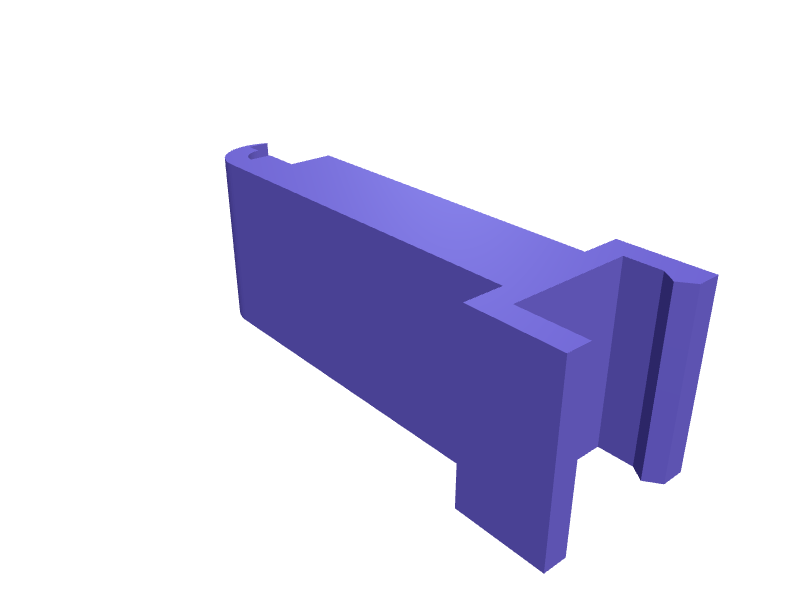
A clip that holds RTL-SDR V4 dipole arms at 90 degrees on a window, 8 mm snap. Print in PETG. Open the ready-made model free, resize it on your phone or computer, then download a print-ready STL, 3MF or G-code sliced for your printer, free.Opening the ready-made model and downloading it as STL or 3MF are free, no card; AI changes use credits, from Maker at $7.99 a month.No printer? We print this part and ship it to your door. See its priceUpdated
2
Adjust
Change its numbers in the viewer for free, or ask the AI in the chat: wall thickness, hole size, the thing it clips onto. AI changes use 2 credits per request (1 for a quick edit, 3 for a redesign), paid with a plan from Maker at $7.99 a month, where the first 3 small changes are free.3Print
Download a watertight STL or 3MF free, with your numbers and hand edits, or G-code sliced for your printer at the same price. After an AI change the download is included in every plan (4 credits without one).
Dimensions of the ready-made model (editable)
| Parameter | Value |
|---|---|
| Wall thickness | 1.6 mm |
| Window edge thickness to snap onto | 8 mm |
| Clip depth along window edge | 12 mm |
| Snap lip length | 6 mm |
| Retention bump depth | 0.7 mm |
| Arm length to wire channel | 25 mm |
| Dipole wire diameter | 3 mm |
| Wire channel wall thickness | 1.6 mm |
| Clearance around window edge | 0.3 mm |
Example prompt
Model a V4 dipole window clip, 8 mm snap, 90 degree stop, 1.6 mm PETG.
Fit notes
Tape on the glass fails. In SpeakCAD you set the arm, preview the clip in the browser, then download the STL.
Questions people ask about an RTL-SDR V4 dipole-arm clip
A clip that holds RTL-SDR V4 dipole arms at 90 degrees on a window, 8 mm snap. Print in PETG.
Click Open it free on this page and create a free account (no card): the ready-made model opens in your browser, on your phone or computer, nothing to install. Change its numbers in the viewer for free and download a watertight STL or 3MF free, or G-code sliced for your printer at the same price. An AI change in the chat uses 2 credits per request (3 for a redesign), and the download after it is included in every plan (4 credits without one). Start with Maker: 50 credits a month for $7.99, cancel anytime.
On this page: open the ready-made model free in a SpeakCAD account (no card), change any dimension in the viewer, then download the STL or 3MF free, or G-code sliced for your printer at the same price.
A shared STL is modelled for someone else's measurements. Here you open the ready-made model free, change it to your measurements in the viewer, then download a file sized for the part you actually own, free as STL or 3MF.
Yes. SpeakCAD slices the part on its servers with OrcaSlicer and your printer's official profile (380+ printers, including Bambu Lab, Prusa, Creality and Elegoo), and you download the G-code (a sliced .gcode.3mf for Bambu Lab printers). G-code sliced for your printer costs the same as the STL: included in every plan, free for a part you shaped by hand, 4 credits without a plan for a part with AI work in it. Pick your printer on the printers page to see its profile.
No. SpeakCAD runs in the browser on your phone or computer: the chat, the 3D engine and the live viewer load in the tab. The only file you download is the finished STL, 3MF or sliced G-code.
Print it your way
More everyday fixes
Shower shelf razor and bottle clipReady-made, opens free. Shower shelves fill up with bottles and razors that fall off the moment you reach for shampoo.MOLLE PALS pouch insert organizer for small gearReady-made, opens free. A rigid insert that drops into a soft MOLLE admin pouch on a 5.11, Condor or Helikon pack and turns the sagging fabric into ordered slots for a Leatherman, a…Rimowa Original luggage tag holder with handle strapReady-made, opens free. A rigid card holder that hangs from the telescopic handle of a Rimowa Original, Essential or Classic case, or an Away Carry-On and Samsonite spinner, and sho…Cybertruck vault-bin dividerReady-made, opens free. A divider that splits a Cybertruck vault bin into two 150 mm wells for straps and a lock.MacBook Air M4 sleeve corner guardsReady-made, opens free. Four TPU corners that slip over a 13-inch Air M4 in a thin sleeve so backpack drops do not dent the aluminium.Dash vent phone holder with hook clipsReady-made, opens free. A vent phone holder hangs a phone at eye level for navigation without blocking the view.