1
Hobby & gaming
ASUS ROG Ally X grip shell
A two-part shell that thickens Ally X grips by 8 mm without covering vents or the rear buttons. Snap fit, 1.6 mm PETG or TPU. Open the ready-made model free, resize it on your phone or computer, then download a print-ready STL, 3MF or G-code sliced for your printer, free.Opening the ready-made model and downloading it as STL or 3MF are free, no card; AI changes use credits, from Maker at $7.99 a month.No printer? We print this part and ship it to your door. See its priceUpdated
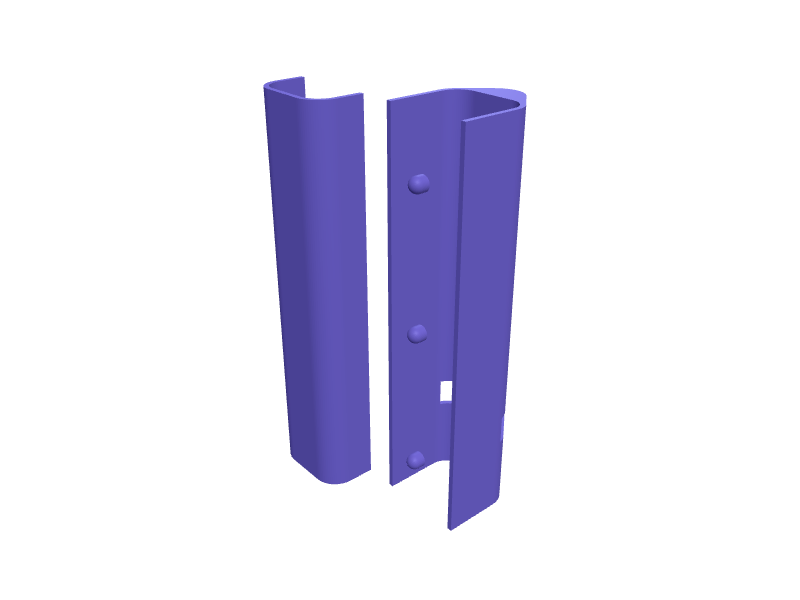
2
Adjust
Change its numbers in the viewer for free, or ask the AI in the chat: wall thickness, hole size, the thing it clips onto. AI changes use 2 credits per request (1 for a quick edit, 3 for a redesign), paid with a plan from Maker at $7.99 a month, where the first 3 small changes are free.3Print
Download a watertight STL or 3MF free, with your numbers and hand edits, or G-code sliced for your printer at the same price. After an AI change the download is included in every plan (4 credits without one).
Dimensions of the ready-made model (editable)
| Parameter | Value |
|---|---|
| Shell wall thickness | 1.6 mm |
| Device grip thickness (X) | 26 mm |
| Device grip depth (Y) | 40 mm |
| Corner rounding radius | 6 mm |
| Extra palm bulge depth | 8 mm |
| Grip shell height (Z) | 130 mm |
| Number of vent slots | 5 |
| Vent slot width | 4 mm |
| Vent slot height | 14 mm |
| Rear button cutout width | 18 mm |
| Rear button cutout height | 9 mm |
| Clearance around controller grip (per side) | 0.4 mm |
| Clearance between snap tab and socket | 0.3 mm |
Example prompt
Create an Ally X grip shell, +8 mm palms, vent and rear-button cutouts, two-part snap, 1.6 mm walls.
Fit notes
Stock grips are thin for long sessions. Describe your hands in SpeakCAD, preview the shell in the browser, then download the STL.
Questions people ask about an ASUS ROG Ally X grip shell
A two-part shell that thickens Ally X grips by 8 mm without covering vents or the rear buttons. Snap fit, 1.6 mm PETG or TPU.
Click Open it free on this page and create a free account (no card): the ready-made model opens in your browser, on your phone or computer, nothing to install. Change its numbers in the viewer for free and download a watertight STL or 3MF free, or G-code sliced for your printer at the same price. An AI change in the chat uses 2 credits per request (3 for a redesign), and the download after it is included in every plan (4 credits without one). Start with Maker: 50 credits a month for $7.99, cancel anytime.
On this page: open the ready-made model free in a SpeakCAD account (no card), change any dimension in the viewer, then download the STL or 3MF free, or G-code sliced for your printer at the same price.
A shared STL is modelled for someone else's measurements. Here you open the ready-made model free, change it to your measurements in the viewer, then download a file sized for the part you actually own, free as STL or 3MF.
Yes. SpeakCAD slices the part on its servers with OrcaSlicer and your printer's official profile (380+ printers, including Bambu Lab, Prusa, Creality and Elegoo), and you download the G-code (a sliced .gcode.3mf for Bambu Lab printers). G-code sliced for your printer costs the same as the STL: included in every plan, free for a part you shaped by hand, 4 credits without a plan for a part with AI work in it. Pick your printer on the printers page to see its profile.
No. SpeakCAD runs in the browser on your phone or computer: the chat, the 3D engine and the live viewer load in the tab. The only file you download is the finished STL, 3MF or sliced G-code.
Print it your way
More hobby & gaming
LEGO minifig wall bar for 36 figuresReady-made, opens free. A 300 mm bar with 36 studs in two rows that hangs minifigs by the legs.8BitDo Ultimate 2 charging-dock riserReady-made, opens free. A 15 mm riser under an Ultimate 2 dock so a thicker aftermarket grip still seats on the pogo pins.Card deck box with sliding lidReady-made, opens free. A deck box protects sleeved trading cards during transport and stops the stack spilling in a backpack.Tripod phone clamp with quarter-inch threadReady-made, opens free. A phone clamp turns any tripod into a video rig, and a printed one can be sized for a phone in a thick case that commercial clamps refuse.Xbox Elite Series 2 controller display standReady-made, opens free. A display stand for the Xbox Elite Series 2 controller that shows off its rubberised grips and paddles while keeping it within reach of the console.Wingspan board game card and token insertReady-made, opens free. A drop-in insert for the Stonemaier Wingspan base box (interior about 292 x 218 x 65 mm) that holds the 170 sleeved bird cards, bonus cards, food tokens, egg…