1
Tools & jigs
Helping-hands PCB vise 80 mm
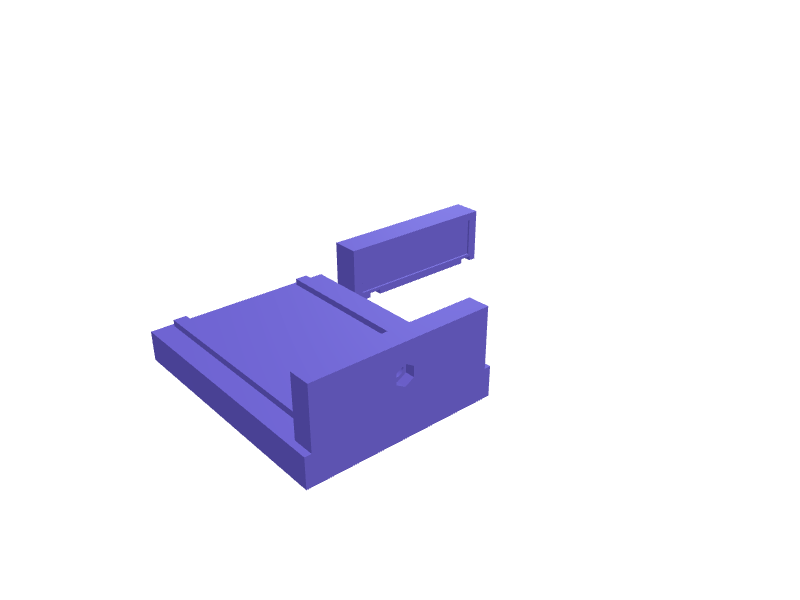
A small vise with 80 mm jaws and a 6 mm ball joint that holds a PCB at any angle. Jaws have 1 mm silicone-pad recesses. Print the body in PETG and add a bought ball. Open the ready-made model free, resize it on your phone or computer, then download a print-ready STL, 3MF or G-code sliced for your printer, free.Opening the ready-made model and downloading it as STL or 3MF are free, no card; AI changes use credits, from Maker at $7.99 a month.No printer? We print this part and ship it to your door. See its priceUpdated
2
Adjust
Change its numbers in the viewer for free, or ask the AI in the chat: wall thickness, hole size, the thing it clips onto. AI changes use 2 credits per request (1 for a quick edit, 3 for a redesign), paid with a plan from Maker at $7.99 a month, where the first 3 small changes are free.3Print
Download a watertight STL or 3MF free, with your numbers and hand edits, or G-code sliced for your printer at the same price. After an AI change the download is included in every plan (4 credits without one).
Dimensions of the ready-made model (editable)
| Parameter | Value |
|---|---|
| PCB length the jaws span | 80 mm |
| general PETG wall/shell thickness | 2 mm |
| pad recess depth in jaw faces | 1 mm |
| base X | 115 mm |
| base Y | 90 mm |
| base Z (needs room for ball socket) | 14 mm |
| rail protrusion height | 3 mm |
| rail width | 6 mm |
| sliding clearance | 0.4 mm |
| X depth of fixed jaw | 10 mm |
| X depth of moving jaw | 14 mm |
| across flats + clearance | 8.4 mm |
| flex slit width | 1.4 mm |
Example prompt
Design an 80 mm PCB vise with 1 mm pad recesses, 6 mm ball joint socket and 2 mm PETG walls.
Fit notes
Alligator clips tear pads. Tell SpeakCAD the board width, preview the vise in the browser, then download the STL.
Questions people ask about a helping-hands PCB vise 80 mm
A small vise with 80 mm jaws and a 6 mm ball joint that holds a PCB at any angle. Jaws have 1 mm silicone-pad recesses. Print the body in PETG and add a bought ball.
Click Open it free on this page and create a free account (no card): the ready-made model opens in your browser, on your phone or computer, nothing to install. Change its numbers in the viewer for free and download a watertight STL or 3MF free, or G-code sliced for your printer at the same price. An AI change in the chat uses 2 credits per request (3 for a redesign), and the download after it is included in every plan (4 credits without one). Start with Maker: 50 credits a month for $7.99, cancel anytime.
On this page: open the ready-made model free in a SpeakCAD account (no card), change any dimension in the viewer, then download the STL or 3MF free, or G-code sliced for your printer at the same price.
A shared STL is modelled for someone else's measurements. Here you open the ready-made model free, change it to your measurements in the viewer, then download a file sized for the part you actually own, free as STL or 3MF.
Yes. SpeakCAD slices the part on its servers with OrcaSlicer and your printer's official profile (380+ printers, including Bambu Lab, Prusa, Creality and Elegoo), and you download the G-code (a sliced .gcode.3mf for Bambu Lab printers). G-code sliced for your printer costs the same as the STL: included in every plan, free for a part you shaped by hand, 4 credits without a plan for a part with AI work in it. Pick your printer on the printers page to see its profile.
No. SpeakCAD runs in the browser on your phone or computer: the chat, the 3D engine and the live viewer load in the tab. The only file you download is the finished STL, 3MF or sliced G-code.
Print it your way
More tools & jigs
Tesla Model 3 Aero wheel hub cap removal toolReady-made, opens free. A hooked lever that pops the 18 inch Aero wheel covers off a Tesla Model 3 without gouging the alloy underneath.Prusa CORE One spool-holder drybox riserReady-made, opens free. A riser that lifts a Prusa CORE One side spool 40 mm so a 2 L drybox can sit under the PTFE inlet.Drill-press vice jaw pads 100 mmReady-made, opens free. A pair of 100 × 25 × 8 mm jaw pads with a 4 mm V-groove for round stock and 2 mm through-holes matching a typical 100 mm drill-press vice.Bench-cookie set 60 mm non-slipReady-made, opens free. Four 60 × 12 mm bench cookies with a 2 mm TPU pad recess on each face so a workpiece stays put for sanding.Drill depth-stop collar setReady-made, opens free. A drill depth-stop collar slides onto a twist bit and stops the chuck from driving deeper than you want, so dowel holes, hinge cups and pilot holes all end a…Hex bit holder with magnet trayReady-made, opens free. A compact holder keeps 1/4 inch hex screwdriver bits sorted by type and within reach on the bench.